Still have no sound when receiving mail. I copied a sound file to ~/Library/Sounds and changed the Incoming Mail setting but no sounds when mail is received.
You don’t need to copy the file, eM Client will do it for you. But, the sound file format needs to meet certain criteria. See Mac version uses system notifications by default, - #2 by prinzip
Still have no sound when receiving mail. I copied a sound file to ~/Library/Sounds and changed the Incoming Mail setting but no sounds when mail is received
That’s a bug with the latest eM Client V11.0.1054 for Mac where “it’s not saving the path location” as per my post in the following thread. No doubt the devs will do an update to fix this later.
Hi @Geoffr
In eM Client 11, custom notification sounds are handled through the macOS notification system to support Focus features. Unfortunately, there is a known issue where certain sound filenames, such as new_mail.wav, may be replaced with a default system sound, even though the custom sound still appears to be selected in the settings.
In simple terms, eM Client can show your chosen sound in the settings but end up playing a different sound when a new email arrives. This is a bug we’re aware of.
Only certain audio formats are supported by macOS notifications, including AIFF, WAV, and CAF, and compatibility can also depend on how the file is encoded. You don’t need to copy the sound file into ~/Library/Sounds yourself, as eM Client handles this automatically.
Could you let us know which version of macOS you’re using and which sound file format you’ve selected? Please also let us know the file names of the sounds you used. Also, does the default system sound play instead of your custom sound when a new email arrives?
I’m using MacOS 27.0.1. I have swoosh.wav selected in Settings. Currently no sound when new mail arrives. I have copied swoosh.wav into the ~/Library/Sounds folder but that doesn’t do anything.
Yes same for me too OS 27.0.l and no sound file will work at all for incoming mail. Not even any default wav / pcm codec files using two differant mini macs.
I can send you if it helps an email with differant eg: .wav, .aiff & .caf files “that all work for sending mail” but will not for incoming mail that “all used to all work in V10” for Incoming mail.
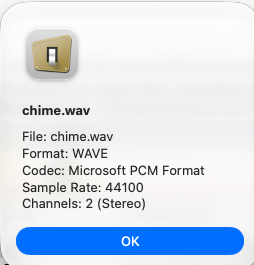
This is an example audio file format that only works for sending mail but not receiving
I modified “swoosh.wav” to “swoosh.mp3” and moved it to the Sounds folder and it seems to be working now.
Spoke too soon - no sound today when receiving mail.