I noticed an envelope symbol overlaying the emclient start icon in my Win11 taskbar, assume it indicated new mail in the inbox. However, when I stat emclient and process (usually delete) the new mail, the sub-icon envelope symbol does not disappear, I have to restart Win11 to clear.
If you mean the eM Client new mail notification icon “doesn’t dissapear after you read all the mail” i had that problem a couple of times in the Beta versions and even completely closing and reopening eM Client "the new mail envelope icon still showed in the taskbar” for me.
The only way then for me to get rid of the envelope notification was to logoff Windows and log back on. I haven’t seen this issue again personally with the offical release V11.0.1054 as yet.
Support advised if you read the email to fast, the icon may not update, but that should be minimal case but they would keep an eye on it if this becomes a problem with users.

Confirming I’m seeing this issue in the production release. It’s intermittent and I haven’t been able to reproduce it consistently enough to file a bug report yet. A slightly-less-annoying way to get rid of the bogus envelope overlay is to unpin the app from the taskbar, close the app, start it again, then re-pin the app to the taskbar. Still a pain, but less than having to log out or restart.
1 Like
@rasworth and @andyneil when it happens, does it happen when eM Client is minimised to the taskbar or when it’s open in the background ?
Or does it happen either way ?
Running, minimized, or not running, the envelope sub-icon remains. Not sure if it ever disappears before restarting.
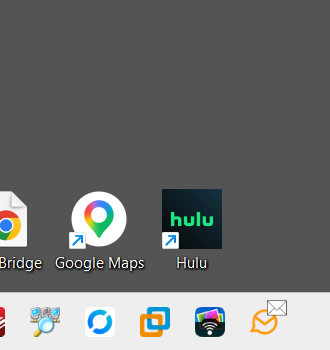
Yes that’s the new mail notification icon that should normally go away after reading new mail.
So if you have the release V11.0.1054 “after the new mail has been read” for a test before deleting the email “wait for an extra say 2-3 secs” and see if that new mail notification icon goes away.
I may have pulled the trigger too soon on this “bug”. I completed rooting out all the Outlook settings, including the registry entry under Mail:default, and the problem has not reappeared.
To be clear, I don’t invoke emclient at login, bring it up when I want to check mail, and then close it down. The problem earlier was the envelope symbol did not disappear when I closed it, now (so far) it does.
Problem is still there, sequence of events:
- emclient not running, no envelope symbol present on taskbar icon
- invoked emclinet, one piece of mail in inbox, envelope appears
- deleted inbox item, envelope still present
- closed emclient, envelope still present.
- went thru multiple cycles of opening and closing emclient, envelope never disappears
Not a biggie, just annoying.
It’s been so intermittent I haven’t picked up a pattern about minimized vs background, sorry.
How long do you wait after reading the mail till you delete the mail in your Inbox ?
Also are you running the MSIX app installer version or did you upgrade using the MSI version ?
several seconds and msix
several seconds and msix
Ok so then could be “new mail is in another Category Tab” or could be “Settings not right”.
If you have Inbox Categories enabled and differant Inbox tabs, “check if there is any new mail in other tabs” that could then be be causing the new mail notification icon to stay on the taskbar.
If you don’t have Categories enabled “then check your eM Client Settings below” via “Menu / Settings / Notifications / General” and “Menu / Settings / Notifications / Mail” to see if they are differant to mine using eM Client V11.0.1054 with Windows 11 Pro.
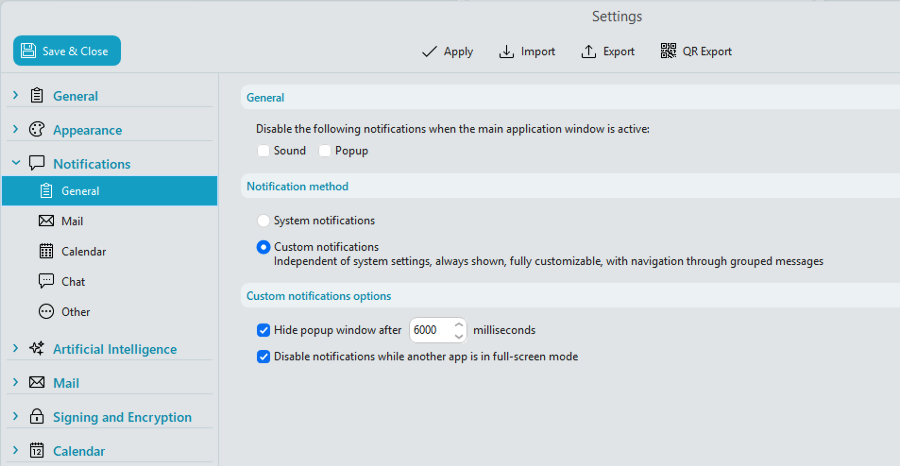
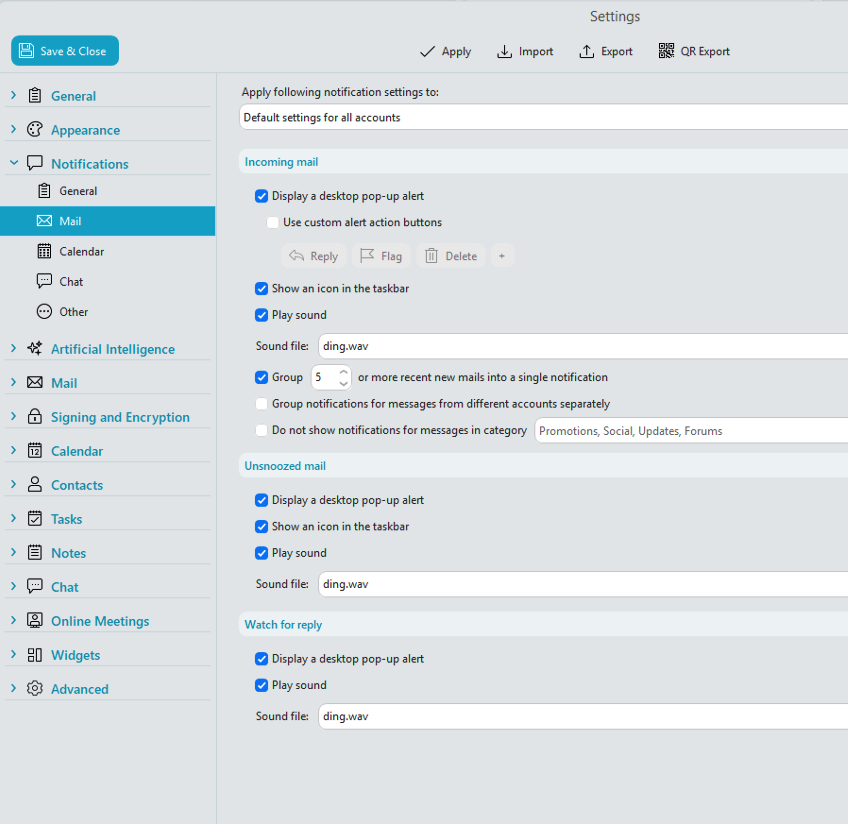
No, I don’t have inbox categories enabled.
My settings differ from yours on the first in that I have system enabled, not custom.
The second are identical.
Decided to try using the envelope. Invoked emclient and left it minimized. No envelope symbol present. Sent a test msg from another computer, the envelope sub-icon appeared. I brought it up and read msg, envelope disappeared.
So all is working as designed, at the moment. Haven’t seen the “sticky envelope” syndrome today.
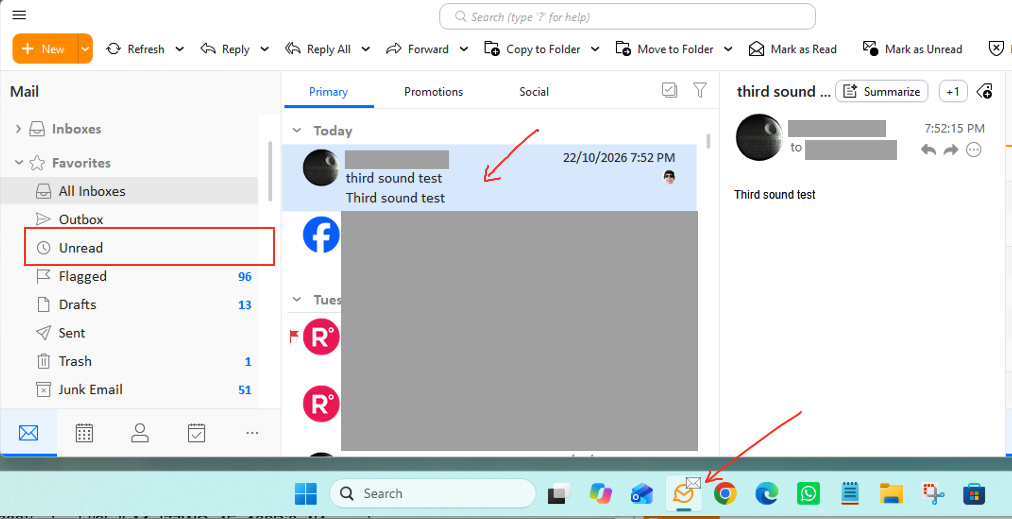
Ive noticed since i got Windows 11 Pro (26H2) update with eM Client V11.0.1267 the new mail notiofication small envelope icon stays there alot of the time now and “doesn’t go away after reading new mail” no matter how long you leave the email there.
As you can see below there is no unread email in the first screenshot, yet the new mail small envelope icon is still showing on the taskbar. My eM Client Settings below havn’t changed.
As @andyneil says further up to fix it you have to “unpin the icon from the taskbar and then repin to the taskbar”, or as i did was “log out of Windows and log back in” which clears it as well. But either way is annoying. So need the devs taking another look at this.
Note:- The new mail small icon “in the system tray” seems to go away after reading email, so its only the small envelope icon on the taskbar that appears to be the problem. Closing eM Client does not remove the small envelope icon on the taskbar.
I have the same problem, running V11.0.1267 and Windows Home with the 26H2 update.
If you originally installed eM Client from the website, try the latest V11.0.1389 from the release history page and see if that fixes that problem. Seems to be working ok for me atm with Win 11 Pro (26H2) with eM Client minimized or behind other apps.
I just installed that release, and it seems to have fixed the problem for me.
I spoke too soon. The problem popped up again after a while, but I’m not sure of the sequence of events before that - I just noticed that I had the envelope on the taskbar icon but no new mail.