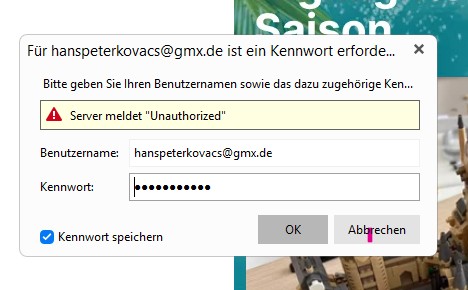
Every time I open eM Client, I get an annoying splash screen (jpg added). How can I get rid of it?
Btw, my GMX account works well!
Thank you for your kind replies!
HPK
Every time I open eM Client, I get an annoying splash screen (jpg added). How can I get rid of it?
Btw, my GMX account works well!
Thank you for your kind replies!
HPK
Could be you need to “generate a new app password” for the Mail client in your GMX account for two factor authentication and make sure it’s a separate app password if you are using two factor authentication as per threads below.
Or you might need to “disable two factor authentication in your GMX account” and then use your normal email password.
If that doesn’t make any difference then update what your GMX Incoming Server Address, Server Port and Security Policy is via “Menu / Accounts” so we can check your settings.
If you look at the end of the first link above, which is the thread I created, you can see that I did fix this error by creating separate app specific passwords on gmx.com. That is, you need to add 3 app specific passwords, one for mail, one for contacts (carddav), and one for the calendar (calddav), then enter them individually in eMClilent’s gmx account settings.
Why gmx do things this way is anybody’s guess. One possibility is that it’s unintended.
I would suggest to eMClient devs that they contact gmx and show them these threads. It’s going to be an ongoing pain point for anyone trying out eMClient with gmx servers.