I have exactly the same problem. I have numerous custom names for email addresses, and custom names for phone numbers. These are CRITICAL. I also noticed that a user from 2013, eleven years ago, asked about this very issue. WOW! Eleven years and still no solution? What I do find odd is that my custom names for email addresses often remain intact. Not always, but often; however, my custom names for phone numbers NEVER remain intact. They usually get changed to some arbitrary number/code. See image below:
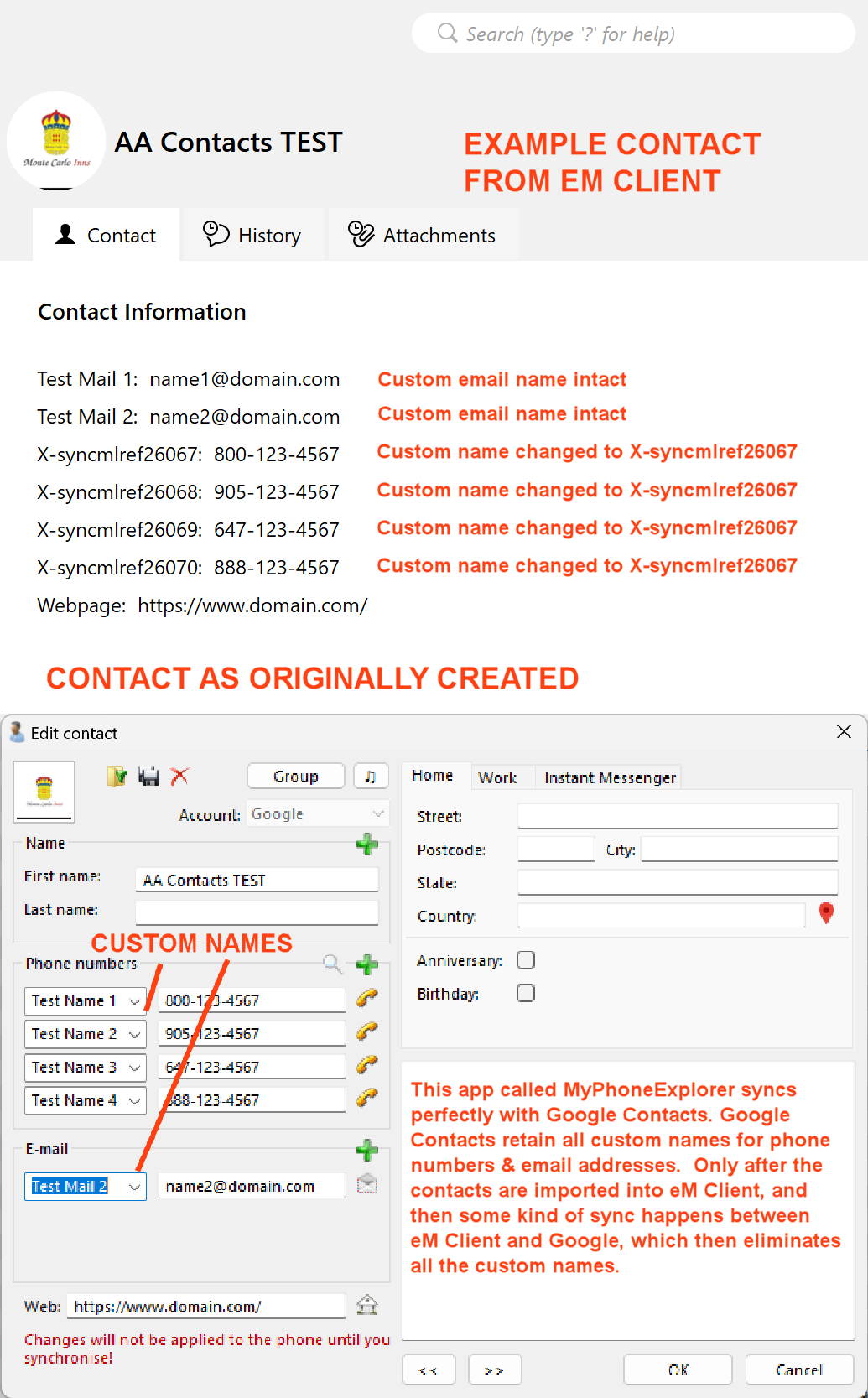
Let me now try to explain the whole story. The custom name issue has been ongoing for years, and not just with eM Client, but also with Outlook and several other email clients.
Okay, I have a program on my Windows (11) PC called MyPhoneExplorer. I also have the corresponding app, MyPhoneExplorer, on my Android device, a Pixel 8 Pro, but it works on virtually all Android devices.
MyPhoneExplorer is extremely flexible, especially when it comes to contact management. It allows for an almost unlimited number of custom (the app calls them Userdefined) names for phone numbers and email addresses.
When I create a contact in MyPhoneExplorer, I can add a custom name to a phone number like the following example:
Custom Name Here: 123-456-7890
When I sync that contact to my Android device via MyPhoneExplorer, the custom names and corresponding phone numbers are there. PERFECT! When my device subsequently syncs my phone contacts to my Google contacts online, the custom names and corresponding phone numbers are still there. STILL PERFECT!
However, when I used to use Outlook as my email and contacts client, and I import all my contacts into Outlook, the moment Outlook syncs with my Gmail account, it automatically syncs the contacts as shown in Outlook to Google. This then eliminates all the custom names within my Google contacts. When my Android device then automatically syncs with my contacts online, and I subsequently sync my contacts in MyPhoneExplorer, all the custom names within MyPhoneExplorer disappear. They are either replaced with some weird entry, or they are substituted with the default Home, Work, Other, etc.
The exact same thing happens with eM Client. Even if I go into eM Client settings and tell it NOT to sync contacts, within a day or so, something happens, much like what happened with Outlook, and all custom names disappear. As it stands now, the ONLY way I can maintain those custom names is to stop my device from syncing contacts with Google online. While the contacts on my device are always correct, and are also correct on my PC program MyPhoneExplorer, my contacts on Google (online) are not. Something within eM Client (and Outlook, etc.) is still syncing contact information with Google. I don’t know what’s happening, but if I could simply STOP eM Client from syncing anything related to my contacts, it would solve the problem.
As I said earlier, eM Client appears to now be able to maintain custom names for email addresses, but not for phone numbers. Clearly you fixed the issue with email addresses, so why can’t you do the same with phone numbers?
Summary:
MyPhoneExplorer > Phone = Perfect
Phone > Google Account = Perfect
Google Account > Phone = Perfect
Phone > MyPhoneExplorer = Perfect
The problem ONLY happens if and when I import my contacts into eM Client (or Outlook, etc.). Once this happens, within 24 hours my Google contacts online all have the custom names removed. After the import of contacts INTO eM Client, here’s the summary:
MyPhoneExplorer > Phone = Perfect
Phone > Google Account = Perfect
Google Account > Phone = Custom Names gone
Phone > MyPhoneExplorer = Custom Names gone
The ONLY way to then solve the problem is to delete ALL my contacts EVERYWHERE. Delete them from MyPhoneExplorer, from my phone, from my Google account, and from eM Client. Then I have to go back from scratch and import a backup copy of my contacts into MyPhoneExplorer, then sync with my phone to get them back into my device, and then sync my device with Google to get them back online. I also have to then import them back into eM Client; however, once I do this, within 24 hours, everything is screwed up again. Very frustrating.
Now, you may wonder why I even need the contacts within eM Client since I’m using MyPhoneExplorer to manage my contacts? Good question, and there’s a great answer. I need them in eM Client to allow for automatic address entry when I write a new email message. If I don’t have any contacts within eM Client, then I have to manually type all email addresses on all new messages because eM Client has no internal reference to go by.
CONSIDER THE FOLLOWING EXAMPLE:
I regularly visit very large corporations where I may have 20 contacts. As it stands now, I create one main contact for the corporation, and then list all 20 numbers with individual custom contact names. So, if I need to contact someone at ABC Company, I open that contact and there are all the names and corresponding numbers.
Sure, I could create 20 individual contacts, but that’s inefficient, and it would force me to remember everyone’s name for all those large accounts. I don’t want to do that.
Sadly for all third-party email clients, if Google were to ultimately announce a desktop app for PCs, you would all be out of business. I would eliminate all email clients and use the desktop Gmail program. However, there is no current plan for Google to create such a desktop program, so I am forced to use other methods.
For what it’s worth, here’s the original inquiry from 11 years ago: