The Subject Line, To: and From: lines are aligned vertically in a narrow column. See image This is just a recent problem.
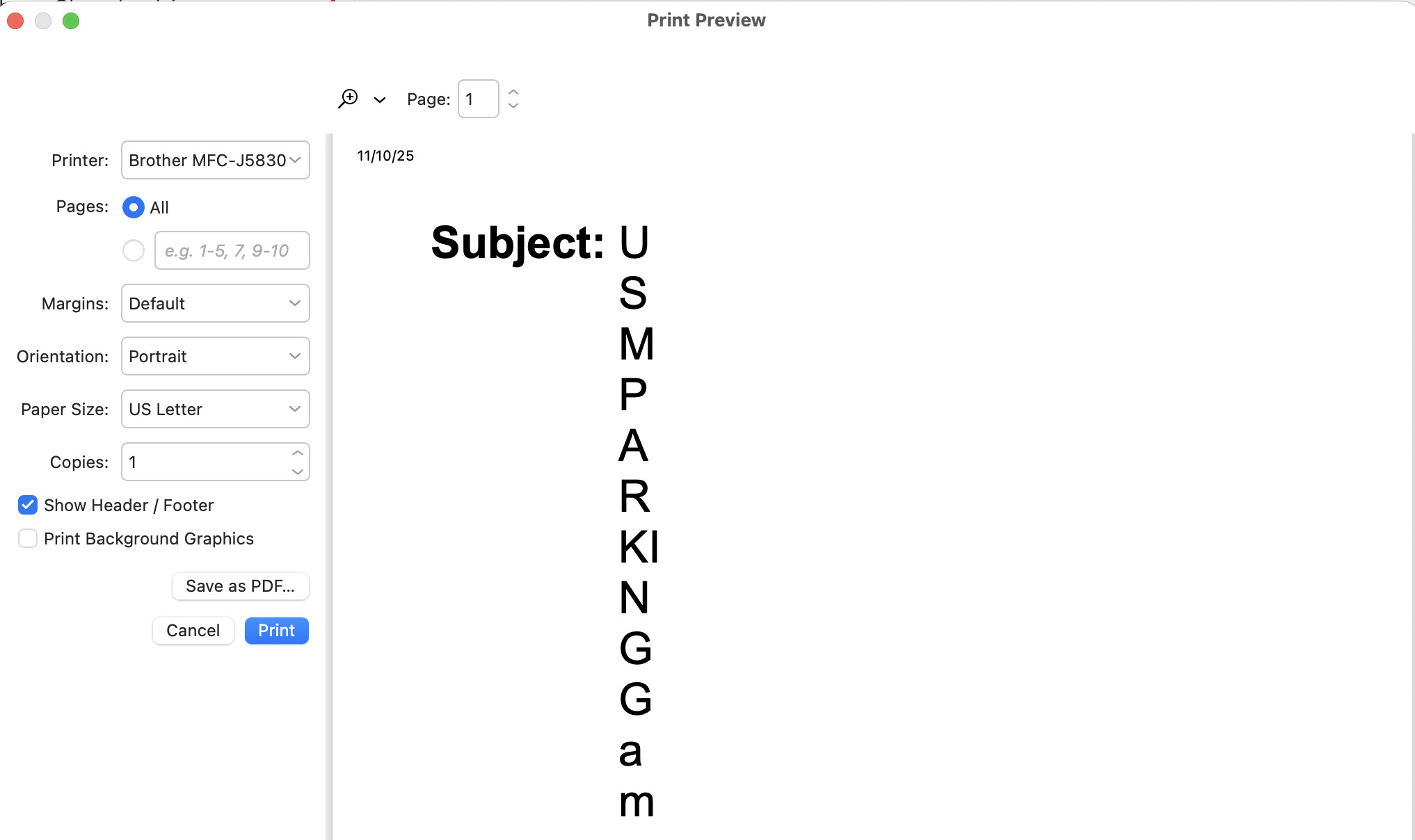
Same issue here on MAC OS. Does anyone have any suggestions? Just to expand on this issue, it only happens with EM Client, everything else prints fine on the computer and it doesn’t matter what printer is selected, including PDF. Seems to be a formatting issue before it’s sent to the print preview dialog.
The Subject Line, To: and From: lines are aligned vertically in a narrow column.
Is this on every email ? Or only a specific email ?
Also what version of eM Client do you have ?
It is happening on every email. Version #10.3.4341 (dd5d6dc)
I’m personally not getting that happen on any email with the same version on PC or Mac, so as it’s happening on every email for you, suggest to first try uninstalling eM Client and if you have Windows “don’t delete the database” when asked on the uninstall wizard. The reinstall V10.3.4341 and see if that fixes it.
Failing that if you have been making regular eM Client backups, restore a recent dated backup when you know it was working ok via “Menu / File / Restore” and that should normally fix it.
Or if you dont have any recent eM Client backups, then suggest to next create a new database and setup eM Client as new again and see if that fixes the problem.
To create a new database, “close eM Client” and then go to your current hidden database folder location and rename it to eg: eM Client-Old.
(Hidden database folder Windows)
C:\Users%username%\AppData\Roaming\eM Client
(Hidden database folder Mac)
/Users/User Name/Library/Application Support/eM Client
Then reopen eM Client and setup new. If you have an IMAP, Exchange, Office 365 or iCloud account all your messages will then restore from the server and see if that fixes the problem.
If you previously had either POP messages or Local Folder messages that are then missing in the new database, you can do a Partial Restore from the old database via going to the following eM Client blog page which explains how to do that part way down the page.
https://www.emclient.com/blog/how-to-restore-backup-in-em-client-614
Lastly if creating a new database still doesn’t fix it, then could be something to do with the eg: “email coding of your senders emails which might be possibly non standard html”, which would need to be checked out by official support.
So to do that “right click in the body of the email” and click “Save As” and save the file on your hard-disk in a folder. Then if you have a current active paid Pro, Personal or Business version go to the VIP Support page and login and lodge a support ticket and attach the saved .eml file to have it investigated.
Tried your suggestions, but nothing helped. Will submit a support ticket now. Thank you.
Okay, so I have the license “Pro with Lifetime Updates”, but it’s telling me I have to pay for VIP Support?!? Is this accurate or another bug?
Okay, so I have the license “Pro with Lifetime Updates”, but it’s telling me I have to pay for VIP Support?!? Is this accurate or another bug?
When you purchase eM Client version, it includes 12 months VIP support. So if you have gone past 12months then you can purchase another year of support via the following link.
“Get a 1-year extension to your VIP Support”
https://www.emclient.com/extend-support
“eM Client Support Overview page”
https://www.emclient.com/support
Quote extract :-
“I have license with lifetime upgrades but cannot log in the Support page”.
“The subscription applies the same way to all licenses, so it can expire even for users with Lifetime Upgrades. When your Support subscription expires, it does not change the validity of your license, it will work the same way. You need to renew your subscription if you want to get access to the VIP Support”.
I’m not paying for support to work around a bug that EM Client created and needs to be fixed. I’ll go back to Thunderbird and finally give up on EMC.
I don’t think it’s a bug as I have the same version on two different computers and it doesn’t happen for me on either Mac or Windows.
If every email is like that even plain text emails, then might be something specific to your either eM Client settings or OS possibly printer driver.
Try maybe uninstall and reinstall your printer driver and then close and reopen eM Client.
did you end u getting this issue fixed ?
It’s a bug if it doesn’t work properly and I’m not paying for them to fix it. I’m not the originator of this post, so obviously I’m not the only one with the issue. I’m not sure why you mentioned Windows more than once, I have stated that I’m on a Mac.
I have multiple printers available and they all show the same in the preview and the actual printer output. I can’t imagine I need to remove and reinstall them all.
Sometimes uninstalling and reinstalling printer drivers can resolve issues. But that’s obviously up to you if you want to try that.
Apart from that suggestion you will probably need official VIP support unless the originator of this thread or other forum users can advise other options.
I have tried all suggested solutions, and the issue remains…unfortunately!
.and still nothing from support! Pretty disappointed!
Agreed. Seems like there should be some answers or at least some help to resolve this.
Using Mac Tahoe OS 26.2 (Beta version) this now has been reproduced in another thread and the devs are working on a fix as @kim_Fisher advised below. So sounds like “something in the Mac OS has changed” which then caused this issue which explains why it never happens to me in the OS 26.0 Non Beta OS version.
2 Likes
I just received an EMC update, still didn’t fix this issue.
I just received an EMC update, still didn’t fix this issue
Then suggest you reply back to whoever sent that update “if you haven’t already” and advise it’s still an issue.
Not sure what you mean by “whoever sent that update”? The update was from EM Client.
As far as we know this happens only with macOS Tahoe 26.2 Beta (at least all betas up to Beta 3). We are looking into it but keep in mind that beta versions of operating systems are unstable.
1 Like