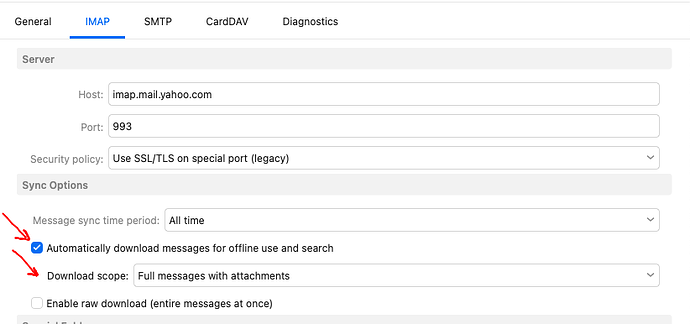
I have an odd problem with eM Client on Windows, but not on MacOS. When I double-click a pdf attachment in a message, it takes 10-20 seconds to open in Acrobat Reader, even if the message is already downloaded. However, this only happens when Acrobat Reader is already open. Acrobat doesn’t need any other documents open, it just needs to be open, itself. Otherwise, the pdf opens almost instantly after double-clicking it in eM Client. I have “Download messages for offline use” and “Include attachments” enabled in settings.
This issue only happens when opening pdf attachments from eM Client. I can open them from Outlook, or from File Explorer and they open instantly regardless of Acrobat’s status.
I tried uninstalling and reinstalling Acrobat Reader but it made no difference. Using another pdf viewer is not an option as I often need to view pdfs that require Acrobat to show properly.
Hi, we have tried to reproduce this but without luck, sadly. Which version of eM Client/Windows/Acrobat are you using? If you try turning off VPN/firewall/other security apps, do you notice any difference?
Thank you for the reply, Kim. I was using version 10.3 when I posted this, but I just noticed yesterday that version 1.4 is out. For some reason, eM Client never notified me that there was an update, even if I manually checked from the menu. I am now on 10.4 and the problem seems to have disappeared. I will post here again if it comes back, but for now, you can consider this resolved.
I have this exact problem, but I’m on version 10.4.4195 on Windows 10 21H2 and acrobat reader version 2025.001.20997
The symptoms are exactly as described in the OP - if Acrobat Reader is already open, double clicking a pdf attachment in emClient takes a very long time to open in acrobat reader. If acrobat reader is not already open, the pdf opens immediately.
I use pdfs heavily throughout my workflow, and this problem is exclusive to emclient.
I am the original poster and this problem has returned for me, as well. I am 10.4.4195. The issue seemed to go away when I first upgraded to 10.4.4195, but now it is back. Again, it only happens with eM Client and Adobe Reader. It doesn’t happen with other apps with Adobe Reader, and it doesn’ t happen with eM Client and the few other pdf readers I have tried. Adobe Reader is the only one, though, that fully supports the pdf format properly.
I have an odd problem with eM Client on Windows, but not on MacOS. When I double-click a pdf attachment in a message, it takes 10-20 seconds to open in Acrobat Reader, even if the message is already downloaded.
If you have an IMAP or Exchange type account try setting it to download messages and attachments for offline use to see if that makes any difference as per V9 & V10 examples below.
As could be the delay opening the pdfs is eg: “because the attachment is still downloading” and not fully cached locally yet in the client.
(eM Client V10 example) to download messages offline including attachments
Thanks for the suggestion, cyberzork, but as noted in my original message, I already have "Download messages for offline use” and “Include attachments” enabled in settings.
I can easily reproduce this issue. Version 10.4.4209 Windows 11.
Issue only occurs in Acrobat Reader, it does not occur with Edge as the default PDF viewer.
Issue only occurs with eM Client.
Issue only happens the first time I open a PDF file in Acrobat when it is already open. After that, The PDF appears instantly. To reproduce the issue, I first need to close Acrobat
Hey guys. We hear you that it seems to only happen with eM Client, but in the same vein it sounds like it only happens with Acrobat Reader. We haven’t been able to reproduce it reliably on our end, and we don’t have a clear solution right now. We recommend reporting this directly to Adobe so that they can investigate it further.
That’s a fair point, Kim, and I will report it to Adobe. However, Adobe Reader probably has hundreds of times as many users as eM Client, so when every other application opens PDFs without delay, it sure seems like eM Client is doing something differently than all those other applications. I hope that you all are reaching out to Adobe, as well.
It seems that Adobe is the issue. There are many posts on other forums about the issue happening in Adobe products from other applications - a few workarounds have been suggested but none work for me.
I had the exact same problem: “When I double-click a pdf attachment in a message, it takes 10-20 seconds to open in Acrobat Reader, even if the message is already downloaded.”
Gemini helped me to solve the problem in seconds:
Open Adobe Acrobat Reader.
Go to Menu (or Edit) > Preferences.
Select Security (Enhanced) in the left sidebar.
Uncheck the box for “Enable Protected Mode at startup”.
Thank you for this, dd-living. I had done the same thing several weeks ago, when I was on an older version of eM Client. Disabling Protected mode in Acrobat made no difference then, but I just tried it again and it seems to work. Hopefully, the change will stick. When I first upgraded to version 10.4.4195 of eM Client, the problem went away but then it mysteriously came back.
Frustratingly, several different things appear to fix it, but only temporarily, or perhaps just as a placebo…
Turning off protected mode seemed to fix it immediately, but only for a very short time before the problem reappeared.
Turning off all AI features in acrobat reader also seemed to fix it, but again it was not permanent.
It does make me think that the problem is not really with acrobat reader, and that these fixes aren’t really doing anything at all.
As I said previously, I have other software on this PC that opens twice as many or more PDFs during a typical workday than emclient, and all of those open immediately always.
For what it’s worth - on Win 11 Pro updated and latest Em Client, pdf attachments open instantly when I set Chrome as default for that, and with a normal lag when I set OnlyOffice as the default.
No noticeable extra lag from opening them from Em Client compared to opening them from a file manager.
Like you, I’ve dealt with this annoying 15 second pause, seemingly at random, when opening up PDF attachments from emClient into Adobe Acrobat, for nearly a year! Yes, I could save the file and open it up manually, or make sure Acrobat is always closed before I open the attachment… but who has time for that??
Reinstalling emClient didn’t help.
Doing the same for Acrobat also didn’t help!
My IT fellow at work decided it was time to starting capturing log data from emClient and Acrobat using procmon64.exe as I’m the only one here that uses emClient and hopefully come up with some sort of resolution. The “fix” was to rename a file so it wouldn’t run (or change its security properties so that it can’t run, period). We don’t use any of Adobe’s cloud tools, so the fix doesn’t hurt us.
Here is the report after a day’s worth of testing (generated by Claude):
.
Symptom
PDF attachments opened from emClient take ~15 seconds to appear in Acrobat
Inconsistent — some open instantly, others hang
Opening the same PDFs directly from a local folder has zero delay
Reinstalling emClient and Acrobat did not help
Disabling Acrobat’s Protected Mode, cloud services, and related features via the GUI and registry keys (e.g., bIsSCReducedModeEnforcedEx, bFileOnDemandEnabled under FeatureLockDown) reduced unnecessary polling but did not resolve the delay
Theory
Acrobat’s cloud collaboration sync component (AdobeCollabSync.exe) blocks PDF rendering while it initializes, and this is triggered by emClient’s temp file handoff path.
Likely caused by Acrobat applying stricter security/sandboxing to files opened from the user profile’s temp folder — the same PDFs opened from a standard local directory show no delay.
The delay can be reproduced independently of emClient by manually placing PDFs in the user profile’s temp folder and opening them from there.
Testing (Process Monitor, Sysinternals)
Filtered captures using ProcMon with the following Include filters:
Process Name: Acrobat.exe, AcroCEF.exe, AcroRd32.exe, AdobeCollabSync.exe, armsvc.exe, explorer.exe, MailClient.exe, RdrCEF.exe, smartscreen.exe, svchost.exe, System
Result: NAME NOT FOUND
Path contains: acrobat, emclient, temp
Across multiple (20+) captures (13K–31K events each), the same pattern appeared:
emClient extracts the attachment to AppData\Local\Temp\eM Client temporary files\<random>\
Acrobat spawns a child process that immediately enters a polling loop on the Exchange-ProMessages SQLite database (4,600+ failed file accesses in one 55-second capture)
This child process blocks the main Acrobat rendering process until it times out
All queued PDFs unblock simultaneously once the timeout completes
Fix
Renamed AdobeCollabSync.exe to AdobeCollabSync_.exe in the Acrobat DC program folder (Acrobat must be fully closed first, no reboot required)
Result: 18 of 19 test attachments opened in under 1 second; longest was 6 seconds (large/complex document)
Only affects Adobe’s cloud document review/sharing features — reversible by renaming the file back