Unread counts don’rt match. Should be 0 because all 6 of the emails are read and none of them are technically in the unread folder because they’ve all been moved elsewherer as I explained in my last issue. Something has changed causing read mail to be in the unread folder most of the day. This never used to happen. Moved mail was moved to other folders and you didn’t have to go to change to a different fiolder to get it to actually perform the move.
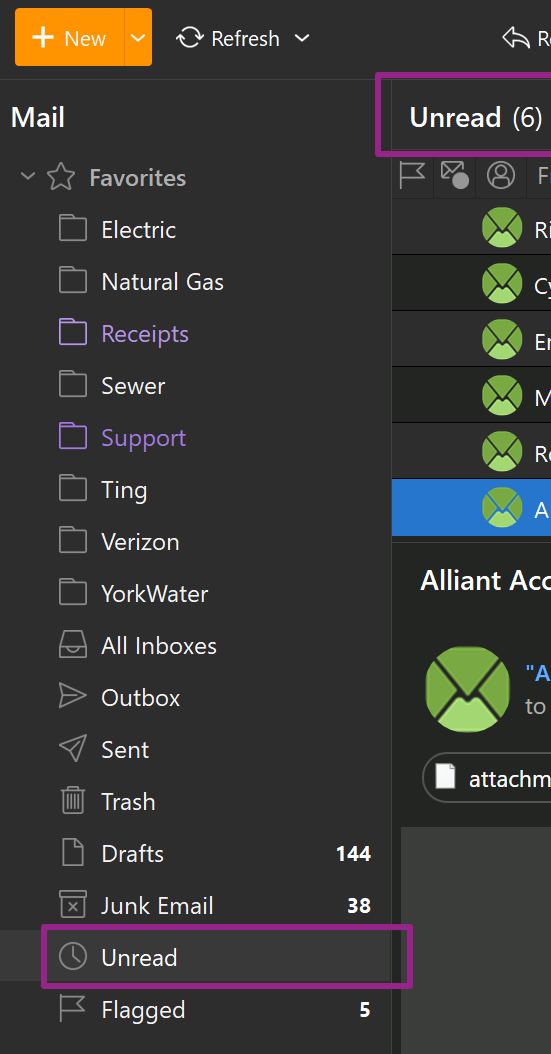
Moved mail was moved to other folders and you didn’t have to go to change to a different fiolder to get it to actually perform the move.
Once emails are read in the Global Unread folder “even if you move them”, you still need to “click to another folder” which will then clear them from the unread folder and they will then “only show in the original account folder location or show in the folder you moved them to” as I explained in your other thread on this same subject.
This has allways been how it works by design.
So if you click to another folder “and the read messages are not being cleared from the global unread folder”, then I would lodge a support ticket via going to the VIP support page as points to then some sort of eg: possible database issue or program issue in some way.
Also “if you have no messages showing in the unread global favourites folder” but you are still showing unread even after closing and reopening eM Client, then I would also contact official support via the VIP support page.
.
I know you say that but that’s never been my experience. In fact since iiems are tagged with Inbox or other folders on delivery the only thing holding them in the GUF should be that they are unread
What I recall was if you read something tagged for Inbox as soon as it was read it disappeared into the inbox and out of the GUF. Either way the counts don’t match. I’m guessing the reason for that is one is still counting based on what I recall while the other is counting your way. What you’re saying doesn’t make sense. Why would you ever want to have to change folders to remove stuff from GFU? Who would even think to do that?
How am I suppose to open a VIP support when my support license has expired?
I personally found out by reading the forum.
How am I suppose to open a VIP support when my support license has expired?
If your VIP 12 months Support has expired, you can extend that for another 12 months via the following link.
“Get a 1-year extension to your VIP Support”
https://www.emclient.com/extend-support
My issue with re-upping is that they didn’t fix tthe problems from last year.
What problems were those ? Can you link to threads you had on those issues.
I went through what I hsd but most are regarding Android which are essentially email chains. I think most of the ones assigned numbers orat least numbers that I see in my email desc are resolved. Therer was one I hadn’t responded back to regarding dark mode and unreadible emails that seems resolved I was just waiting tto see if anything else was unreadible.