So often I send emails to email-adresses with typos again and again because I can´t remove them.
I´ve tried all the advice above and all seem to work - but still the misspelled email-adresses are proposed when I start typing
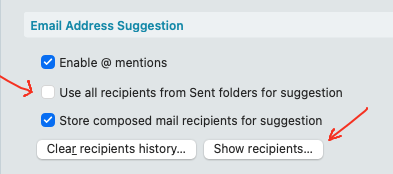
If the unwanted email address “doesn’t have an X next to it in the To: line to remove it”, and “Use all recipient’s from the sent folders for suggestion is disabled in Settings”, and “the unwanted email address is not showing in the Show recipient’s history in Settings”, then it means “that email address has definitely been added as a Contact in one of your email accounts”.
“Menu / Settings (Preferences) / Mail / Compose” V10
So next to remove that unwanted email address from Contacts “as per my thread post , when you compose the email, "Click on the word “To” (on the left) as in the first example screenshot below.
Then “Click the dropdown on the far right of Folders” and select “All Contacts”.
Then either “Type or Paste in the unwanted email address in the Filter Contacts field” or Scroll down and find the unwanted email address".
Lastly “Right click on the unwanted email address” and delete it. Then “close the select contacts window and close the compose window”. Then next close and reopen eM Client and open / compose a new email and it should be gone.


