But nobody can answer my question: where are the kept? In which file? Where does eM save used email addressess?
When you type a few letters of a recipient in the To:,Cc,Bcc line suggested email addresses "are looked up in three places “from your contacts”. and “from your sent folder” and from your “email address suggestions” history.
So the first place I reccomend to look for that email address [email protected] is “Contacts” using either the method I posted in the above thread link or via manually going to Contacts and manually searching for that contact and editing that contact or delete that contact and recreate it.
Next if that email address is definitely not in your Contacts, then as @Frantisek_Svarc already advised above, go to Settings (Preferences) / Mail / Compose" Email Address Suggestion and click “Show Recipient” and see if that email address is in there. Sometimes they can be hard to find, so dblcheck again in there.
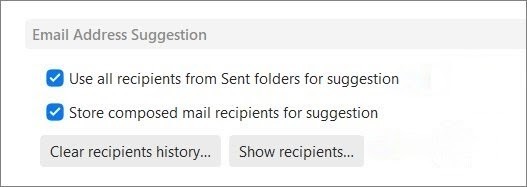
If you have a very large recipient history in Show Recipients and want to 100% rule out if it’s in there and carn’t see it, then you could eg: just “Clear the Recipient history” and start new.
Next if that email address is not showing in the recipient history and even clearing the recipient history is still being automatically suggested, then “uncheck use all recipients from the sent folder” and click Apply & Save Settings" and the close and reopen eM Client and type a few letter of that recipient in the To:,Cc,Bcc line and see if it still appears. You will then know if it’s coming from your sent mail folder emails.
Apart from that "at the end of the To:,Cc,Bcc lines when you type email addresses sometimes you will see an “X” where you can click that to remove unwanted email suggestions.