I have tried everything and followed all tips and instruction I could find but… there is one wrong autofill emailaddress wich I can not remove or delete. Tried everything but it stays in the list.
It is not the real emailaddress but name given to it. So if I type the four three letters in the addressbar: ‘best’, in the suggestions/autofill comes: ‘bestuur 058’ with an emailaddress underneath it (a valid mailaddress). But ‘bestuur 058’ is not used anymore so I want to delete it from the suggestions/autofill: impossible till now. (There is no grey X, it is not in the list, there is no contact ‘bestuur 058’ but there is one with the mailaddres which was used for that).
Where are these suggestions saved, is there a list available?
Hello,
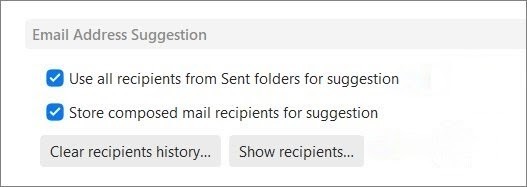
did you check Settings - Mail - Compose - Email Address Suggestion?
eM Client suggests addresses from sent messages and stores recipients for later quicker composing. Try checking the show recipients and check whether you can find it there.
Yes, I did. The list after: settings, compose, email address suggestion, show mailaddresses (the button right) does not contain the wrong mail address.
[email protected] is a correct address and a lot of mails have been send to it, but ‘bestuur 058’ is wrong and that is used for suggested mail addresses.
I can not solve this by deleting all the mails send to the correct mailaddress but with the wrong ‘name’ attached to it.
But nobody can answer my question: where are the kept? In which file? Where does eM save used email addressess?
When you type a few letters of a recipient in the To:,Cc,Bcc line suggested email addresses "are looked up in three places “from your contacts”. and “from your sent folder” and from your “email address suggestions” history.
So the first place I reccomend to look for that email address [email protected] is “Contacts” using either the method I posted in the above thread link or via manually going to Contacts and manually searching for that contact and editing that contact or delete that contact and recreate it.
Next if that email address is definitely not in your Contacts, then as @Frantisek_Svarc already advised above, go to Settings (Preferences) / Mail / Compose" Email Address Suggestion and click “Show Recipient” and see if that email address is in there. Sometimes they can be hard to find, so dblcheck again in there.
If you have a very large recipient history in Show Recipients and want to 100% rule out if it’s in there and carn’t see it, then you could eg: just “Clear the Recipient history” and start new.
Next if that email address is not showing in the recipient history and even clearing the recipient history is still being automatically suggested, then “uncheck use all recipients from the sent folder” and click Apply & Save Settings" and the close and reopen eM Client and type a few letter of that recipient in the To:,Cc,Bcc line and see if it still appears. You will then know if it’s coming from your sent mail folder emails.
Apart from that "at the end of the To:,Cc,Bcc lines when you type email addresses sometimes you will see an “X” where you can click that to remove unwanted email suggestions.
OK. To clear: I have done everything you write but it does not solve my problem.
I will try again to explain my problem.
a. there is somehow somewere the folowing: personal name1 [email protected]
b. [email protected] is valid mailaddress from someone in my contacts but not with the name personal name1 but with personal name2.
c. to the mailaddress [email protected] I have send mails and I have received mails from but all that mails do not carry the personal name1, but all the send en received mails go to and come from personal name2 [email protected].
d. to be absolutely clear: in the Send map there are a lot of mails send to personal name2 [email protected] but no mails send to personal name1 [email protected]
The only way to prevent the suggestion personal name1 [email protected] is uncheck the option in Settings, Email, Compose, Suggestion → use all receivers from Send folder etc etc
That works because then the mailaddress [email protected] is not used.
But is still impossible to remove pesonal name1[email protected]. The bold part. I do not want to delete the mailaddress [email protected] but I do want to delete the part “personal name1” from that mailaddres because that part is used for showing suggesions and that is a wrong part and I don’t want to see it in suggestions.
The only way to prevent the suggestion personal name1 [email protected] is uncheck the option in Settings, Email, Compose, Suggestion → use all receivers from Send folder etc etc
That works because then the mailaddress [email protected] is not used
I would then next suggest “to contact official eM Client support” who then might be able to suggest a way to fix that.
Im not aware of anyway “to modify email addresss already sent in your sent folder”, so if removing use all recipients from the sent folder worked, then that’s all we can advise on this free community forum.
So if you want further assistance and have a current active paid Pro, Personal or Business version go to the VIP support page and login and lodge a support ticket and link this thread.
I don’t think it is possible to change or delete the part between " " + if there are two of them (two “…” attached to one mailaddress). So the workaround is:
disable use all receivers from send folder…
if i want to use an emailaddress from a receiver which is not a contact I make it a contact
contacts are use for suggestions
That is the only way to avoid wrong suggestions from de send folder