Worst EMail programme I've ever used!

I’ve used eM Client in the past and it has been fine but this version (8) is totally crap!
The worst problem has to be the time it takes for new emails to open in inbox.
I honestly wouldn’t use this over priced programme if YOU paid me!
Thank God you didn’t offer me a decent discount to obtain the Full version…
What a waste of money that would of been!
It’s back to a decent email programme now ahh how about Windows 10 Mail…

Pete Wilson

I totally agree - in fact this is probably the worst program I have ever downloaded. It is extremely clunky. I can launch Outlook and reply to an e-mail in the time it takes em-client to open. It then plays tricks: e-mails change boxes!
I spent an hour using the appearance-changer (another clunky program) and saving it, only for the original one (which I dislike) to re-appear when I next opened em-Client.

It has also crashed on me. What’s wrong with the program ? I’d guess that it tries to do too much. It is an example of Big Bloat. There should be a simple, pared-down free version for ordinary people rather than screen-addicted whizz-kids in Big Organisations.

I’m new to em client as my previous client will no longer supported (PostBox). While em client isn’t perfect and lacks features I had in PostBox, it’s working for me in a production/work environment. The current version of em client is 10.1. Maybe try installing the new version and see if it’ll do the job. There is a free version to try.

1 Like

@weirwolf

can launch Outlook and reply to an e-mail in the time it takes em-client to open.

eM Client loads for me usually in 5secs on Windows and Mac with 8GB ram and a SSD drive. If it’s taking alot longer that, then could be a eg: computer hardware “hard-disk speed issue” or maybe “not enough system ram” or cpu speed.

Or you might have a eg: mail account database issue “possibly corrupted” so then is slow loading.

It then plays tricks: e-mails change boxes!

Can you elaborate on that. Are you referring to eg: Inbox Category Tabs or something else ?

It has also crashed on me. What’s wrong with the program ?

eM Client doesn’t normally crash.

As long as eM Client installed correctly without errors, then that could be happening if an eg: account setup “might have errors within some messages from the server end”, or if you eg: “imported mail from another mail client which might have had errors in that mail database”.

So we would need to know if you imported any other accounts or setup email accounts as new and what mail accounts they are. Also if you setup multiple accounts did eM Client crash on a specific account or did it crash when you clicked on a specific thing in the GUI. Need more info. Also do you have Windows or Mac and what OS version are you running. Also eM Client ver.

Also apart from possible mail message errors or mail database errors, sometimes mail clients can crash due to eg: Resident programs running in the background “on computer startup” can interfere with mail clients. Programs that can sometimes interfere are eg: Firewall / Security programs, Antivirus programs etc. So if you have anything like that installed other than what comes default with your OS, try completely disabling those to test incase of Interference.

I spent an hour using the appearance-changer (another clunky program) and saving it, only for the original one (which I dislike) to re-appear when I next opened em-Client.

After you create your own custom theme in the Theme Editor, then “save the theme in a folder on your hard-disk”.

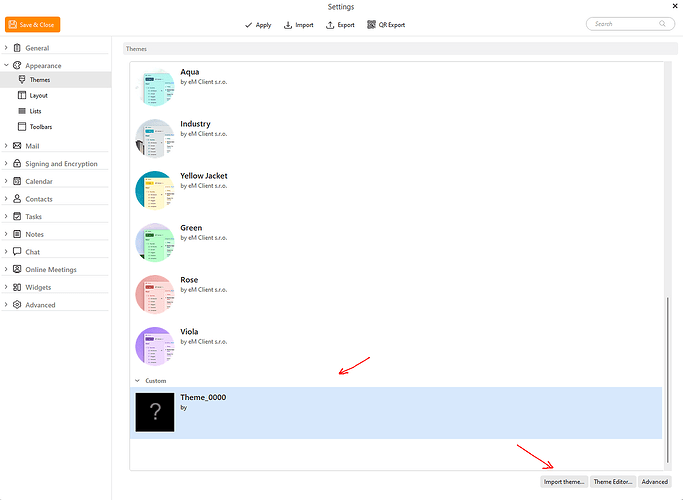
Then import that modified saved theme back into the themes using the “Import” button at the bottom of Themes as per the screenshot example below.

The imported or custom saved theme you make “will then appear at the bottom of the Themes list” to choose from anytime. Then finally Apply and Save and Close Settings.

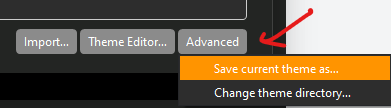
If you are modifying an existing Theme, you first “Save the Theme”, by clicking the “Advanced” button at the bottom right. Give the Theme a custom name when saving so you know what it is.

Then “modify that saved theme” in the eM Client “Theme editor” and finally, import that modified saved theme back into the themes using the “Import” button at the bottom of Themes.

Lastly if you don’t want the custom theme anymore, click / select it at the bottom of the Theme editor and press the “del key”.

(How to create or adjust my own eM Client theme) - eM Client Support page.

https://support.emclient.com/index.php?/Knowledgebase/Article/View/149/6/how-to-create-or-adjust-my-own-em-client-theme

Also there is also user created Themes you might like to try as well.

(eM Client user created custom Themes)

https://www.emclient.com/themes
Disagree.

For me personally eM is most reliable and usable mail client.
Using for many years already and will not go somewhere else.

Amazingly fast, stable, customizable.
Does exactly what I need.
The theming is very good and I can customize the views as I need.

I used a free version for many years, so I recently bought a full license, in order to show that I like the program and encourage the continuous maintenance in future.

2 Likes

Well, something must be pulling at the feet of this program!
I have just seen a pop-up: “Look for this bell to adjust your notification preferences for specific topics or whole categories.” No bell! The instructions for theme-changing (I hate the blue that seems to be an eternal heritage from Microsoft) are very difficult to interpret. I have given up on that.

I changed my client from Outlook because Outlook would no longer connect with my ISP. This program did - but at the cost of clunkiness. Clunky programs from the year 1999 (Dreamweaver 4) still perform very well and usefully, but this one seems to have to fight its way on to my screen.
I guess I’ll just have to live with it…reluctantly. Being a European child of WW2 I shall have to make do and maybe try to mend. Or uninstall then re-install from scratch.

Thanks for your reply. It takes at least 10 seconds for an e-mail to open after being clicked on!

The guide to theme-change is very obscure and complicated. Plain English is not much used in the USA.

Every process I go through is slow, sometimes involving several clicks. I have a Dreamweaver-4 program dating from Windows 95 times and it runs extraordinarily well on Windows 10 64 bit, so I would have thought that em-client would run at least as efficiently as Outlook within Office 2010. I have used Outlook (based on Word) for 25 years because I can use the keyboard to make French, Irish, Norwegian and Spanish accents.
I’ll try again, following your kind instructions.

I installed the program ‘clean’ and from scratch without importing from Outlook 2010. I have Windows 10, an SSD and an HDD. I had to migrate from Outlook because it would no longer connect with my ISP to send mail.

Although I am thoroughly disheartened, I shall try uninstalling and re-installing.

You don’t get it.
You can agree it’s the worst email client ever released and still enjoy using it at the same time. :slightly_smiling_face:
There’s not much point in arguing with people who like things to work their way and no other way around.

@weirwolf

Every process I go through is slow, sometimes involving several clicks. I have a Dreamweaver-4 program dating from Windows 95 times and it runs extraordinarily well on Windows 10 64 bit, so I would have thought that em-client would run at least as efficiently as Outlook within Office 2010.

I have Windows 10, an SSD and an HDD.

As every process is still slow then that could be cpu speed and / or as well not enough ram. What cpu do you have and how much ram ?