I was in the middle of composing a reply and I closed down the separate window in which I was composing the reply. Unknown to me eM decided to send the half finished email out to the person! Why?
That doesn’t normally happen. You may have possibly eg: accidentally hit the keyboard shortcut Ctrl + Enter and it sent.
“eM Client Shortcuts”
“eM Client Shortcuts Settings”
https://www.emclient.com/webdocumentation/en/10.0/emclient/default.htm#Settings/Shortcuts.htm
Is there a way to delete specific shortcuts? I do not want this to happen again. If I want to send an email I want to have to click the SEND button.
Is there a way to delete specific shortcuts?
You carn’t delete them, but "you can change it to a eg: “different keyboard combo” you wouldn’t use via going to “Menu / Settings (Preferences) / General / Shortcuts” and click on the shortcut you want to modify, and at the bottom right in the field you can change it. Then Apply & Save Settings.
“eM Client Shortcuts Settings”
https://www.emclient.com/webdocumentation/en/10.0/emclient/default.htm#Settings/Shortcuts.htm
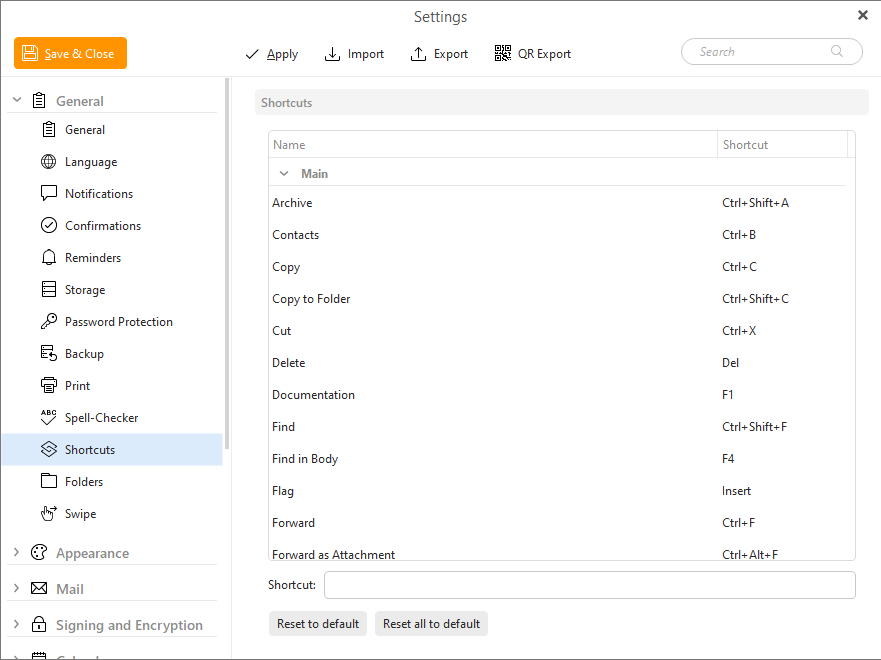
THanks I assigned it to extremely obscure 4 keypress that I would never use. Also did the same thing for the other send operation.
Apparently, there is a somewhat obtuse way to remove the shortcut altogether. If you click on a shortcut that you want to change and instead of press the new hotkey combination you go down to the bottom of the window and click on the input box you will see a X appear at the end of the window. Clicking that X will remove the current short cut key altogether.
I told eMClient support that is is not intuative at all since the application does not require you to click in that input field to register a hotkey so the end user is never aware of there is even an X option available!
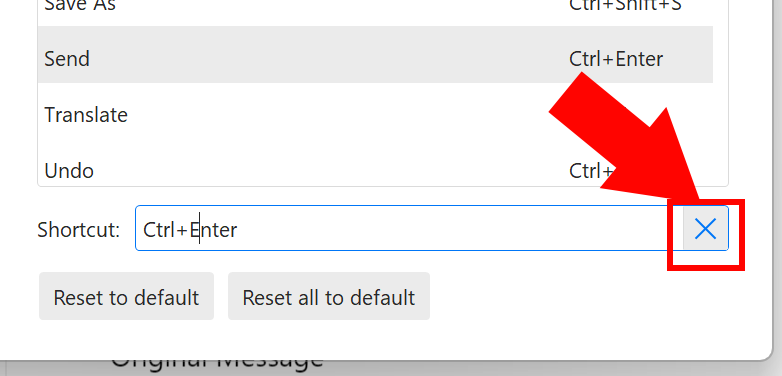
Yes agree i was initially confused how to remove shortcuts and wasn’t obvious to the user. I only found out about the X as someone told me on the forum previously .
Maybe “when you click in the field”, the devs could popup a note “click X on far right to remove”
Id also suggest to add about the X to the shortcuts documentation as currently it only says:-
https://www.emclient.com/webdocumentation/en/10.0/emclient/default.htm#Settings/Shortcuts.htm
Quote Extract:- “To change a shortcut simply click on it in the list, and press the NEW shortcut you want to change on your keyboard - eM Client will detect it”.