After repetitive and intractable sync problems i unistalled eMC and i’m trying again. I just installed V9 and added my hotmail account, but cannot see any of the folders that appear on Outlook Web in my eMC list under ‘Mail’. That is apart from the ‘standard’ ones like Inbox, Sent and Trash. And these are all empty. All the others are missing. The only thing i can see - when i click on my email address in the eMC list under Mail - are the messages that are in my Outlook Web inbox.
I hope someone can please understand what i am trying to explain and tell me where i’m going wrong, please?
EDIT - after many hours and many failures, i tried creating a random folder under my email address and suddenly all my folders and their contents appeared in my left-hand (“Mail”) column. I deleted the bogus folder and tidied up a few ‘appearance-type’ settings. I thought i’d finally cracked it as the synchronising -the original problem - seemed to be working fine. But then i tried to send an email from eMC and got “there was no account set up”.
I would really, really appreciate it if some kind person would tell me what i need to do and hopefully save me another several hours of work tomorrow. Thanks in advance.
I just installed V9 and added my hotmail account, but cannot see any of the folders that appear on Outlook Web in my eMC list under ‘Mail’. That is apart from the ‘standard’ ones like Inbox, Sent and Trash. And these are all empty.
That can happen initially as it can sometimes take time for the IMAP mail folders and mail inside the folders to appear after adding your account “depending on how many IMAP folders you have” and the speed of you Internet connection. You can see where the synching of folders is up to via clicking “Show Operations” via the dropdown on the right of Refresh.
i tried to send an email from eMC and got “there was no account set up”.
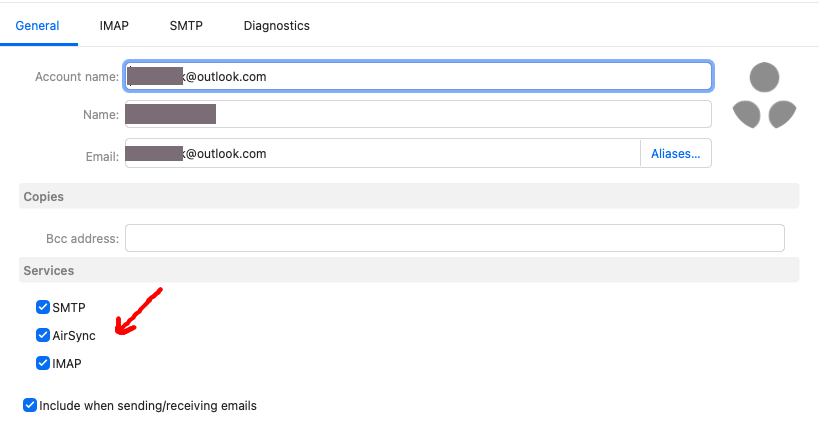
Sounds like AirSync may not be enabled.
Go to “Menu / Accounts” and click on the “General Tab” of your Outlook account.
Then go down to “Services” near the bottom, and make sure“AirSync” is still enabled. If it’s not, enable it and then save accounts and try again.
Thanks so much - an easy fix it appears and all seems to be working OK now.Let’s hope those dreadful sync problems don’t resurface as i much prefer the eMC interface.
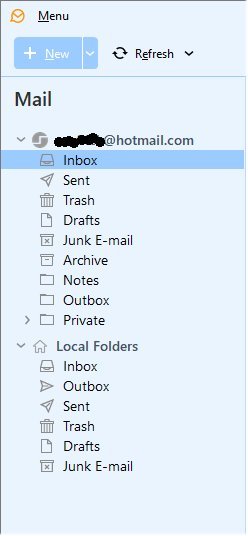
One strange (to me) thing: I now have a group of populated folders under my email address in ‘Mail’ (see pic).
Underneath there is a group of empty “Local Folders”. When i send an email, it appears briefly as a red ‘1’ next to the Outbox in my local (otherwise empty) folders. I would have thought it should appear in the Outbox of the other group?
As a corollary to this question, am i right in assuming that the ‘Local Folders’ are there purely for local storage? In other words, when eMC syncs with the outlook server, they will not be affected? So i can copy stuff from the other group of folders into the Local Folders as a kind of emergency back up? If this is the idea, it seems very useful but incompatible with the ‘Local Folders’ Outbox being used when i’m sending mail?
Thanks again.
Edit - another thing is that when i open eMC it defaults to the inbox in Local Folders, not the populated inbox.
The Local Folders Outbox “acts as a temporary holding area for all outgoing mail”, regardless of the account type (IMAP, Exchange, or POP3) etc. Emails sit there until successfully sent by the SMTP server. So thats why you see the sending message in the account outbox and also in Local folders outbox simultaneously for a few seconds.
Local folders is also required for the “Send Later” feature and stores messages when offline.
The Local folders is also used for “users who choose to setup & store all their POP account email in Local Folders” rather than in a separate folder tree.
So i can copy stuff from the other group of folders into the Local Folders as a kind of emergency back up? If this is the idea, it seems very useful but incompatible with the ‘Local Folders’ Outbox being used when i’m sending mail?
Yes you can copy any account email into Local Folders for backup purposes. If you do that make sure you setup either the Automatic period backup via “Menu / Settings / General / Backup” or regularly backup via “Menu / Backup” incase you need to restore Local Folders later.
You can alternatively “if you upgrade to V10” create / mount a Data File (.emdf) to store and backup any email account mail via going to “Menu / Data Files”. These are similar to eg: Outlook .pst files but are much better as don’t have the limitations of a .pst file.
Edit - another thing is that when i open eMC it defaults to the inbox in Local Folders, not the populated inbox.
Go to “Menu / Settings / General” and click in the “Show on startup” field to set the startup acct Inbox or All Inboxes
Thanks again for the explanation and solution. I could not choose all inboxes - apparently because “show global folders” was not checked. I couldn’t find that, but i selected “specific folder” and then chose the inbox under my email address, which seems to have worked. I also unticked “show local folders” so the interface is now about as simple as possible. I got one of the dreaded red triangles once - but only once, so i’m hoping all is back to normal until MS move the goalposts again.