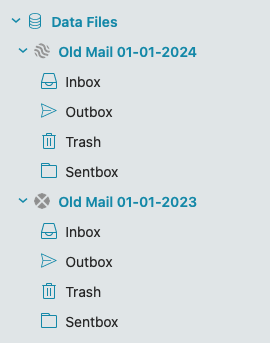
The FAQ for data files says:
Data files are separate databases that can be connected to your eM Client - you can mount or unmount them based on current need.
You can convert other message files into a new data file - such as PST or OST files, using the menu > File > Import option or mounting it via menu >Data Files section.
Which is all very well, but what would you actually use them for in practice?
Data files are good to have for keeping eg: Long Term Archive Mail where you might “view or copy the messages or add more messages etc every so often” via Mounting and Unmounting.
eg: I keep every years emails 30+ years (500,000+ messages) in separate dated .emdf data files on my hard-disk in a custom archive old mail folder to keep the current eM Client mail database “overall size smaller”, and “also to avoid any possible corruption” with the mail database if they were all combined in my current main database.
Some users also use eM Client “Local Folders” to store long term or other types of offline mail, but i personally like to keep them externally outside of the eM Client in Data Files.
Data Files example below.
1 Like
OK, that makes sense. So you use them like an archive.pst in Outlook.
I’m a newbie and still testing (even I bought a license to use all functionality)
The setup is MacMini MacBook iPhone iPad and in the network environment one NAS and one HD with access from everywhere.
I’m not sure but, is the difference between data files and local folders (in German Lokale Ordner) the place where data is stored ?
If yes, where are data files stored ? (I did checked the info function on eM but the data location is text and number, without meaning to me)
Can I change the location e.g. to my server so that MacBook can access the data (email archive) from outside?
Can I use data files in eM like old PST file? (structured eg like projects, etc )
Thank you for clarification
Rolf
Welcome to eM Client!  We released a blog post on Data Files just this summer so you may find it answers some of your questions: Daten immer im Griff: eM Client Datendateien | eM Client
For any passer-by, the English version: Stay in charge of your data with eM Client Data Files | eM Client
Thanks for the link and I read the blog post.
I added 2 data files, both on the NAS, and it works with my MacMini.
However, I do not see the data file option on my MacBook and on the iPad nor on iPhone.
Why do I not see the option to add data file nor to mount existing data file?
However, I do not see the data file option on my MacBook
On Mac, click on the word eM Client in the Menu and Data Files is in the drop-down to then Mount or unmount etc like Windows.
Im not aware of Data file mount / unmount options on the mobile apps as yet.
Ups, connected on the Mac but now is the data file empty and my work from yesterday gone. Can I restore the work I did yesterday as I moved productive mails into it
Ups, connected on the Mac but now is the data file empty and my work from yesterday gone.
Did you unmount the data file after you moved emails into it , before reopening the same data file on your your other Mac ?
Sorry, can’t tell you. I used the transfer function with the QR code for the Mac installation.
Everything I see at the moment, are the 4 files in the data file folder.
As you can see in the screenshot, they are shaded and I can not add them to the desktop installation anymore. But based on the size 18.2 MB and the date yesterday, I guess this would be the data file.
Is the data file still open on your first Mac?
If it’s open it will show above Local Folders at the bottom left or will show below Accounts.
If it’s not open on your first Mac , then go to “Menu / Data files” and click Mount and select your data file (.emdf) and see if that will open or if that also shows nothing in it.
If that opens and you can see your emails, then go back to “Menu / Files” and Unmount it. Then open that .emdf data file on your 2nd Mac.
Sorry for the late reply. It was not my mistake, but the forum was locked for me after 3 replies even I paid a license right after the first login.
My reply to my blog, added by myself on last Friday, was visible till today, looks like eM changed my comment without informing me beforehand. This is a clear misuse of data protection law.
++++++++++++++++++++++++++++++++++++++++++++++++++++++++
Here my comment, which I was not able to process on Friday anymore.
I closed both eM apps and then, the emdf file was 33 KB 
Luckily, I copied the emdf 18.2 MB before mounting again.
So I copied back and bingo, the data from yesterday are here again.
Now, I’m very concerned about the use of eM Client
After this hectic exercise it would be great if you could, for all readers of this track, summarize the correct process.
- if I mount a data file, do I have to unmount before the second client likes to mount
- can I keep the data file mounted, even I open or close my laptop with the second client
- can I save with Time Machine the emdf file or do I have to save the others (-shm -wal) as well
- if I use the internal backup via settings - general - backup for daily automatic eM backups, I assume all data including data files are backed up . Correct ?
Probably a summary in the blog would be helpful to all users.
Anyway, thanks so much for your help
Rolf
if I mount a data file, do I have to unmount before the second client likes to mount.
As far as I’m aware “yes you need to unmount it before opening it on another eM Client installation”. or you could more than likely corrupt that data file as it’s already open.
If that’s not right someone will update this thread.
if I use the internal backup via settings - general - backup for daily automatic eM backups, I assume all data including data files are backed up.
I asked that question in another thread, but never got an answer to that. So I personally “unmount the .emdf files” when not backing up, and then backup those data files separately.
1 Like
I just sent an request to the support team.
Ticket ID: 176866
Subject: Data file questions in the Em Client forum
Below the official answer from eM support
-
Yes, please always unmount the data file before mounting it to a different client - the data file should never be accessed by two different clients at once.
-
Yes, you can keep the data file mounted when you put your laptop in or out of sleep mode.
-
Please make sure to save all of the files - the shm and wal files contain information about the changes that haven’t yet been compacted to the main dat file by the app.
-
No, I’m afraid that only your main database folder gets backed up.
At the moment, I requested more details about the point 1.
Keep you posted.
Following the answers from eM support.
With this reply, I will close my task and thank you to the eM support to be helpful in this matter.
If you close your laptop, then the data file will not get unmounted automatically. If you want to access the data file on a new device, you should always unmount the data file on the old device first.
Our database and data files are not meant to be accessed by multiple eM Client instances at once.
If you have any feature or adjustment suggestions, you can submit them via our Sleekplan app here: https://emclient.sleekplan.app/ - our developers actively monitor it and periodically implement selected requests.
If you submit a request, you will be notified of any progress regarding the implementation, and other users can vote for your idea.
Best regards,
eM Client Support