I opened EM client today as I have for many years and it asked if I wanted to update. I don’t want ahead and said yes assuming it was something to do with my version 9 but once I clicked on that I found out I was going into version 10 update which I didn’t want to do at this time. The button was to either proceed with the update or hit the exit button which I soon would take me back to the program in the state that it was. This is not the case. I try to open it I come to this same dialog box where it says proceed or exit. What do I need to do to fix it?

Sounds like you will then need to downgrade back to V9 if you don’t want to go to V10 right now
See the following eM Client support page link.
I have my last version downloaded. Do I have to do an uninstall first and then reinstall? Will everything be like it was or do I need to do anything special to get it back without reinstalling all the email accounts? Will my EM Client software keys, and account passwords, and the email accounts, all be there like before? Makes me really nervous about the possibility of a lot of reconstruction work. Please advise.
I have my last version downloaded. Do I have to do an uninstall first and then reinstall? Will everything be like it was or do I need to do anything special to get it back without reinstalling all the email accounts?
As the database now appears to have been upgraded to V10, you carnt just uninstall and reinstall V9 as the database is different now.
Have you been making regular eM Client backups either automatically via the Settings or manually via Menu / Backup ? You can check by going to your “Documents / eM Client” folder and see if there are any recent dated backup.zip files.
Also do you have a POP, IMAP, Exchange, Office 365 or iCloud account?
Also did you have anything in Local Folders ?
So it sounds like the easiest thing to do is just go ahead and buy V10 at this time and just press the proceed button and everything should be okay? What is the step by step process to do that as easily as possible?
So it sounds like the easiest thing to do is just go ahead and buy V10 at this time and just press the proceed button and everything should be okay?
You can certainly choose to proceed with the license upgrade which normally works fine from V9 to V10 from own experience of doing that.
If you have any problems upgrading or after it’s installed, just update in this thread.
I installed V10 Pro on all three PCs. I was getting a lot of sync errors at first when I had it open on all three PCs that I installed the upgrades on. Right now I just have my main pc running in the errors are pretty rare. The biggest problem I’m seeing right now is that when I go into the calendar it is often blank and the refresh button area is circling as it’s refreshing. Takes quite a while and then eventually the calendar items populate the screen. That never happened in version 9. Should most of this work itself out or do I need to do something to fix that problem?
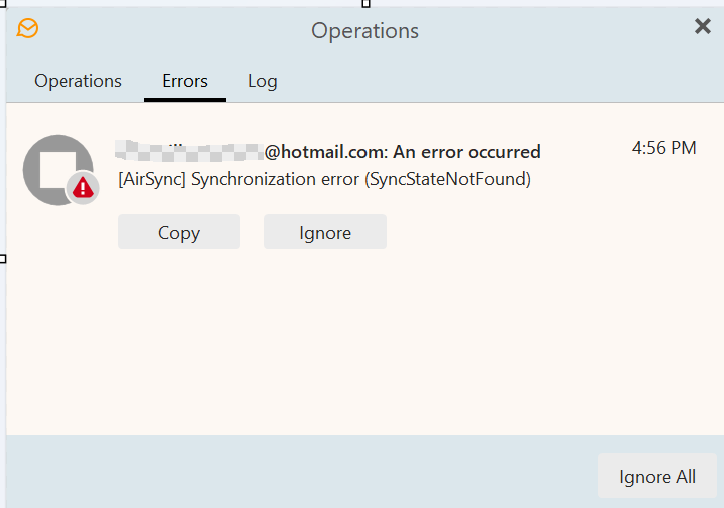
The biggest problem I’m seeing right now is that when I go into the calendar it is often blank and the refresh button area is circling as it’s refreshing. Takes quite a while and then eventually the calendar items populate the screen. That never happened in version 9.
If your Hotmail calendar is sometimes blank or taking along time to update “as long as your internet connection is working normally”, that might then be a local account problem.
So suggest to try removing and readding your Hotmail account via “Menu / Accounts” and see if that fixes it. Could be a corrupted account.
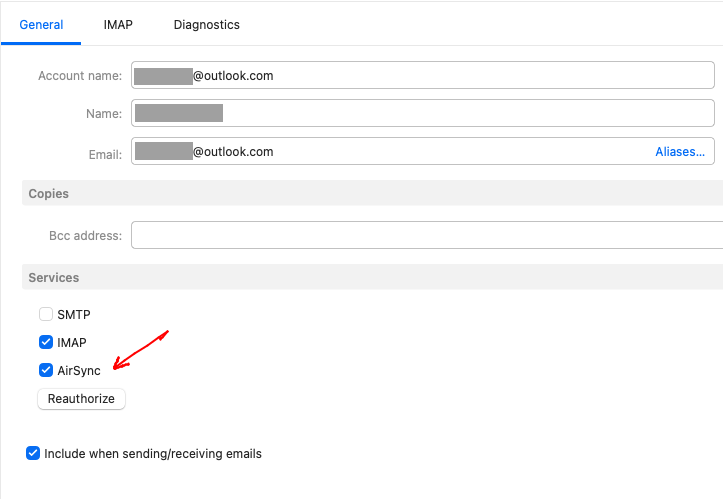
Also check in your Hotmail account under the General tab that you have AirSync enabled as per the below Outlook IMAP example screenshot.
Apart from that, sometimes optionally installed resident programs can interfere such as eg: Optionally installed Firewall / Security programs or VPNs etc. So if you have anything like that installed “other than what comes default with your OS”, try completely disabling those to test.