em-client does’nt sync mails from google imap-server
sync-icon turns and turns and turns … but nothing is synced from the server
log-file shows no errors
i’m using em-clients standard settings for my [email protected] account
em-client does’nt sync mails from google imap-server
sync-icon turns and turns and turns … but nothing is synced from the server
log-file shows no errors
Could be your Gmail account is still synching depending on the size of your online mailbox.
So click on your Gmail account “All Mail” folder, and then click the drop-down on the right of Refresh and click “Show Operations”. Then see if the Gmail account is still synching.
watching the sync-action i can see very very slow speed
my inbox contains 10 mails, may sent box is 3 mails
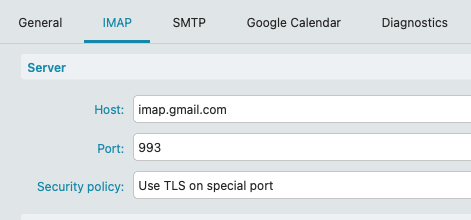
Ok could possibly be the wrong Gmail IMAP settings. Go to “Menu / Accounts” and click the “IMAP” tab under your Gmail account and see if you have the same server settings as per below.
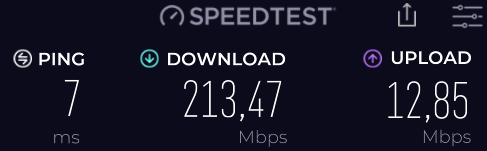
If you already have the same IMAP Server settings and removing and re-adding your Gmail account via the automatic account wizard made no difference, and your download speed is fast, then if your email is taking ages to arrive, then “you might possibly have a resident program running in the background” slowing the mail arriving.
So if you have an eg: optionally installed firewall / security program or optionally installed antivirus program or vpn “other than what comes default with your os” then try completely disabling those to test incase of interference.
what i now found in the logs: (i have typed xxxxx to hide my mail-adress)
11:31:52 [email protected] [IMAP] MailClient.Accounts.ConnectionException: Die Synchronisation des Ordners’[email protected]/[Google Mail]/Alle Nachrichten’ ist fehlgeschlagen mit folgendem Fehler: Der Server hat nicht innerhalb von 00:01:00 geantwortet
—> System.TimeoutException: Der Server hat nicht innerhalb von 00:01:00 geantwortet
at MailClient.Imap.Base.Extensions.CopyToAsyncWithTimer(Stream source, PipeWriter writer, TimeoutTimer timer, IProgress1 bytesRead, Action1 loggingCallback, CancellationToken cancellationToken)
at MailClient.Imap.Base.TransportPipe.StartReading(Stream stream, CancellationToken token)
at System.IO.Pipelines.Pipe.GetReadResult(ReadResult& result)
at System.IO.Pipelines.Pipe.GetReadAsyncResult()
at System.IO.Pipelines.Pipe.DefaultPipeReader.GetResult(Int16 token)
at MailClient.Imap.Base.Extensions.g__SlowAsyncPath|30_1(PipeReader reader, CancellationToken cancellationToken)
at MailClient.Imap.Base.Connection.ReceiveAsync()
— End of inner exception stack trace —
at MailClient.Protocols.Imap.ImapActionCommand.ExecuteInternalSync(WorkerStatus status)
at MailClient.Protocols.Imap.ImapActionCommand.Execute(WorkerStatus status)
at MailClient.Commands.Command.Process(WorkerStatus status)
AccountId = 64e4c3ff-4b1b-48f9-839e-38c5c8b81876
AccountName = [email protected]
IMAP_SERVER_TYPE = Gmail
RunInPlace = False
GUIStatus_Exception_Reported = True
11:31:52 [email protected] [IMAP] System.Threading.Tasks.TaskCanceledException: A task was canceled.
at MailClient.Protocols.Imap.ImapAccount.SynchronizeIntAsync(Boolean forced)
at MailClient.Protocols.Common.SynchronizableMailAccount.<>c__DisplayClass22_0.<b__0>d.MoveNext()
GUIStatus_Exception_Reported = True