My various gmail accounts and both Yahoo email accounts will not sync. The loading icons just keep going round and round. This keeps happening and I re-install the accounts – and after a day or two it happens again.
Other accounts (like my business.com” ) send and sync just fine.
My various gmail accounts and both Yahoo email accounts will not sync. The loading icons just keep going round and round. This keeps happening and I re-install the accounts – and after a day or two it happens again.
Could be your OAuth tokens need removing and re-adding and might be partly corrupted.
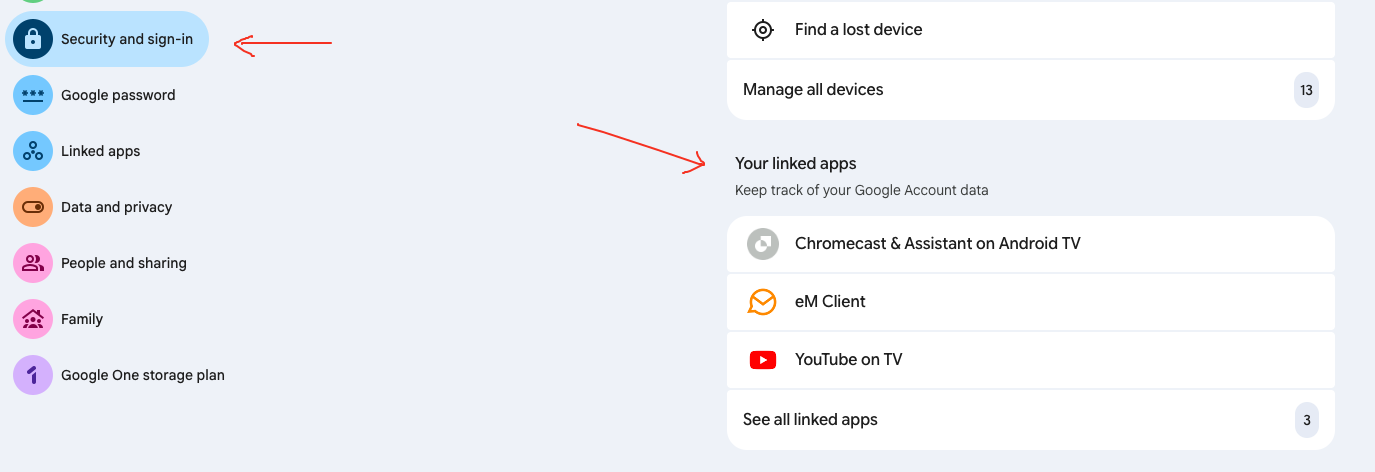
To remove / revoke the Gmail OAuth token, go online to your Google My Account / Security” section as per the example below, and once removed “then close and reopen eM Client” & you will get prompted to re-allow eM Client.
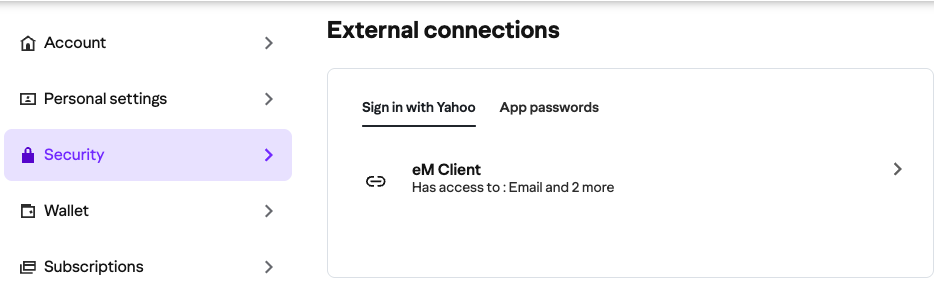
To remove / revoke the Yahoo OAuth token, go online to your Yahoo My Account / Security” section as per the example below, and once removed “then close and reopen eM Client” & you will get prompted to re-allow eM Client.
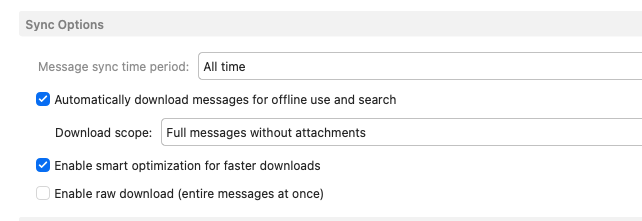
If you have IMAP configured Gmail & Yahoo accounts, you can also speed up the synching of messages and attachments which might also help you with this issue of constant loading icons by going to “Menu / Accounts” and clicking the “IMAP” tab and enable to automatically download messages for offline use etc as per the below V10 example.
If that still keeps happening then you might have some eg: external resident program interferring with the mail client causing the constant loading icons. Programs such as optionally installed antivirus programs scanning can sometimes delay mail clients synching properly. Also sometimes optionally installed firewall / security programs and vpn’s can interfere. So if you have anything like that installed other than what comes default with your OS, try completely disabling those to test.
Lastly if you have nothing like the above optionally installed running resident on startup, then suggest if you haven’t already tried to “shutdown your computer and modem / router for say eg: 2 mins” and then power everything back on and see if that fixes it. As could be an Internet connection speed issue causing the loading icons / synching problems.
Thanks - appreciate the response but I don’t seem to have “remove / remove your eM Client OAuth token” as an option anywhere. I do have the option of “remove all access.” Will that have the same outcome?
As long as the eM Client token is gone in your account, then yes whatever you have there to click on to remove it. You will know if its the correct one after removing and then closing and reopening eM Client & re-allowing access when prompted, where the eM Client OAuth token should then reappear in your account online where you removed it.