Hello all, I do like working with eM Client as my Windows EMail Client. And I choose it also for the fact that it is possible to use PGP to encrypt messages directly in the software. Unfortunately I had to learn that it uses a weak hashing algorithm known as “SHA1”. SHA1 is considered unsafe and is vulnerable to PGP/GnuPG impersonation attacks. 
Why is this? If a software offers security features I would expect that those features are updated to the latest standards. Or at least that the user is offered slternate choices of settings things up. For example, getting the chance to use a PGP-keypair that has been generated outside of eM Client.
For now I have turned off the PGP-featured in eM Client…
I am looking forward to reading any comments on this subject.
Best, Wolfgang
Hi Wolfgang, you definitely can set up PGP keys generated outside of eM Client. Just open Menu > Settings > Signing and Encryption > Certificates and Keys, click the Manage Certificates/Keypairs button, and then use the Import button.
Also, eM Client doesn’t use SHA1, can I ask where you found this information so that we can correct it? For keys created in eM Client, we generate RSA (public/private cryptography), for data encryption we use AES256, and for hashing SHA256.
Hi Kim, thanks for replying to my post. I do know that I can import PGP keys. But those keys are not placed into the “my keys section”, but into the “keys of others section”. So this is not what I am talking about. I would like to be able to use GnuPGP-software in connection with eM Client, as integration. Or the possibilities of creating a key pair within eM Client should be improved.
I am using the service ADDY.IO to work with alias email adresses. If I do enter my public key to one of my recipients I am receiving an email stating
# Warning Your GPG Key is Unsafe
The GPG key that you just added to your recipient xxxxxxx on addy.io uses a weak hashing algorithm known as “SHA1”.
SHA1 is considered unsafe and is vulnerable to PGP/GnuPG impersonation attacks. It is strongly recommended that you update your key to use a different hashing algorithm or create a new key entirely.
Best, Wolfgang
If you import only a Public key, it will be added to the “Others’ certificates/keys” section (since it can be only used to check signature and encrypt message for that recipient). If you import both Private and Public key, it will be available in the “My certificates/keys” section (and it will be available to both Sign and Decrypt messages). If you don’t see it there, you are not importing a Private key.
Could you please elaborate on what you mean by “If I do enter my public key to one of my recipients”?
Hi Kim, OK, well this is very interesting and will most likely solve my problem. I did not realize that I can import both key parts… Very good 
And referring to ADDY: The service offers the possibility to attach the public part of your PGP-key to your recipient address in ADDY. Like this you will receive emails that have been sent to one of your alias email addresses as encrypted messages…
Best, Wolfgang
Hi Kim, I am afraid things are not working out as hoped…
(1) The staff at ADDY analysed the public key I did create using the eM Client. This is what they found:
This key is using RSA-4096 with SHA-1 signatures.
That combination is considered insecure and obsolete in 2025.
Many tools and services will warn about it or outright reject it (for example, git with recent GnuPG will show “BAD signature” in red if you try to verify something signed with this key).The key will still work in addy.io as normal but it is advisable to update the SHA-1 signatures if possible.
Below are the raw packets for your key that you can send to the support team of eM Client for them to see:
off=0 ctb=99 tag=6 hlen=3 plen=525
:public key packet:
version 4, algo 1, created 1764849663, expires 0
pkey[0]: [4096 bits]
pkey[1]: [17 bits]
keyid: 4F1E5E2DADE5B644
off=528 ctb=b4 tag=13 hlen=2 plen=40
:user ID packet:
off=570 ctb=89 tag=2 hlen=3 plen=543
:signature packet: algo 1, keyid 4F1E5E2DADE5B644
version 4, created 1764849666, md5len 0, sigclass 0x10
digest algo 2, begin of digest b1 d0
hashed subpkt 2 len 4 (sig created 2025-12-04)
hashed subpkt 27 len 1 (key flags: 03)
subpkt 16 len 8 (issuer key ID 4F1E5E2DADE5B644)
data: [4096 bits]
off=1116 ctb=b9 tag=14 hlen=3 plen=525
:public sub key packet:
version 4, algo 1, created 1764849666, expires 0
pkey[0]: [4096 bits]
pkey[1]: [17 bits]
keyid: F280B765228F44FC
off=1644 ctb=89 tag=2 hlen=3 plen=543
:signature packet: algo 1, keyid 4F1E5E2DADE5B644
version 4, created 1764849667, md5len 0, sigclass 0x18
digest algo 2, begin of digest 8c 5c
hashed subpkt 2 len 4 (sig created 2025-12-04)
hashed subpkt 27 len 1 (key flags: 0C)
subpkt 16 len 8 (issuer key ID 4F1E5E2DADE5B644)
data: [4096 bits]
In a next step I did create a keypair using Kleopatra (the frontend of the gpg4win software) to be imported into the eM Client. While the import worked fine, I cannot send digitally signed emails… This is what I get instead
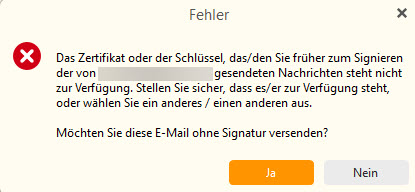
Even if I do have a keypair generated within eM Client and the imported one, I cannot find a switch to select one of the two…
I am lost and back at the beginning of this thread. Can you help?
Best, Wolfgang
Any news on this subject?
Does the new version address the problem?
Still curious,
Wolfgang
Hello all, I can add some news to this thread: I did a complete uninstall of my existing eM Client installation. And reinstalled the software using the newest release. This did allow me to use (import) a private keypair that has been created using gpg4win…

Best, Wolfgang