I have several Gmail accounts that all work fine in eM Client. I’m trying to add a new one [email protected], which works fine in Chrome browser window and native Mac email app. eM Client fails to create new account:
- Auto setup returns “Correct setting could not be determined.”
- Manual entry of imap.gmail.com and smtp.gmail.com returns “server not responding.”
- Fix returns “Server detected, credentials rejected, use different name or password?”
I have several Gmail accounts that all work fine in eM Client. I’m trying to add a new one [email protected], which works fine in Chrome browser window and native Mac email app. eM Client fails to create new account
Auto setup returns “Correct setting could not be determined.”
Sounds like a “domain hosting problem” with the automatic OAuth setup.
Gmail IMAP accounts in eM Client normally “only setup via the automatic account wizard” with an OAuth token and don’t require manual setup.
So if you are using one of the latest V9 or V10 builds, then sounds like something with your Domain mailbox hosting is not setup correctly at the server end for automatic OAuth token setup.
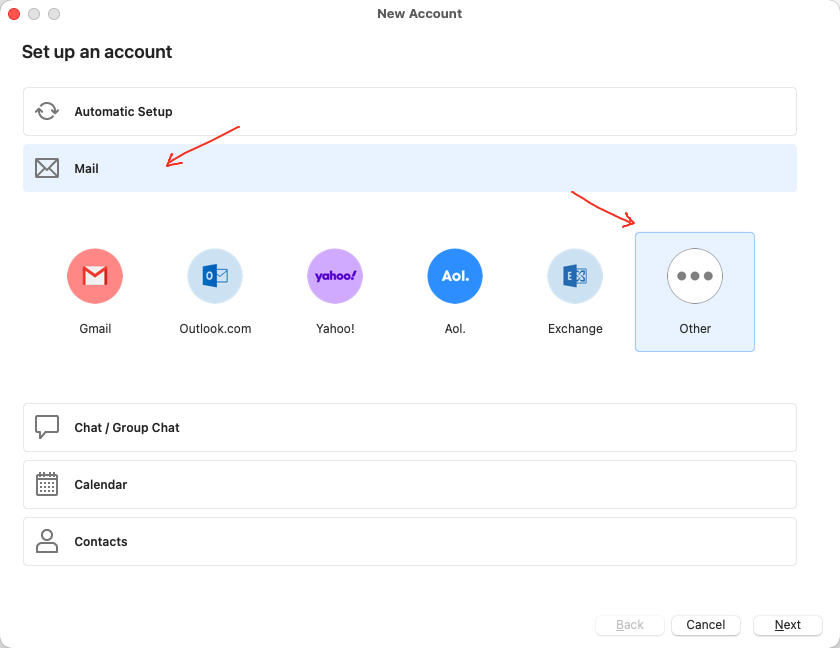
So you might need to alt “generate an app password” in your domain mail server account and use that password instead via the manual setup via “Menu / Accounts” and click “Add Account” and choose “Mail / Other” and follow the prompts.
These are the below IMAP and SMTP server settings you can use.
eM Client V10.3 or higher
(IMAP)
Port 993 "Use TLS on Special Port”
Or
Port 143 "Use STARTTLS if available”
(SMTP)
Port 465 "Use TLS on Special Port”
Or
Port 587 "Use STARTTLS (Always)”
—
eM Client V6 to V10.2
(IMAP)
Port 993 Use SSL/TLS on special port (legacy)
Or
Port 143 Use SSL/TLS if available
(SMTP)
Port 465 = Use SSL/TLS on special port (legacy)
Or
Port 587 Force usage of SSL/TLS
1 Like
“eM Client / Accounts / Add Account” drops me straight into “Automatic Setup” with no option to choose “Mail / Other”.
V10.4.5326 (97a2e75)
“eM Client / Accounts / Add Account” drops me straight into “Automatic Setup” with no option to choose “Mail / Other”.
Click on “Mail” below the automatic setup.