Latest version 11.
It is not possible to change the “From” address for new emails located in the Drafts folder.
When I change the “From” address from the default address to another account, the default account’s address remains.
It’s perfectly posible here: eM Client 11.0.1267 on macOS 27.2
Works fine with Android.
Does not work with win10
1267 Win10 here.
Did a draft folder repair on alla draft folders, now it works fine, Thank you.

Hi, tried again - still problem to change from adress in draft folder.
Same problem with em version 8.
Favorite → draft list draft folders for all accounts.
accont a-> draft list draft for account a and so on.
When I change from address from b to a nothing happen, draft is not moved to account a → draft folder.
Same problem with em version 8.
Tried repair again, no change.
Well that’s a different story now:
I can change the “from address” of a mail in the common draft folder successfully - originally you posted that you could not do that. Can you now?
However, here too, even with a changed “from address” the mail remains in the draft folder of the original account.
A minor inconvenience - for me at least. But still, yes, should be changed.
I can change the “from address” of a mail in the common draft folder successfully - originally you posted that you could not do that. Can you now?
In common draft it looks the same as what I write in the next paragraph.
No I can not chage it.
Have a mail in account B draft folder with B as from: adress (from column before open)
When I look at the header from: is also B.
When I open that mail from: is account A.
Using the latest V11.0.1267 on Pc and Mac i can definately change the sender address of any draft messge “via the dropdown at the top of the compose window.” Do a screenhot of what doesn’t change so we can see what you are referring to. Blank out anything personal.
Sorry, I have to explain better.
A is shown in the from: column
from: is A when I open the the message.
I change from: to B.
Save and close the message.
The from: column still shows A
Open the message again and From: shows A.
That still works for me.
Make sure that after you are changing the from address “that you are saving the draft” via either “File / Save” in the Menu or via the “Shortcut keys” Windows Ctrl + S / Mac ⌘ S or that might be why its not saving the correct from address when you reopen the draft.
Yes I have saved it.
Tried to change from with k-9 mail client.
That works fine (from to B)
When I open that mail in em for Android from address is changed to A
When I return to k-9 nothing have changed.
In em the draft is shown in B-draft with from: A
I noticed that draft when opened in em android a new mail message is shown. When a draft is opened From: is set to the default account address.
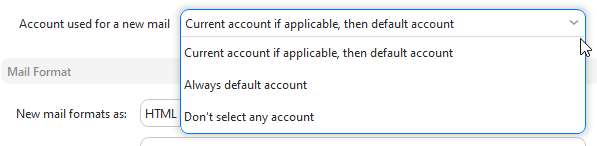
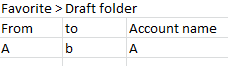
When it looks like this everyting is fine.
I think it’s like a raffle to come here. It is not possible to know for sure what happens when I close an email in the favorite >draft folder (which shows drafts for all accounts) after changing from:
Will account name be right when I change from:
Will the draft appear in the accounts draft folder (A > draft)