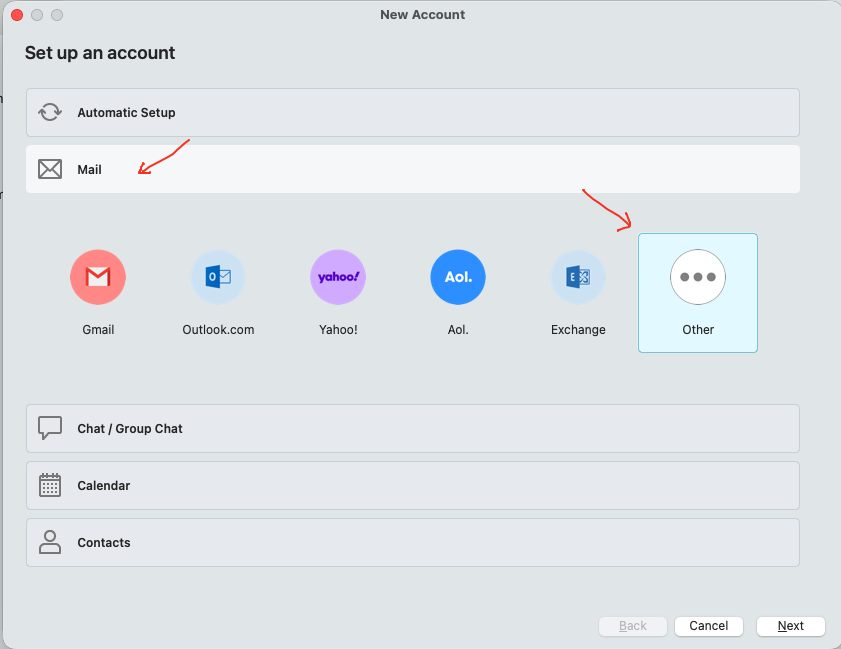
Also to follow on from @skybat post above, if you are using eM Client V10.3 or higher these are the IMAP & SMTP settings you can use for a manual setup via “Add Account / Mail / Other”.
According to the Titan Mail website mail settings they use Port 993 and 465 for IMAP setup as per the Titan mail support link below and need to be manually setup as per screenshot end of post.
(IMAP)
Port 993 "Use TLS on Special Port”
Port 143 "Use STARTTLS if available”
(SMTP)
Port 587 "Use STARTTLS (Always)”
Port 465 "Use TLS on Special Port”
Lastly according to the Titan Mail link above if you are still getting invalid username and password “you need to disable 2FA (two factor authentication) in your Titan mail control panel” to allow third party apps to work. See “the end” of the Titan mail settings link webpage instructions on that.
Titan specifies IMAP 993 (TLS on Special Port) and SMTP 465 (TLS on Special Port), which matches your advice.
My problem is that eM Client never creates the account. The setup wizard performs the connection test first, both IMAP and SMTP report “Server not responding”, and the wizard stops there.
Because the account is never created, I can’t reach the screen where I can manually choose “Use TLS on Special Port” or change the ports.
Is there a way in eM Client V10.3 to bypass the automatic connection test and create the account manually so I can enter those settings myself?
Yes as per the screenshot above. Go to “Menu / Accounts” and click “Add Account” and then click the Mail tab” below automatic setup, and then click “Other” on the far right, and click Next and follow the manual wizard to enter your IMAP details.
Go through the account setup as @cyberzork advises, however,
DO NOT enter password just yet, continue by clicking NEXT
and complete other entries, a pop-up will ask for password,
again ignore this - you will now be able to access the account
and make any changes to IMAP & SMTP ports, when done
enter password and try to connect.
skybat
¡Buena suerte!
¡Saludos desde Valencia la soleada en España!
¡Mis mejores deseos y mantente a salvo!