Using an iPhone / iPad Contacts section for a Gmail account using the latest V10.4.5360 / OS 26.4.1 when you first open the app and go to the “Contacts” section, the contacts “are in reverse A-Z order Z at the top”, and i allways have to scroll up to the top to get to the A contacts.
In the Filter / Sort “at the top right of the message list” there is only Ascending & Descending but no A-Z order on any of the options in the sorting / filter options.i can see ? Anyone know how to fix this.
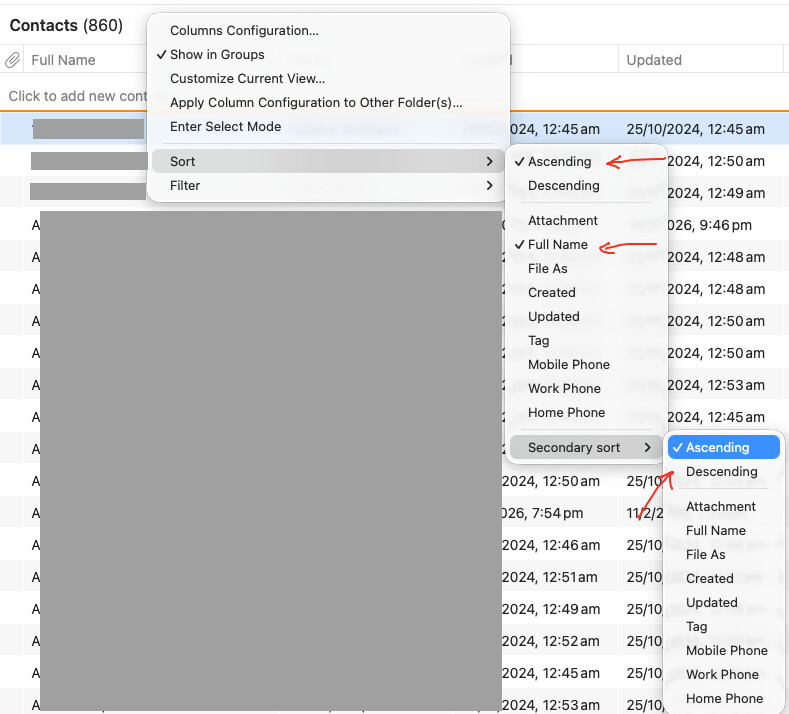
On the desktop i can sort with the below Sort options in Contacts & Settings on eg: the Mac Desktop V10.4.5326 and “it does stay in A-Z order A at the top” when i close and reopen the program as in the below Mac desktop Gmail Contacts example.
But the exact same settings on the iOS mob app is reversed Z at the top when the app is closed and reopened.
1 Like
In our tests the A-Z sorting appears correct, but each time you enter contacts, the focus is at the bottom of a contacts list – you’re on Z and have to scroll up to A. This would be a bit different to what you’re observing if I understand correctly.
In our tests the A-Z sorting appears correct, but each time you enter contacts, the focus is at the bottom of a contacts list – you’re on Z and have to scroll up to A. This would be a bit different to what you’re observing if I understand correctly.
Using the mobile app, if i scroll up to the top of the Contacts List in A-Z sort order via the filter whether i set Ascending or Descending with either First Name or File As set in the Primary Sorting or Secondary sorting, “when the mob app is closed and reopened” it always focuses on the Z contacts at the bottom of the Contacts list and not the A Contacts at the top of the list. I solved this issue with the Desktop by doing the following.
When you go to Contacts on the Desktop and click the “Full Name” heading column at the top as in the example screenshot below, it toggles the Contacts from A-Z or Z-A. So i toggle it on A-Z and it focuses automatically at the A contacts at the top of the list. No scrolling up is required.
So when i then close and reopen eM Client and go to Contacts “i see the Contacts focused from A at the top” as i want and don’t have to scroll back up to the top to see all the A Contacts.
However the mobile app doesn’t have that First Name column heading to toggle, and the filter sort options don’t do the same thing. Yes they do sort in A-Z filtering, but you have to always scroll up to the top to see the A Contacts and then if you close and reopen the mob app, you immediately see Z contacts focused and have to re-scroll backup to the top of the list to see the A contacts.
Ah, understood. In that case, we have been able to reproduce it and will prepare a fix. Thanks!
This issue now appears to be fixed with the latest iOS app V10.5.246 update