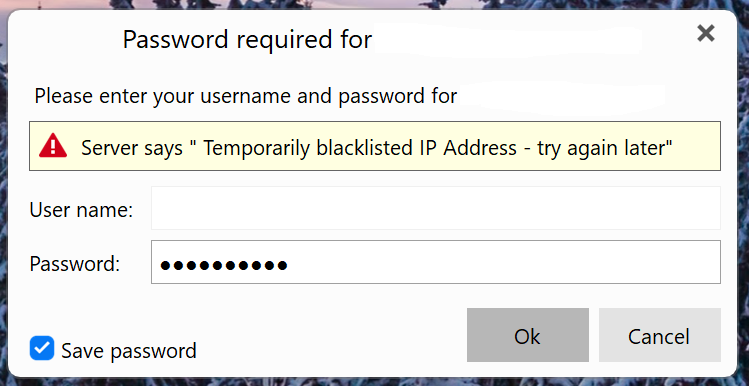
I keep getting this error the past few days with my Comcast email. Tried changing the IMAP Port settings but hasn’t made any difference.
Thanks for any input on resolving this.
I keep getting this error the past few days with my Comcast email. Tried changing the IMAP Port settings but hasn’t made any difference.
Thanks for any input on resolving this.
Hi, the message is from Comcast so we can’t really address it on our end, but based on what it says (blacklisted IP address), try searching for your IP address here https://check.spamhaus.org/. If it’s listed, the page will include an explanation, as well as steps you can take to remove it.
If you still use concast/xfinity as your ISP, you might need to follow these steps as well if the above does not help: Release and renew your Internet Protocol (IP) address - Xfinity Support
I’ll check it and see, thanks!
From looking at the Xfinity forums that happens a bit for alot of users as per the below Comcast / Infinity forum link below.
That can happen if they detect eg: suspicious activity, such as sending spam, malware infection, or multiple failed login attempts, originating from your IP address or an email account on your network.
So “if they verify you are not blacklisted anymore after 24 hours” as per their policy and you can login ok to your Comcast / Infinity webmail ok, then update what your incoming “Server Address, Server Port & Security Policy” is so we can see if there is any obvious error messages
Also with Comcast / Infinity accounts make sure you enable “Third party mail access” within your account or it will fail on u/p, and also if you have two step (2FA) setup in your account “make sure you use the generated app password in eM Client” and not your normal email password or it will fail on u/p.
No luck getting it resolved. Even the latest update didn’t help and getting the popup error messages is annoying as well as not receiving emails until hours later or sometimes not at all. Uninstalled eM Client and setup Outlook and it’s been working fine using my Comcast IMAP email.
What are your incoming IMAP Mail settings in eM Client ?
Try this first:
Turn off your modem/router, and keave it off for 30–60 minutes (some ISPs require longer) then turn it back on and check your new IP
you can check your ip address here