Hello,
i have set my mobile EM Client App to NOT synchronise emails periodically and to NOT synch in Background.
But this does not seem to work. I get mails every few minutes. I want to catch mails manual only.
Is this maybe a bug?
Hello,
i have set my mobile EM Client App to NOT synchronise emails periodically and to NOT synch in Background.
But this does not seem to work. I get mails every few minutes. I want to catch mails manual only.
Is this maybe a bug?
If its an IMAP. Exchange, Office 365 or iCloud account “they receive realtime pushed from the server” as per the nature of those type of accounts, and its only normally with a POP account you can disable the synching.
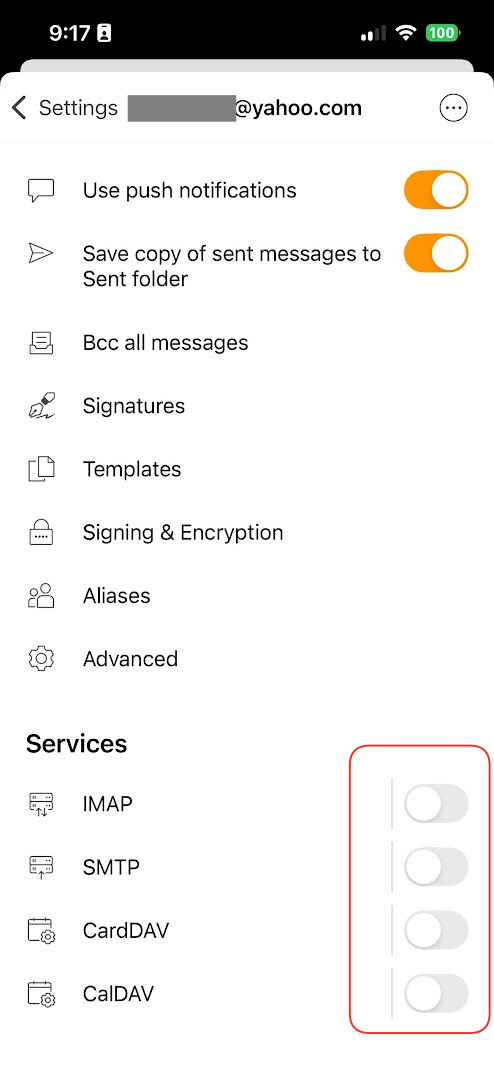
So the only way im aware of if you want to manually check those accounts, is to go into the Mobile Settings and open the account, and “Disable all the services” at the bottom as per the below example IMAP account. That “hides the account”.
Then re-enable the services when you want to use the account again.
Thanks cyberzork,
all E-Mail Accounts are IMAP. For me, it’s not the best way to call it “Stop Synch” and stil sync. What, if i don’t want my Mails to sync automatically? I shouldn’t be forced to disable IMAP than. It just should stop Synching, in my opinion.
But thank you, for your answer.
Thats the nature of the IMAP that was designed years ago as a push-like experience, acting as a real-time bridge between the server and the email client. So if you don’t want that, then you will need to go back to a POP account setup to then sync the mail manually.
The disadvantages of POP is that “it only synchronises your Inbox” and “doesn’t sync any of the other folders”. So you are far better to stick to IMAP in my opinion.