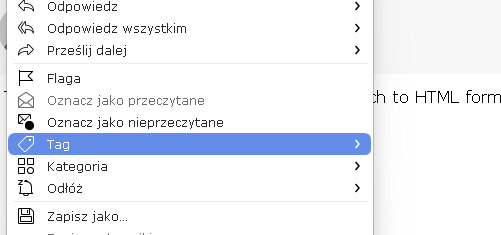
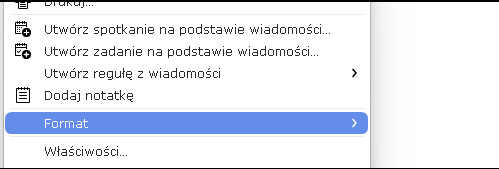
I just installed an update and it seems there musts be some bug related to popup menus. Almost all menus do not open submenus, for example, when message is opened I want to navigate to menu → format → [no submenu], or menu → tag → [no submenu].
If you a referring to eg: Gmail Server Tag / Labels Ive also had that happen before with previous eM Client versions “mainly ver 10” where after I upgraded “there is only Local Tags” as though I had lost connection to the server but I hadn’t. Even restoring previous eM Client backup.zip files didn’t make any difference. So I figured must be some external connection issue. Rebooting my computer and modem made no difference and I had no optionally installed firewall security programs or optionally installed antivirus programs or vpns etc.
Then mysteriously after “sometimes hours later” or at one time “was a day later” the Gmail Tag / Labels suddenly appeared. So I don’t know what causes that and is some unknown annomoly.
All that I can suggest is try uninstall eM Client and if you have Windows “don’t delete the database” when asked on the uninstall wizard and then download and reinstall via the release history page for PC or Mac or Windows Store “depending on where you originally installed eM Client from”.
Failing that try powering off your computer and modem for eg: 2 mins and then power back on and reopen eM Client and see if that makes any difference as might be some external issue too.
No, it’s completely something else. Computer reboot has nothing to do with the issue.
As I did mention, tag → was just for example. It’s about most of the submenus.
Quick step I can reproduce:
Open any message.
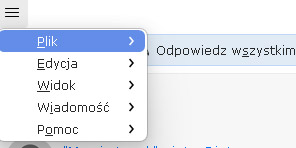
Click on the menu icon (3 lines top-left).
None of the submenus open for these:
File → [nothing happens]
Edit → [nothing happens]
View → [nothing happens]
Message → [some menu, but none of further submenus there]
Help → [nothing happens]
In the “Message” submenu or right-click in the messave view,
nothing opens for further submenus, e.g. Format → [nothing]
Normally some submenu should be openen on mouse over, right?
A few images here.
So there should be some submenu opened, right? But nothing happens when mouse is over (menu >).
Ok I understand.
Have you tried uninstall and reinstall ?
Try uninstall eM Client and if you have Windows “don’t delete the database” when asked on the uninstall wizard and then download and reinstall via the release history page for PC or Mac or Windows Store “depending on where you originally installed eM Client from”.
Still the same after reinstall. This is PC version installed using the installer directly from emclient page.
Ok all the menu items are there for me personally using eg: Windows 11 25H2 & V10.4.4195
So next check that you have the latest updates and patches for Windows 10 or 11 just incase its something missing in your Windows updates affecting it.
Next If you already have the latest 24H2 / 25H2 patches “and have been making regular eM Client backups” either automatically via settings or manually via the menu “where you know all the menus were there in a recent backup prior to upgrading”, then suggest to “close eM Client” and go to the following eM Client hidden database folder and “rename it to eg: eM Client-Old”.
(Windows hidden eM Client database folder)
“Users\yourusername\AppData\Roaming\eM Client”
Then uninstall eM Client and select to “delete the database” when asked on the uninstall wizard.
Then download and “install the older eM Client version you had prior to the upgrade” from the release history page" and then “skip the setup” & restore your recent dated backup that matches that version via “Menu / File / Restore” and see if all the menu options reappear.
If the menu options then re-appear ok, then make a new manual backup via “Menu / Backup” and then once backed up, click “check for update” in the Menu. Or close eM Client & manually install the latest 10.4 update again via the release history page, and see if menu options all appear.
If the menus still don’t reappear “even with the previous eM Client version”, then “maybe something else in Windows OS has changed” affecting it in the eg: registry etc.
Apart from that, if you have a current active paid Pro, Personal or Business version go to the Official VIP Support page and login and lodge a support ticket.
It’s obvious that previous version I had before worked and works properly. I had to install it back to work normally atm. Yes, I posted support on v-support page. We’ll see.