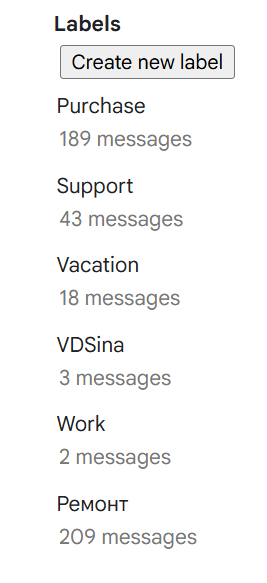
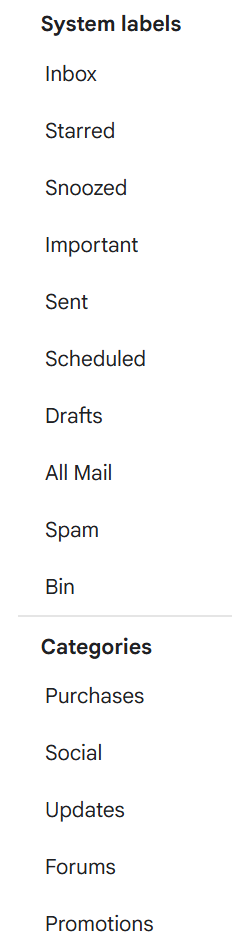
I have 2 email accounts: Gmail and Fastmail and I want to copy emails from Fastmail to Gmail. If I use Copy to folder in eM Client all is going as expected except for some new labels in my Gmail account: $istrusted, $x-me-annot-2, $canunsubscribe, $hasattachment, $ismailinglist. Is it expected behavior or some bug in Gmail or/and in eM Client?
Are those lebels the same in your Fastmail or Gmail webmail online with the $ infront ?
If they are the same online, you need to remove the $ infront as labels starting with special characters like that will normally cause synchronization or display issues in external mail clients “because IMAP protocols and third-party software handle non-standard characters and folder structures differently”. So they wont normally copy or sync with the label $ there.
I don’t have this labels in Gmail, at least I don’t see them in Web. Maybe they are exist, but they are system and hidden.
I have standard set of Gmail labels like: Starred, Snoozed, Important, Scheduled etc.
Ive Googled those Gmail labels and they are metadata tags and you are apparently normally able to “hide them in Gmail online in labels” as i mentioned.
But as you carn’t “as you don’t see them online” then i would suggest you go online and ask the Gmail Community. Apart from that other users on this forum might have other ideas.
Quote from Google Search:-
Gmail uses these metadata tags to categorize and filter incoming emails behind the scenes:
• $istrusted: Used by security filters to verify that a sender is authenticated (e.g., passing SPF/DKIM checks) and safe.
• $x-me-annot-2: A technical annotation string typically associated with Apple Mail or Fastmail servers syncing via specialized IMAP protocols.
• $canunsubscribe: Tied directly to Gmail’s subscription management feature, indicating that the message includes a valid one-click unsubscribe header.
• $hasattachment: A standard internal flag that triggers the paperclip icon indicating a message has a file attached.
• $ismailinglist: A classification tag used to bundle automatic newsletters or listserv emails into the Promotions or Updates categories