Is there a way to setup EMC so that all mails to/from a POP3/IMAP account by default use a database file without the need for several Rules to move or copy from account x to the Inbox/Outbox in the database file? I use Outlook Classic today and thats the default for a POP3 account, iow that incoming/outgoing mails “lives” in the .pst file by default.
I import the .pst file first into EMC and create a .emdf file but find no way to point EMC to send incoming mail directly to that file, i must always create Rules, one for incoming, one for outgoing.
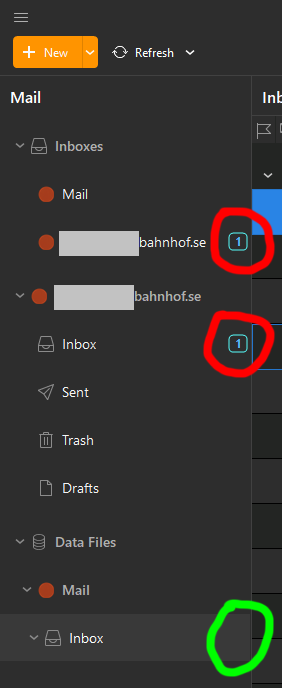
That is somewhat doable, but i end up with multiple Inboxes for one (1) account. One for the Favorites, one for the Account itself and one more in the databse file. Yes, i can hide Favorites but i cannot hide the Account itself from the Mail tab to the left and that leaves me with two Inboxes for one (1) account that light up when i recieve mails. Ideal is of course one Inbox for one account. And dare me if i happend to opt for using Local Folders, that give me yet another Inbox…
It can be kind of doable if i just twirl up the folders for the Account and hide Favorites, but if i receive one mail it will be marked as Unread in both inboxes and when i read the same mail in the Inbox in my database file it will be marked as Read there but will remain as Unread in the Inbox for the Account and in the Favorites as well.
If i recieve one mail and read it, it should be marked as Read everywhere. Having the same mail in one Inbox as Unread and the very same mail marked as Read in another Inbox is just confusing.
See the attached image for an example, the mail is Read in the Inbox for the databse but remains as Unread in the two other Inboxes until i manually mark them as Read. (Yes, three Inboxes for one mail and one Account…)
I just want all incoming/outgoing mails end up directly to my database file without multiple Inboxes/Sent.
It would be nice to being able to choose in the Settings “Do you want to use the Databse file named Mail as your default?” and just check the box and be done.Or, just make it possible to go to Settings > Folders and un-check so the Account can be hidden as well.
For me those things are more or less a showstopper for making the transition from Outlook Classic to EMC. To much cluttering with multiple Inboxes for only one Account.
What do i miss?