I have 5 or 6 mail accounts and would like each account to have a different signature, how can I do this?
And then I would like it to be inserted automatically
Thanks a lot
stefano
I have 5 or 6 mail accounts and would like each account to have a different signature, how can I do this?
And then I would like it to be inserted automatically
Thanks a lot
stefano
Go to Settings, search Signat… → Mail - Templates and Signatures.
Watch the video and then maybe I can explain myself better and you can tell me where I am wrong: AwesomeScreenshot-22/08/2025,11:04:54
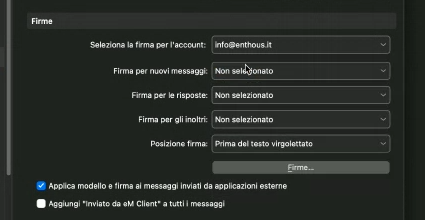
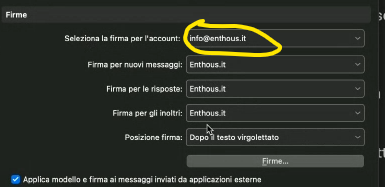
In the first line here you select the Account.
And under them you have the settings to assign default signatures for New email, Reply and Forward.
All of your are set to “Not selected” (Non selezionato)
So select the signatures you’d like to use as default (click the dropdown menu to choose from your created signatures)
and then click “Apply” or “Save & Close” to save the default settings.
ok done but if I then try to create a new email it does not insert my signature 
Can you post another video showing the setting and the creation of the new email?
If you create and assign a default signature for a specific account/address for new email, then it should be filled in when you create a new message from that account/address.
The setting is connected to the specific email address. You need to set the defaults for each email that you want to have a default for.
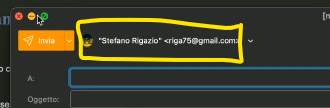
In your settings you set up the default signature for the @enthous.it email address, but when you opened “new mail” your gmail address is filled in as “from”
If you change the sending email your signature would get filled in.
Or maybe you need to set up the default for your gmail address too.
ah ok i understnad, thanks a lot