Hi all, for some reason my sent items folder only holds the sent items of today, tomorrow they are gone. I’ve checked the box to save sent messages in the sent items folder. I’ve looked in other sent items folders (as there are many, why is that??) and some emails appear there but not all. Is there anyone who can help me? I use IMAP/SMTP.
for some reason my sent items folder only holds the sent items of today, tomorrow they are gone. I use IMAP/SMTP.
If you are not seeing all your sent items for an IMAP account, then first check that the missing messsges are showing online in your webmail.
If the sent messages “are also not showing online in your webmail” then either you might have inadvertently moved them to another folder or accidentally deleted them in which case do a search for them via the search field either at the top centre or top right depending on what version of eM Client you have and make sure to select All Folders in the dropdown search field. See the below blog.
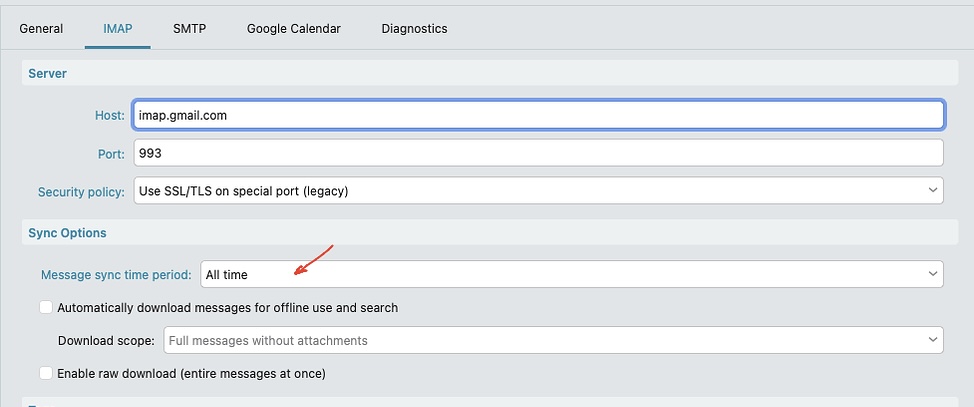
Now if the missing sent messages “are all showing ok online via your webmail”, then could be you might have limited the message sync from the server in eM Client. To check, go to “Menu / Accounts” and click your account “IMAP” tab. Then under “Sync options” make sure it’s set to All time as per the below Gmail Account example.
Next if your IMAP account is already set to Sync All time and you can see all your sent messages online in webmail, then you need to either run the repair or remove and readd the account to resync your server sent messages locally sgain..
To repair the sent folder messages, right click on the folder and click “Properties” at the bottom. Then click the “Repair” tab at the top and click Repair. If it’s a Gmail account right click All Mail.
The repair clears the local cache and starts new. After running the repair, Messages will be slower to reread till fully cached again. So be patient.
If the repair still doesn’t show the missing sent folder messsges but they are all showing ok in your sent folder online, then go to “Menu / Accounts” and remove and readd your IMAP account.