My Sent folder just synchronizes on and on, and I cannot send or receive. Suggestions?
If its only just happened and previously been ok, then might be a physical internet connection issue or possibly something running resident interferring or might be even a mail server outage,
So first to see if its a physical internet connection issue, suggest if you haven’t already “move any emails stuck in your outbox back into your drafts folder” and then close eM Client and shutdown / power off your computer and modem for eg: 2 mins" and then power them back on and reopen eM Client and see if that fixes the problem.
Failing that, next check with your mailbox provider to see if they are currently experiencing any sending or receiving problems their end as could possibly be a mail server issue atm.
Next if no issues at your mailbox provider end, then if you have any eg: optionally installed firewall / security programs, or optionally installed antivirus programs or vpns other than what comes default with your os, then “try completely disabling those to test incase of interference”.
Revising my post for more accuracy: The red triangle to the right of my email account name in the left pane when using emclient, is an issue on both my house Macs, but not on my Windows laptop. The red triangle appears when a send-receive is attempted, either automatically or by manually hitting refresh. By clicking on this red triangle, the send-receive occurs properly after several seconds of the whirling circle. Then for a while I can do a send-receive without having the red triangle, but it comes back–in maybe 10 minutes? The two house Macs have two different accounts on them, so it is not likely an account problem. The problem is long-term, so nothing variable like internet signal issues. IMO, this is likely a problem with emclient matching up technically with the Mac, and perhaps especially with the latest operating system and version, Tahoe 26.1. I will upgrade to 26.2 and post back if that solves anything.
I have no similar problem with Apple Mail on the same computers and router, so it cannot be an internet connection. I have added no security or VPN software to my Mac, it’s just normal Apple native security. The problem is not new, so it is not some fluctuation with the mailbox provider. I see nothing else to ask or try at this point. I have to regard it as an unfixed issue with emclient and Mac M2 and M4 silicon computers, given that that my third computer in the house is Windows and does not have this problem. Emclient support likely believes I am misreporting something, but I do my best. So, an impasse, too bad. Gotta have working email, so in the absence of a solution, gotta migrate to another app, I guess Apple Mail.
Revising my post for more accuracy: The red triangle to the right of my email account name in the left pane when using emclient, is an issue on both my house Macs, but not on my Windows laptop.
I have no similar problem with Apple Mail on the same computers and router, so it cannot be an internet connection. I have added no security or VPN software to my Mac, it’s just normal Apple native security.
If the problem doesn’t happen on Windows and only happens on Mac “using the same Internet modem / router” with a stock Mac OS, then you may have eg: Incorrect SMTP server settings, or a corrupted account, or an outdated eM Client version and might need updating or reinstalling.
So first if you have an IMAP, Exchange, Office 365 or iCloud account, go to “Menu / Accounts” and try removing and readding your account and see if that fixes it incase it is a corrupted account.
Next if removing and readding your account doesn’t fix the sent folder synchronizing problem, then close eM Client and uninstall eM Client. Then go to the release history page and download the same or later version of eM Client for Mac and reinstall and see if that fixes it.
If uninstalling and reinstalling eM Client on Mac still has the same sent synchronizing problem, then go back to “Menu / Accounts” and update what your SMTP server address, Server Port and Security Policy is so we can see if there is any obvious errors.
Also “click the drop-down on the right of Refresh” and click “Show Operations”:and see if there is anything obvious problems showing there.
Also click the “Log Tab” and “look for any obvious errors” and paste them in this thread and we might also then see what’s wrong.
I will upgrade to 26.2 and post back if that solves anything
Have you updated yet to OS 26 ? and also have got the latest eM Client V10.4.4293 ?
this is likely a problem with emclient matching up technically with the Mac, and perhaps especially with the latest operating system and version, Tahoe 26.1
eM Client sends perfectly for me using a eg: Two Mac M2 Pro Mac Minis, and doesn’t have constant sent folder synchronizing issue using Sequoia or Tahoe and the latest eM Client V10.4.4293 so there is no issue with Mac OS compatibility.
Thank you for your thorough response. It would be perhaps too coincidental, given that the same problem appears on both Macs, if the emclient software on both Macs were corrupted somehow. I have a standard outlook.com email account, and webmail works fine. I sent to emclient support my operations log and pics of my account configuration pages, but that was Jan 2, so nothing back yet. However, I have sent them the ops log before, no feedback except that it was a sync problem, no surprise or solution there. I am on Tahoe 26.2 and the most current emclient version as well. I looked at the operations log, no special tech skills, but I do not want to post it. I did notice: [myemailaddres.com] IMAP Synchronizing folder ‘/Sync Issues/Server Failures’. The reason for the server failure is I suppose the question.
Have you updated yet to OS 26 ? and also have got the latest eM Client V10.4.4293 ?
this is likely a problem with emclient matching up technically with the Mac, and perhaps especially with the latest operating system and version, Tahoe 26.1
eM Client sends perfectly for me using a eg: Two Mac M2 Pro Mac Minis, and doesn’t have constant sent folder synchronizing issue using Sequoia or Tahoe and the latest eM Client Thank you for your thorough response. It would be perhaps too conincidental, given that the same problem appears on both Macs, if the emclient software on both Macs were corrupted somehow. I have a standard outlook.com email account, and webmail works fine. I sent to emclient support my operations log and pics of my account configuration pages, but that was Jan 2, so nothing back yet. However, I have sent them the ops log before, no feedback except that it was a sync problem, no surprise or solution there. I am on Tahoe 26.2 and the current emclient version as well. I looked at the operations log, no special tech skills, and I do not want to post it. I did notice: Thank you for your thorough response. It would be perhaps too conincidental, given that the same problem appears on both Macs, if the emclient software on both Macs were corrupted somehow. I have a standard outlook.com email account, and webmail works fine. I sent to emclient support my operations log and pics of my account configuration pages, but that was Jan 2, so nothing back yet. However, I have sent them the ops log before, no feedback except that it was a sync problem, no surprise or solution there. I am on Tahoe 26.2 and the current emclient version as well. I looked at the operations log, no special tech skills, and I do not want to post it. I did notice: 13:06:26.961|001| [myemailaddres.com] IMAP Synchronizing folder ‘/Sync Issues/Server Failures’
I have a standard outlook.com email account, and webmail works fine.
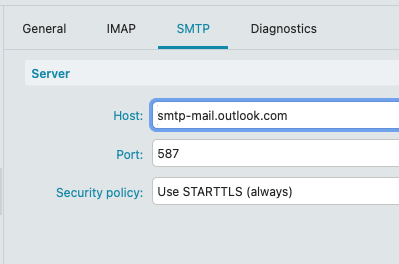
These are the Outlook.com SMTP Server settings for eg: eM Client Mac V10.4.4293 that work fine for me, so check if you have the same settings if you are running the same version. If you are running eM Client V9.x or older then the SMTP Security Policy will be “Force usage of SSL/TLS”
I looked at the operations log, no special tech skills, and I do not want to post it
IMAP Synchronizing folder ‘/Sync Issues/Server Failures
Ok not enough info to tell from that but being it says “Server Failures” that could be the remote Server issue. You normally just find the actual errors in the log and blank out anything personal.
I sent to emclient support my operations log and pics of my account configuration pages, but that was Jan 2, so nothing back yet
If you have then already lodged a support ticket via the VIP support page, then they will advise from your logs what’s wrong. Apart from the operations log, you will also probably need the Outlook.com “SMTP log” from the Settings (Preferances) / Advanced section, but support will advise if they need that and how to do that if they need it.
So wait till you hear back from them. This time of year may take longer than normal due to the Xmas / New Year holiday season.