I’ve been very concerned that eM Client has been accessing webpages in the background associated with e-mails when the e-mails are received in eM Client. The e-mails are not even opened.
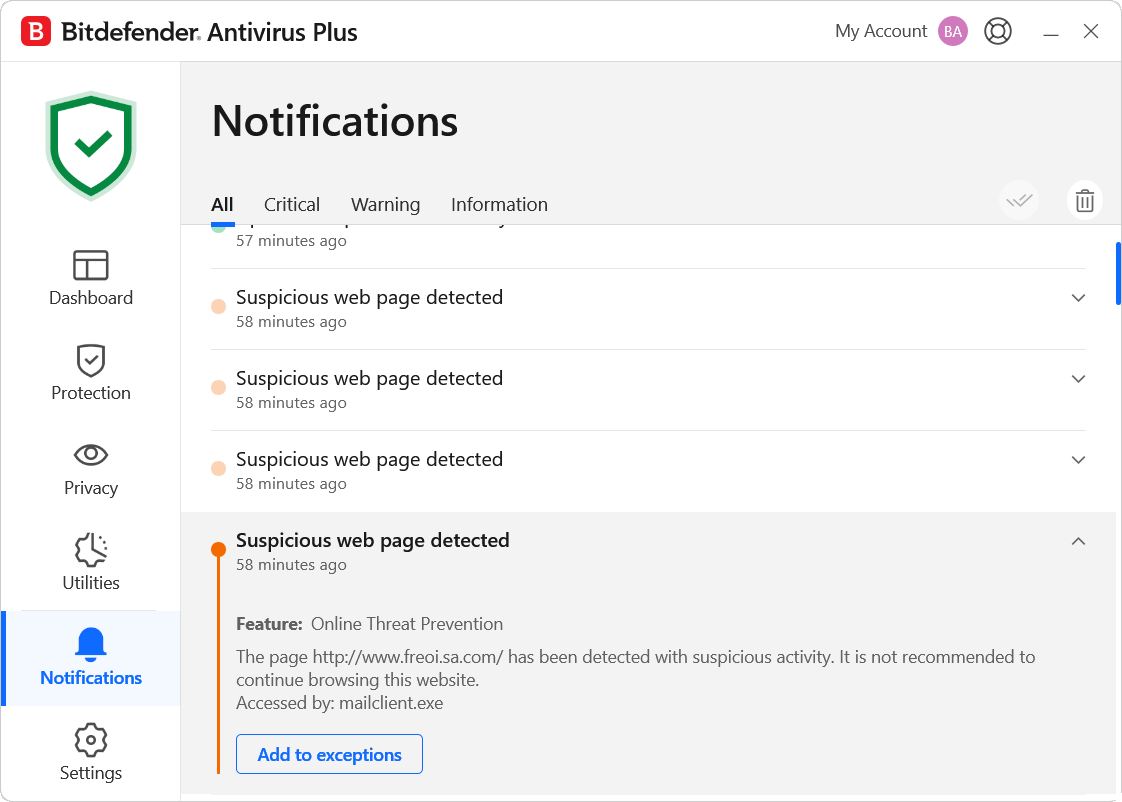
Bitdefender Antivirus Plus has been notifying me of this as “Suspicious web page detected”.
It identifies “mailclient.exe” (eM Client), as the program. I don’t understand why eM Client is accessing websites in e-mails upon receipt of those e-mails. This is huge security problem because of spam.
This is happening every day, with multiple notifications like this, obviously spam e-mails. All regarding mailclient.exe and websites it is accessing that I would never go to.
Maybe there is a setting in eM Client to stop this behaviour. I haven’t found it.
It identifies “mailclient.exe” (eM Client), as the program. I don’t understand why eM Client is accessing websites in e-mails upon receipt of those e-mails. This is huge security problem because of spam.
Its normal for mail clients to access anything within the email “unless you block the sender” including external url links and images etc and is not an eM Client security problem.
Your Antivirus Security program is just alerting you to url links etc within the email that might be suspicious “like most other third party antivirus programs do when scanning your incoming email”.
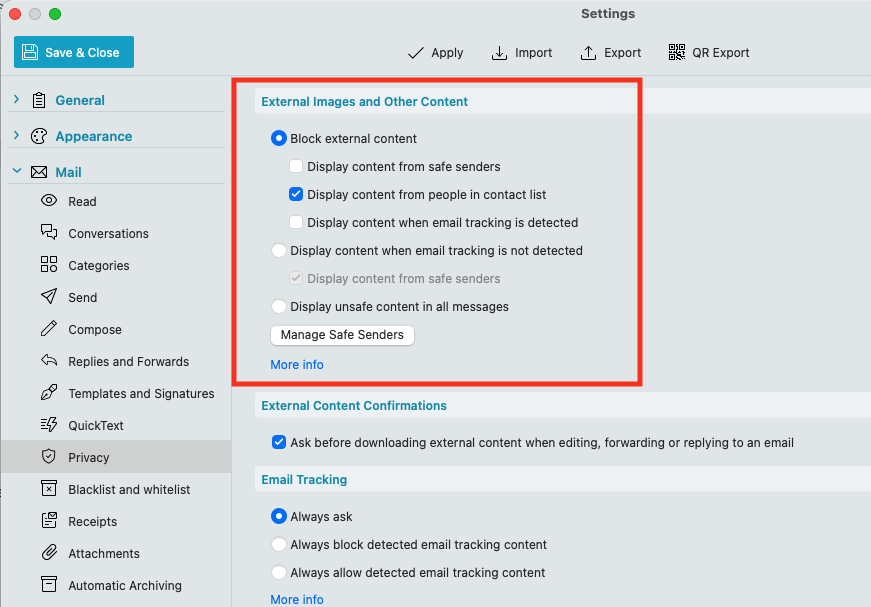
You can control whether the mail client accesses any senders email content via going to “Menu / Settings (Preferances) / Mail / Privacy” where by default eM Client blocks external content.
You can adjust that to suit yourself as to what external senders email is displayed including spam email. See the online documentation.
If you are getting alot of spam / Junkmail in your Inbox with content and links you don’t want and your mailbox providor doesn’t have Junkmail filtering options, then you can setup eg: Local Rules in eM Client to block them via “header, subject, body content or domain name”. See eM Client Rules documentation below.
Like I said, eM Client is accessing the URLs immediately upon receiving the e-mail and before I open it. Bitdefender is blocking it when the websites are suspicious.
From the documentation:
External Images and Other Content are objects in an email that are not directly a part of the email, but that are downloaded from an external source once you open the message.
Which is as it should be. No e-mail client should be accessing URLs in e-mails unless the e-mail is opened, but eM Client is doing it.
eM Client does not do that. The only possible visits of external urls I can think of is when downloading a favicon of the domain to be able to show the avatar in the list. If you want to disable that, you can do it in the settings.
I do not have Bitdefender myself, but in the screenshots you showed it just says:
The suspicious URLs were “detected”, but it does not say they were “accessed”
It seems like it was the downloading of avatars that was the “culprit”. After turning that off, I got no more notifications from Bitdefender. I’m assuming that it was the search for a favicon at the spamvertised websites that triggered the warnings, but …
Avatar downloading
eM Client automatically downloads and displays avatars for your contacts from the web.
We download images from Gravatar, domain icons and more.
Looking for an image from Gravatar or looking for a favicon is not a security issue, in general. Without more information, though, that “and more” is a security risk. I don’t know what else might be searched for and downloaded from spamvertised websites. Obviously images, but even image files can be designed to contain or trigger malware (like SVG). Basically, one should not obtain or open image files from untrusted sources, which a spamvertised website is most definitely. Of course, eM Client doesn’t know if the e-mail is spam or that if the websites referenced in it are trusted or not.
The avatar search and downloading is great, but it’s an all or nothing setting.
So it seems, yes.
As I mentioned, I do not have Bitdefender. It would be interesting to know if Bitdefender can actually determine the type/nature of the request.
I just wanted to add anecdotal info from me, I also ran into this issue today as I use both Bitdefender and a hardware firewall on the network level.
I tested eM Client with some old email inboxes I no longer use. They are mostly filled with spam (one of the reasons I no longer use them).
As soon as I started loading emails with eM Client (DESPITE having set all external content to “block”) both Bitdefender and my network firewall went haywire, blocking loads of connections to servers categorized as suspicious or even malicious.
Those were connections for BIMI URLs (“default._bimi.evil-exampledomain[.]com”) as well as favicons.
At least I now know that both Bitdefender and network firewall are working as they should, but this is a bad look for my first impression of eM Client.
Also one of the reasons Thunderbird seems to have not implemented this feature yet.
Until I found this thread, I did not know I could disable external avatar downloading through “settings > contacts”. IMHO this setting should also fall under “external content” in “settings > mail > privacy”.
While this “may” not be an immediate security risk (it could be though! if the image fetching logic has a security flaw) it certainly is a privacy risk, since spam senders get a connection on their servers from the mail client user, allowing them to track their IP & approximate location, and more depending on which info gets exchanged in the HTTP(S) headers during the image fetching connection.
Pair this with an adversary that uses specific targeted subdomains in their spam emails and they get immediate feedback when you have received the email, also including IP address etc.
I have also sent this concern to the eM Client support email, as I think this should be addressed better or made clearer during setup, including an explanation of the risk.
We implemented the contact avatar feature to be as safe as possible - nothing is downloaded unless it’s a valid image and we only check the top level domain, so the targeted subdomain will not give an immediate feedback. And when it’s just the app itself checking for the domain icon, it will not be linked to your email address.
For those who prefer not to use this feature at all, you can turn it off in settings.
But I have forwarded your feedback to our devs for consideration for future updates, to see if we can perhaps add another step to the initial setup wizard which would deal with all Privacy options, where you could automatically turn off loading of any external content before you add your accounts.
Hi Olivia,
Thank you! Much appreciated!
A setup wizard step and unified settings page for all outgoing external communication settings (i.e. for everything that controls what external destinations the application calls) would be very nice!
Hello,
Bitdefender scans emails before delivery only for Gmail and Outlook addresses.
To enable this, you must configure them via the Bitdefender interface: Protections > Email protection