somehow the search results are sometimes incomplete.
The search word is in the subject, mailtext and From of the mail, but it still doesn’t find it, only other mails..
The setting Use server search, if possible (Serversuche anwenden, wenn es möglich ist) is activated
The fields From, To, Contains words (enthält Worte) are activated. But even when I search for “subject:foo” it doesn’t show me the mails I’m looking for.
What can I do?
PS: There is no popup saying that the “search results might be incomplete, because not all messages have been downloaded”…I know this might be an indicator, but it seems that all messages are there.
This is a guess simply because you do not mention.
Click your cursor over the left end of the search field to extend it
then Click this extension to show some options - I always select ALL FOLDERS
You possibly were not telling search where to look.
skybat
¡Buena suerte!
¡Saludos desde Sevilla la soleada en España!
¡Mis mejores deseos y mantente a salvo!
No, the mail should be in the inbox, event switching to ALL FOLDERS doesn’t make any difference.
But I saw something else, the mails are not even shown in the inbox, when I scroll down. But they are on the server…I believe I have different problem than searching..hmm
No, the mail should be in the inbox, event switching to ALL FOLDERS doesn’t make any difference.
Have a look at the eM Client search blog for more options you can try to locate your emails.
But I saw something else, the mails are not even shown in the inbox, when I scroll down. But they are on the server.
If you then can only find them on the Server Inbox but not in eM Client Inbox, then “they might be in another Category Inbox tab” if you have V10. See the following blog which explains that.
If the emails are still not found in another Category Inbox Tab and only showing on the Server end Inbox, then that means “your Inbox has become out of sync with your Server” and needs to be either repaired, or your account needs to be removed and re-added.
So to repair your account “Right click on your Inbox” or (All Mail) if its a Gmail account and then click “Properties” at the bottom. Then click the “Repair” tab at the top and finally click Repair. The repair clears the local eM Client cache so your emails might take a little time till they reappear and will be slower to re-read till fully cached again which should normally fix that.
Now if repairing your Inbox still doesn’t show the Server Inbox emails, then suggest to either “restore a recent backup when you know those emails where showing” in eM Client via “Menu / File / Restore”, Or if you don’t have any recent backups and you have an IMAP, Exchange, Office 365 or iCloud account go to “Menu / Accounts” and remove and re-add your account.
If you have a POP account “before removing your account” go to “Menu / File / Export” and export your account emails to (.eml) messages so you can then import them later once resetup.
Note:- If you do try repairing your Inbox or removing and re-adding your account, make a backup first via “Menu / Backup” incase you need to restore for any reason. You can see when the backup is complete in Show Operations via the dropdown on the right of Refresh.
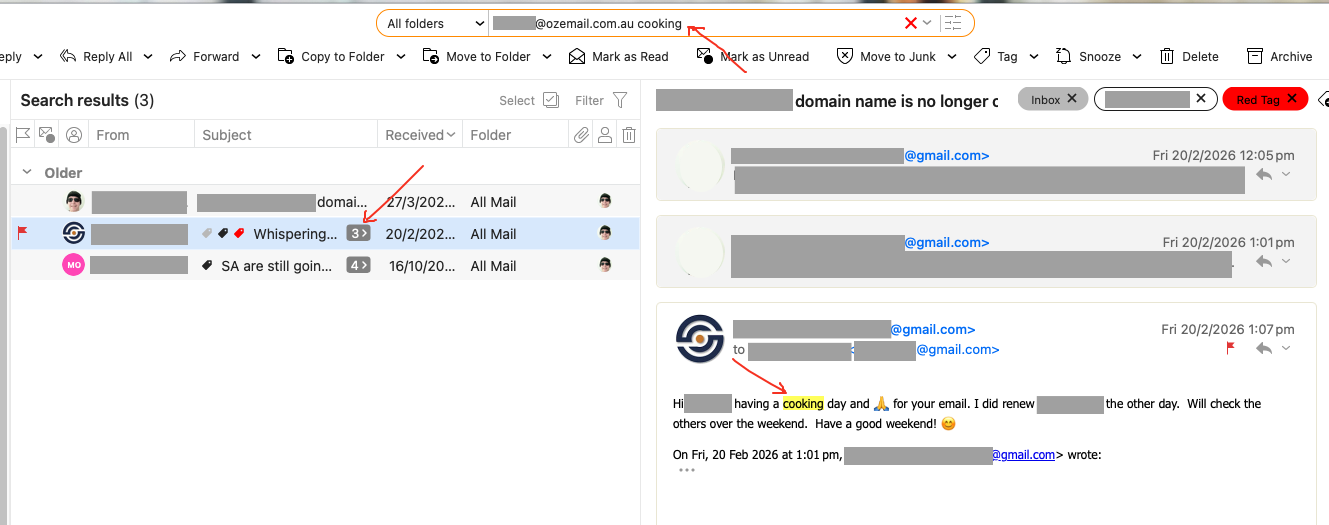
This may be a dumb suggestion, but I too don’t always see the email I am searching for. The reason (for my case) is because they are buried within a conversation that requires examination to see the highlighted search terms.
You have to specific in your search as yes sometimes certain messages are within a conversation.
So if you are looking for a certain email within a conversation ,you might search for the email address or name “following by something within the specific email” such as eg: [email protected] cooking as a search word as in the below example.