The application has slowed down significantly over the last few versions. With each subsequent update, performance has deteriorated further. Search Folders have become practically useless; clicking on certain folders requires waiting 8, 12, or sometimes even 30 seconds. It’s inconsistent, too — sometimes the same folder opens in 8 seconds, other times in 30 — whereas it used to be much faster. It’s as if you removed some database indexes. My computer isn’t under heavy load: 32GB RAM, Ryzen 7, and 18GB of free space on the SSD. CPU usage is at 10%, and there is 14GB of free memory.
How does it work if you free up some space on that drive? Aim for no less than 10% free space as less than 10% is well known to make apps work very slooooow.
I’m having exactly the same issue. Getting slower over past few months although some days works quickly and other days on the same folder takes forever to search. Search feature on EM Client is far superior to what I’ve been used to in gmail & outlook in my opinion but no good if you have to sit waiting for 10-20 seconds at times. Only using a small fraction of our disk space as mostly cloud nowadays and good RAM on 12 month old laptop Intel i7. Laptop works quickly on everything else. Works quickly on Gmail search as well on same account that we use EM Client for so it has to be EM Client that is the issue on this occasion. Otherwise it’s the best email client we’ve used for 30 years.
Using the latest eM Client V10.4.5663 / Windows 11 with full downloaded and cached messages, my IMAP search folders take aprox 4+ secs to appear, but some do instantly appear.
On the latest eM Client V10.4.5663 / Mac Tahoe with full downloaded and cached messages, my IMAP search folders also take aprox 4+ secs to appear, but some do instantly appear.
So as your search folders are taking much longer to appear & you have good computer specs, as a test to see where the problem lies, “do a quick search” for whatever you are looking for with “use server search if available” disabled and see if that also takes the same time to find what you are looking for as per below screenshot to determine if its even slow just searching in general. If thats quick then try remove and re-create your search folders & see if that fixes it.
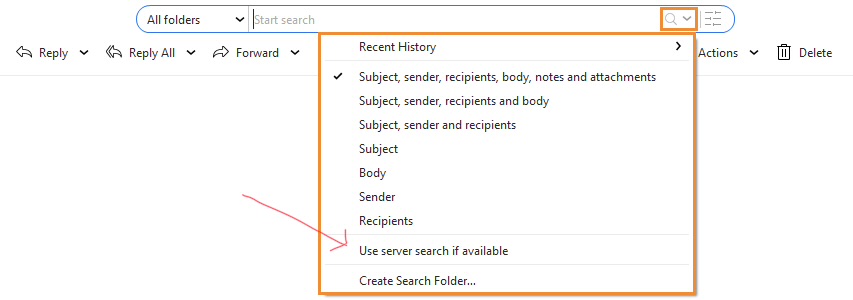
If a quick search is also slow to find what you are looking for compared to previous versions even with Use server search if available disabled, then something might have happened when eM Client upgraded and you might have a eg: corrupted account mail cache or corrupted account in some way and “might need to remove and re-add your accounts” if you haven’t’ tried that already.
Also if it’s an IMAP / Exchange account under your IMAP / Exchange tabs you can set messages to automatically download messages & attachments for offline use etc to make it quicker to find stuff. So reccomend you do that if you don’t already.
“IMAP / Exchange Sync options to download messages for offline use V10 example”

If removing and re-adding your account/s makes no difference and enabling download messages for offline use makes no difference and you are running the latest V9 or V10, then i would next suggest to “try creating a new database” and see if that fixes the problem. To do that “Close eM Client” and then go to the following hidden folder below and rename it to eg: eM Client-Old . Then reopen eM Client and setup as new.
Windows, go to C:\Users%username%\AppData\Roaming\eM Client
MacOS, go to /Users/User Name/Library/Application Support/eM Client
If a new database then fixes the problem and you need data out of your old database, then you can do a Partial Restore in offline mode via following support page blog below where it explains how to do that part way down the following page. How to restore backup in eM Client | eM Client
2 Likes
Many thanks, will give that all a try. As I said and as original poster said, some days it is as fast as your results were and other days it can take 10-20 seconds. We usually only search “current folder” as well as have lots of folders to organise emails so it doesn’t have to search as many emails doing it that way rather than searching all emails.
Can u post a screenshot example of your search folder as an example of “what fields you use” in the Search Folder. Blank out anything personal.
Also what version of eM Client you are using.
Version is 10.4.5642 (2a058e0).
TBH until you just mentioned it we didn’t even know there were fields to select for the search criteria! Just found them and screenshot below is what was ticked by default.
Today the search is working mega fast, yesterday for most of the day seemed to be very slow.
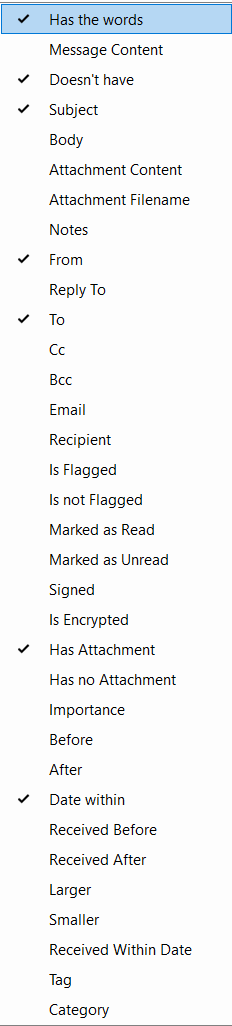
Version is 10.4.5642
TBH until you just mentioned it we didn’t even know there were fields to select for the search
Just found them and screenshot below is what was ticked by default.
Which fields out of those do you use ?
Also if you originally installed eM Client from the website, try the latest V10.4.5663 via the release history page and see if it makes any difference for you.
Before updating, backup your current version first via “Menu / Backup” incase you need to restore for any reason, and close eM Client before updating. You can see when the backup is complete in “Show Operations” via the dropdown on the right of Refresh.
ok many thanks for your help, will try all the above suggestions.
This has no impact; the search function works the same way.
This has no impact; the search function works the same way.
Testing eM Client V11 Beta i now “have no search folders delay at all” where i did have 4+ secs delay still on some search folders with V10 on Windows and Mac using eg: Gmail & other large IMAP accounts.
So recommend if you happy to give V11 Beta a try, it might also help you with the slow search folder issue. eM Client 11 is now entering BETA phase! .
If you do try V11 Beta, “make a backup of V10 first” via “Menu / Backup” incase you want to restore back, as it upgrades your V10 database. Also close eM Client before upgrading.