My screen freezes when i try to open attachments.
Its taking over an hour to download basic pdf and in the mean time I can’t email
This is costing my business money as so much time is lost!
Many thanks
Craig
My screen freezes when i try to open attachments. Its taking over an hour to download basic pdf.
That’s not normal to take that long. First do an Internet speed test to make sure your Internet connection hasn’t slowed dramatically. Speed test is a good site https://www.speedtest.net/
Next if the internet download speed is normal, try powering off / shutting down your computer and then turn back on in case it’s an OS problem and might just need a reboot.
Then if your download speed is ok and rebooting your computer made no difference , then If you have an IMAP / Exchange account, you can go to “Menu / Accounts” and click on your IMAP / Exchange tab and try enabling the account to “download messages for offline use including attachments” as in the below V10 & V9 IMAP acct screenshot examples. It will increase the local mail database space but will speed up opening attachments. You can see when that’s all completed in “Show Operations” via “clicking the drop-down” on the right of Refresh top left.
Apart from that it could be caused by an eg: “optionally installed program scanning the PDF attachment slowing it”. So if you have an optionally installed eg: antivirus programs, or optionally installed firewall / security program or vpns “other than what comes default with the OS”, then try completely disabling those to test incase of interference.
eM Client V10 IMAP example
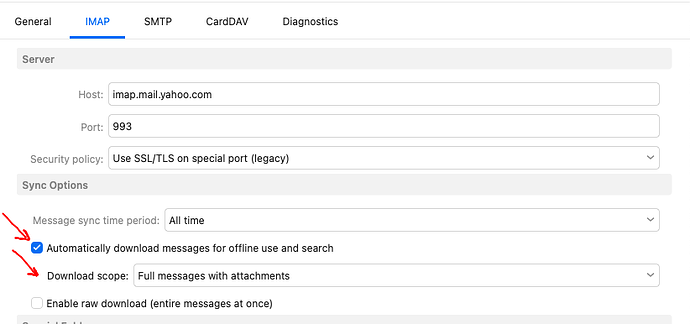
eM Client V9 IMAP example

The settings were already like that …
Then sounds to me like some external issue “outside of eM Client” causing this big hour+ delay with freezing & opening attachments either “within the OS possible running in the background” or from your Internet connection causing this.
Do you have Windows or Mac and what version OS are you running?
Also what version of eM Client are you running?
Who is your mailbox providor ?
Also what speed internet connection do you have ?
Also click the dropdown on the right of Refresh top left and click “Show Operations” and click the “Log tab” and see if you are getting any obvious connection errors ?