domingo 28 diciembre 2025 :: 1349hrs (UTC +0100)
Hey @merinber
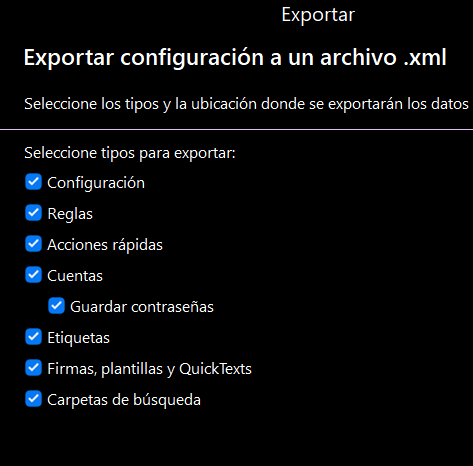
I do not know the items you select to save as xml so I selected
all as in image and then removed one at a time with saving each
time with and without encryption.
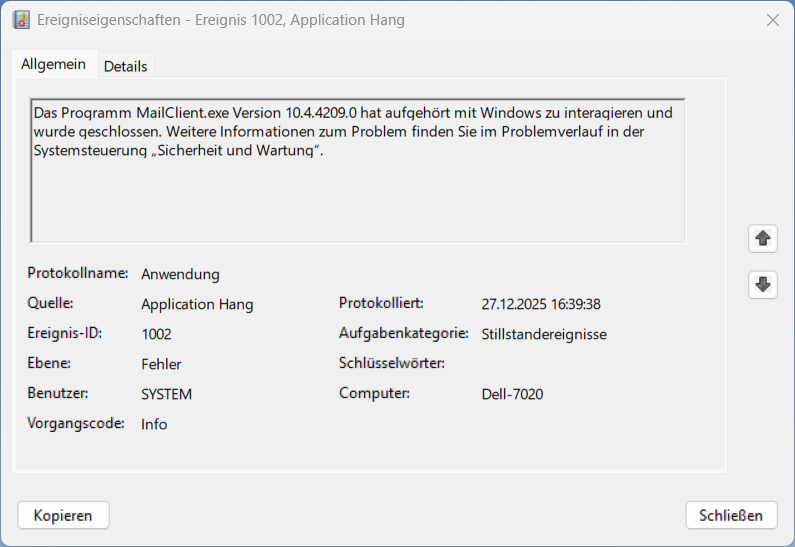
All procedures worked correctly until the last with only one item
selected and eMC froze, I also used Task Master to close.
Then after a system reboot the final item did export correctly.
So my suspicion is that there is possibly some sort of error in
eMC though perhaps my OS contributed to this.
In conclusion I suggest that you raise a ticket with eMC support
unless one of the moderators views this and can help.
About your EML export issue I previously reported to you that
I had exported with no issues.
The only other possibility I can think of might be PC capability
though this doubtful, I have two high spec laptops.
Secondary Laptop (English):
Samsung Galaxy Book3 Ultra
Intel® EVO Core™ i9-13900H Processor
(2.6 GHz up to 5.4 GHz 24 MB L3 Cache)
Windows 11 Pro 25H2
32GB DDr5 RAM
NVMe SSD 512GB (x2)
Wi-Fi 6E
Bluetooth 5.1
16"120Hz Dynamic AMOLED Display
NVIDIA® GeForce RTX™ 4070 Laptop GPU
Backlit, Black with Number Pad
+++++ +++++ +++++ ++++++++++ +++++ +++++ +++++
Main Laptop (Spanish):
Lenovo ThinkPad P16 Gen 2
Windows 11 Pro 64 25H2 Spanish
13th Generation Intel® Core™ i9-13980HX Processor
(E-cores up to 4.00 GHz P-cores up to 5.60 GHz) - (Total cores 24)
64 GB DDR5-5600MHz - (4 x 16 GB)
1TB SSD M.2 2280 PCIe Gen4 Performance TLC Opal - (2 x 512GB)
16" WQUXGA (3840 x 2400), OLED, Anti-Reflection/Anti-Smudge, Dolby Vision™,
Touch, HDR 500 True Black, 100%DCI-P3, 400 nits, 60 Hz, Low Blue Light
NVIDIA® RTX™ 5000 Ada Generation Laptop GPU 16GB GDDR6
Wi-Fi 6E
Bluetooth 5.1
Integrated Mobile Broadband Fibocom L860-GL-16 4G LTE CAT16
Backlit, Grey with Number Pad - Spanish
+++++ +++++ +++++ ++++++++++ +++++ +++++ +++++
How eMC is installed:
I edited setup.msi for a non-standard install with nothing on (C:)
(E:) Program Files →
eM Client →
#Data# … cs da de Dictionaries …etc →
#Attach# … Sub-folders by Type of File / Client Name / etc
#Backup# … Backup Files timed for 1900hrs daily (process modified by ourselves)
#Calendar# … All ICS files
#Themes# … Non standard Themes
eM Client … Database #1 (Main working)
… Database #2 (Holding Company)
… Database #3 (Legal UK)
… Database #4 (Legal Spain)
… Database #5 (Master that includes #1, #2, #3, & #4 - 87Gb)
Database #5 is on an external drive & duplicated in cloud.
skybat
¡Buena suerte!
¡Saludos desde Sevilla la soleada en España!
¡Mis mejores deseos y mantente a salvo!
[email protected]
Hablo español, luego portugués, inglés, francés y alemán
con conocimiento de varios otros idiomas.