Hi,
I’m a long time Outlook (classic) user and I’m currently testing eM Client.
Outlook has an option called " when replying to a message not in the inbox, save reply to same folder".
Is there something similar in eM Client? I’ve seen old posts here which suggests to create rules. That’s not feasable for me.
1 Like
I had already asked about this here, but it didn’t get much of a response.
I have now come up with a rule…
Peter
I need this too, could you please share the rule?
Hi, I’m in the same boat.
Outlook can’t keep up with the number of accounts and shared mailboxes I have to deal with, so I found EM Client.
I like an empty inbox and I mail with a lot of people so I created folders where a mail from person X would go into (rules), because Outlook was able to put the reply in the same folder.
Not needing to search at all (everything is in 1 folder) saves me a lot of time.
And my sent items was almost empty; so, almost no manual cleanup.
Why isn’t this a tickbox somewhere?
Save reply to same folder"
There is a current Sleekplan suggestion below to “Save sent messages in the same folder as the original email” which you can vote for, that sounds like what you want in this thread".
Quote extract below from the above Sleekplan Suggestion.
Automatically store eMails in local and offline local folders (Save sent messages in the same folder as the original email)
Re Missing Feature: Automatically store eMails in local and offline local folders.
The one major drawback of eM Client (as opposed to Outlook and Thunderbird) is that if you reply to an eMail from within either a sub-folder/label within your eMail account or even a local subfolder (i.e. an eMail not stored in “inbox”), a copy of that reply is not automatically copied to that “source” folder… it’s only in the “sent” folder and therefore has to be manually copied from the sent folder to the [source] local folder. Although you can see the email train in “conversations”, the fact that all emails are not in the same sub or local folder, means that if you then backup or archive that folder etc, then it does not contain all eMails e.g. to that person/business client. This kills our productivity and also our corporate compliance.
This feature is available in Thuderbird and Outlook (to mention two other email clients), and would be a very desirable/essential feature for us, so it would be great if eM Client could also add this feature please.
1 Like
Thanks, voted
Thanks, I voted too 
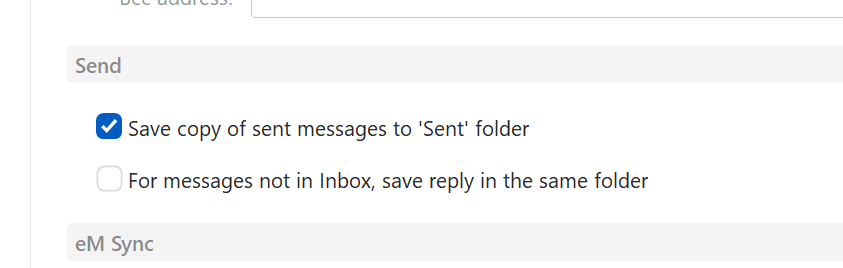
eM Client 11 Beta now can save replies in same folder as original
We’ve added an option to save sent messages in the same folder as the message you’re replying to. This way, you can choose to keep related conversations in the same folder, which can be especially useful if you use folders to organize different projects or tasks.
Enable this in Menu > Accounts > your account > General tab > Send (Windows) or Accounts > your account > General tab > Send (macOS).
2 Likes
Thanks for that!
Works like a charm on macOS 27 Golden Gate Public Beta, eM Client 11.0.79.
I do organize my mails in folders and that is an enormous time saver!
Till
I can’t find this option in Version 11.0.282, Windows app
Hi @Victor377 , this setting can also depend on your account type; some accounts (for ex. Google) create their own copy of a sent message, and ours would be deleted or create a second copy instead. In such account types where we confirmed this behavior, the settings for Sent messages are intentionally hidden.
For accounts that do allow us to create the sent message copy, the settings are located in the Accounts window and look like this:
1 Like
Hi @Olivia_Rust, hope all is well! I have Gmail, I guess that’s why I don’t have this option. I sort emails into Local folders, so having copy of sent email there would be very useful. Can we enable this feature spcifically for local folders (for certain accounts)?