I have something like:
Group 1 → 10 POP accounts
Group 2 → 15 POP accounts
200+ other POP accounts
And I want to click:
Receive Group 2
Receive Group 1
Receive All
…just like Outlook and Postbox.
how do I do it?
I do NOT want to download 200 x maby 5 emails each = 1,000 emails EVERY TIME I click refresh! I only want my important Group 1 and Group 2 emails to download.
How do I do that?
Receive only some email accounts
If you only want to receive specific POP account emails, and / or just manually check for mail when you want, then you need to do two things.
First on every account you don’t want to automatically receive, go to “Menu / Accounts” and click the “General Tab”. Then at the bottom remove the option “include when sending / receiving email” under Services as in the first example screenshot below & then save and close accounts.
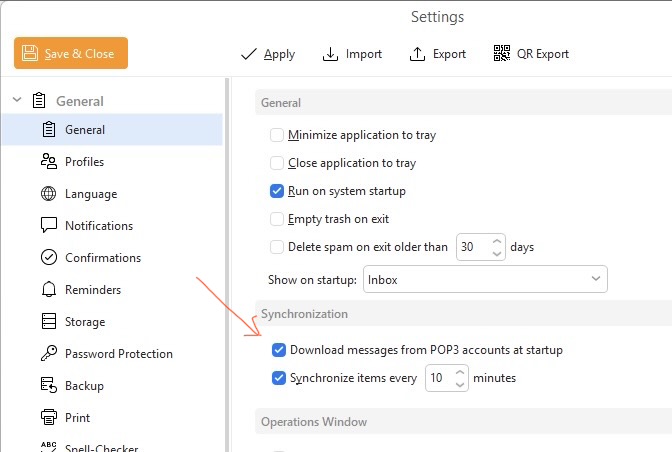
Secondly if you only want to manually check for POP Mail when you want, go to “Menu / Settings / General” and remove the option to “Download messages from POP3 accounts at startup” under Synchronization as in the second example screenshot below. Then save and close Settings.
Yes, I understand that part.
But that is not my question.
My question is:
I have something like:
Group 1 → 10 POP accounts
Group 2 → 15 POP accounts
200+ other POP accounts
And I want to click:
Receive Group 2
Receive Group 1
Receive All
…just like Outlook and Postbox.
Then you would need to put that on a Sleekplan Suggestion for others to vote on.
eM Client has Account groups to combine your various accounts, but there is no option I’m aware of to specify groups when receiving email.