A short time ago my windows 11 computer hard drive failed and Windows could not reload.
Fortunateley I take regular backups of my eM Client emails.
I now have my new computer and I have installed eM Client personal V10.3.2619.
Everything seems to have changed unfortunately making things harder to find. I would like to restore my last eM Client backup. How can I do this? All I can find is Backup butno Restore?
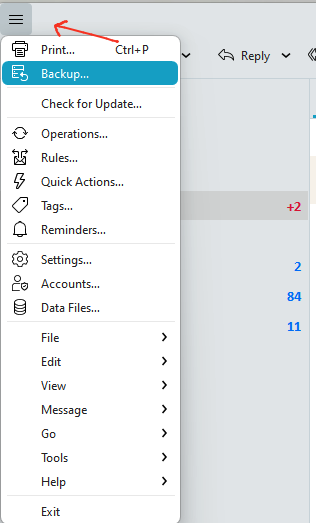
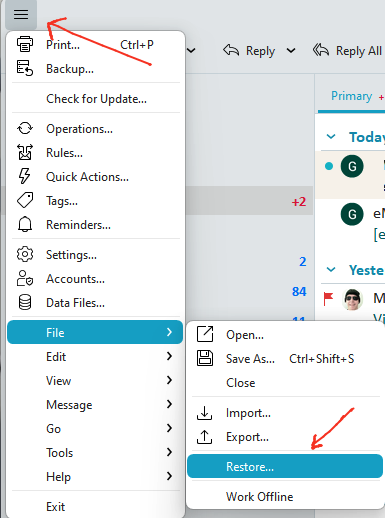
To restore an eM Client backup, go to “Menu / File / Restore”. Your eM Client dated backup.zip files should go by default back into your “Documents / eM Client” folder.
If you have more than one dated backup.zip file, you will get asked which backup file to restore.
As you have eM Client for Windows, the Menu is the “hamburger” 3 horizontal lines at the top left where you access to either manually backup eM Client or restore and eM Client saved backup as in the V10 examples below. Alot of programs now incorporate the menu that way.
This is the most unfriendly piece of software I have ever had the miss fortune to purchase.
You can customize the settings and toolbars etc to suit you.
We can try and assist you on this free community forum with any questions if you need further help. If its not more info about the backup or restore, just create a new thread.
Also if you have purchased eM Client in the last 12 months you then have access to Offical VIP support as well to help you apart from this community forum, where you can go to the following support page and login and lodge support tickets with your registered email address & password.
I only bought it a short time ago. Can I get my money back within a certain period of time?
Sorry i carnt advise you on that, and only that if you have any problems or questions we carnt answer on this community to lodge a support ticket.
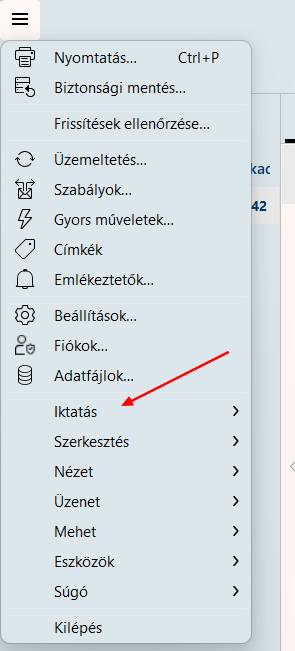
The screenshot was very useful because I couldn’t find it either. It turned out that the translation was incorrect. In Hungarian, it says “iktatás” (means “filing” in English), which no one would ever think of.