Voted! I hope more do atm it is at -6, which is not great 
From business perspective, most people use Reply All and rarely use Reply.
1 Like
Almost did it AGAIN!
I can’t tell you how many times I have destroyed the email chain here by blindly clicking “reply” and then cutting everyone else out of the email conversation.
All of my emails… ALL OF THEM need to be reply all. If I just reply to the sender I’m breaking the chain.
I can’t tell you how many times I’ve accidentally done this. It’s embarrassing to be scolded by the client for cutting everyone else out of the thread.
I’m at the point where I might stop using emclient over the lack of this functionality.
THIS IS FROM 2017!!!
Why can’t we simply have reply all as the default button we instinctively click? Accidentally clicking reply causes trouble in business emails!
Update… I almost just did it AGAIN!!! Why can’t this button simply reply all by default?
Sounds like it is a good idea to add your vote and see if there is enough interest from other users too.
In the meantime, does it not work for you to use the Reply All button in the toolbar at the top (and even hide the “Reply” one too if it makes it simpler?) or to use the keyboard shortcuts?
You can access keyboard shortcut listings from Preferences/Settings → General → Shortcuts and can also change them to what you prefer.
I’ve posted about this before, but this is my final post on the matter. I’m done with eM Client over this single issue.
I just made this mistake AGAIN today with a critical business email. Clicked that reply arrow, sent important information to only one person instead of the whole team, and didn’t realize for 30 minutes. This keeps happening because every other email client and CRM I use has that same button default to Reply All. It’s pure muscle memory at this point.
I get that there’s a Reply All button in the toolbar, but that’s not where my hand goes. When I’m working through emails quickly, I click the button that’s right there next to the email - like I do in Outlook, Gmail, and my CRM. They all understand that in business communication, you usually need everyone to stay in the loop.
The fact that this has been requested since 2017 and the response is still “let’s put it to a vote” tells me everything I need to know. This isn’t some exotic feature request - it’s a basic workflow consideration that’s costing me professionally.
I switched to Outlook yesterday and immediately noticed they show both Reply and Reply All options clearly in the email view. No ambiguity, no accidents. My CRM’s reply button? Defaults to Reply All. Because that’s what makes sense for business communication.
I paid for a personal eM Client license and I recently paid for an update, but I can’t keep using software that makes me look incompetent when I’m just working the way every other email client has trained me to work. This one unchangeable button is literally a liability for my business communication.
Good luck to everyone else dealing with this. I’m out.
1 Like

Are there any updates regarding this issue? At this point, we can clearly see it as a problem that needs to be resolved, not as a mere preference. We are facing the same issue in our office, where we have more than 10 purchased licenses, and we constantly run into the classic “Reply” button (as shown in the attached image). The problem here is not that it would be impossible to add an option allowing the client to change that default button, but rather that there seems to be no willingness to add such an option. It seems absurd that even by 2026 the technical team has not made any progress, while we continue to pay for licenses and complain in vain on this forum. If changing that button is not desired, then at least an option should be added in the settings to allow users to choose which button they want to be displayed there.
1 Like
Hello,
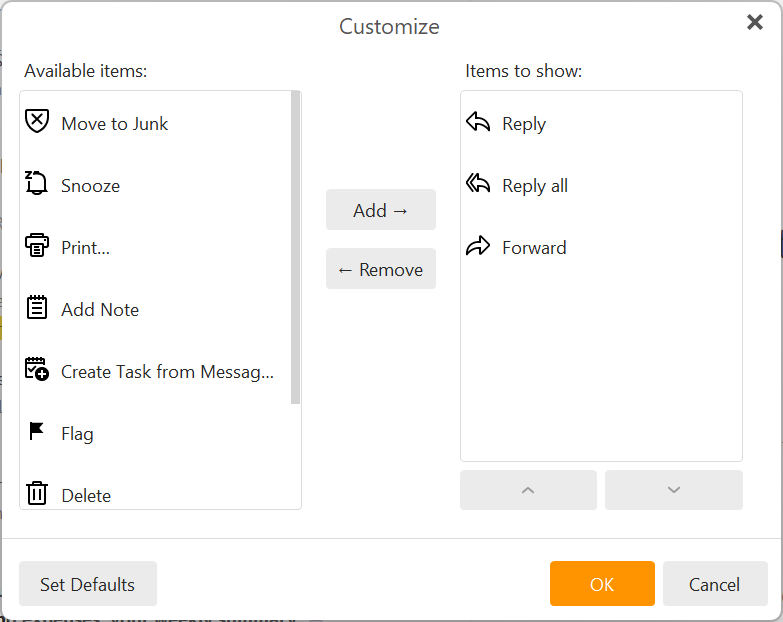
for the upcoming version 11 this is already resolved, as this toolbar is completely customizable there and by default shows Reply, Reply All and Forward buttons, but this can be changed to show just Reply all for example or add other actions like Snooze, Archive etc.
We are considering to somehow improve it in v.10.x where this customization is not possible. Do you think Reply all would be a better default for all the users for now?


Something I miss from PostBox, is the ability to switch between both modes while composing.
I do reply, and a Cmd-shift-R (on a Mac) would put back all.
Cmd-R would put back the simple reply.
I am used to this, and AFAK in eMClient there is no easy switch.
That would avoid: Copy all the already typed text, close the window, answer no to the saving, and reply again to the original message, and paste.
Vincent.
1 Like
Well I can definitely answer that for me: By all means, keep the single Reply as default, please.
2 Likes
I’ve had to switch back to Gmail and Outlook. I paid for eM Client and this is a deal-breaking feature for me.
Both of those apps have “Reply All” as the default. I tried using eM Client again recently and the first thing I did was accidentally reply to a single person, which broke the email chain.
Looking forward to the day that button can do what all other email clients do: Reply All
When others are copied, why would you ever want to exclude them from your reply by default?
This thread was started almost 10 years ago, by the way. Will keep my eyes out for this…
Do you think Reply all would be a better default for all the users for now?
Agree with @ttf I also personally wouldn’t be happy with currently setting Reply All as default in V10. Should only be an option to change it like in V11 via the customize toolbar or Settings.
I would just for now in V10 as @Olivia_Rust advised in her post at the top of this thread, for users to either add the ‘Reply all’ button to your main toolbar (and remove the basic reply button) or, if you use shortcuts, use the Ctrl+Shift+R to Reply
1 Like
Genuine question for those who prefer the current behaviour:
An email comes in from @Michal_Burger, and in the CC are @ttf and @Olivia_Rust.
When you hit that reply button, you want it to only go back to Michael? excluding @ttf and @Olivia_Rust from the conversation?
This is our problem. Outlook, Gmail, Apple Mail, Thunderbird, like most other email clients, have that reply button IN the email set as Reply All which is the proper way to keep everyone in the chain. We all communicate together with this email. We don’t ever reply to a single person if the email has people in cc. We always reply all.
We instinctively push that button. We’ve been trained for as long as we’ve had email clients that it will reply to everyone in the chain. Making that button reply only to @Michal_Burger is dangerous in business because it breaks the conversation.
So my question is: for what reason would you receive an email that has other people in the chain, and then choose to not reply to everyone?
–
@Michal_Burger Quick clarification on V11: you mentioned the toolbar is customisable, but what about the reply button that appears in the email itself? That’s the one we’re all clicking by mistake it’s right there in the message view, where Outlook and Gmail have Reply All.
With respect, “just use the toolbar” isn’t a solution. You can’t ask people to undo decades of muscle memory.
Will V11 let us change what that button does? Or is the customisation toolbar-only? If we still can’t change the in-email button, the problem remains.
When i hit reply, the compose window opens with the senders email address in the To: line and the CC email address’s are shown in the body of the email “where i then delete them if i don’t want them in the conversation”.
I can’t make another post explaining why cutting cc recipients out of emails is not good business practice.
I can’t make another post explaining why cutting cc recipients out of emails is not good business practice.
I an all of my business colleagues and friends have done that for years and in my opinion there is no issue with doing that when you just want to reply to one person where its sometimes a eg: need to know basis or specific information is not relevant to everyone in the conversation.
Chris,
that deserves a genuine answer 
Our use cases seem to be different.
Here are 2 use cases and an anecdote.
First use case: Usual Business mail
I do IT courses, working self employed.
My main contractor is e.g. TrgComp, students come from CompA, CompB, CompC and so on.
So I get an announcing mail from TrgComp, with CompA, CompB, CompC (maybe 4 to 5) on CC.
I then mail some questions back to TrgComp, like “Have you considered…” and I do NOT want that mail to go to the companies of the students.
“Reply ONLY”.
Second case: Private
Just 2 days ago I received a mail from a good friend of mine, saying: “I shall celebrate my xxth birthday then and there…” and it went CC to some 10 other people.
My answer was specifically for her and I did NOT want it to go to all the others.
“Reply ONLY”.
Anecdote:
In the late 90’s I worked for a Boston based company, myself being located in Germany.
Sometimes in winter I received a mail from the Boston based secretary. Her room overlooked the parking lot and the mail said: “I cannot identify the car from here, but somebody left on the lights”. Now this went to all emplyoees registered in the headquarters, about 120 people.
What happened was that ususally you received some 10 to 20 mails (via replay to ALL), saying “Thanks for the info, I’ll go and check” and then 10 minutes later the lucky winner replied to ALL “That was me, thanks a lot”.
We even disussed that and we called it “CC pollution via Reply ALL”
So I hope you see where I come from.
1 Like
If you look at the screenshots Michal posted, he is referring to the possibility to remove or add any of the buttons in the email itself. You’ll be able to have “Reply” and “Reply all” side by side, or remove one altogether and keep only one, or any other combination of the “Available items”.
1 Like
Please take a look on the screenshot. It is a toolbar in email itself, not the main toolbar at the top of the window. I am still wondering you talking about the default behavior in other clients, but I cannot agree.
Outlook - There are 2 distinct icons: Reply and Reply all, it is not that the Reply icon defaults to Reply all. This is going to be the default look in eM Client 11 (Reply, Reply All and Forward buttons)
GMail - For me the Reply button defaults to a single reply (the same behavior as eM Client has)

Postbox - There are no buttons on this place and on the main toolbar (and in context menu) there are distinct buttons for Reply and Reply All
Thunderbird - there are also both buttons like in Outlook, but no Reply button defaults to Reply All as far as I can see
2 Likes
Based on my experience and that of my colleagues, we have observed that in approximately 95% of cases, Reply All is used when responding to an email. I received an email that included multiple recipients in the To, CC fields, and I want all of these recipients to remain included when I reply.
It is very frustrating to respond to an email and only realize after sending it that some of the recipients who were previously included in CC (or other fields) are no longer on the email. The best-case scenario is noticing this mistake after the message has been sent; the worse situation is replying without realizing that the response was not delivered to those originally included in CC, while assuming everything was fine.