Despite having uninstalled and reinstalled eMClient and uninstalling and reinstalling gmail to eMClient, I continue to receive error messages related to contact synching and email sending and receiving, see attached.
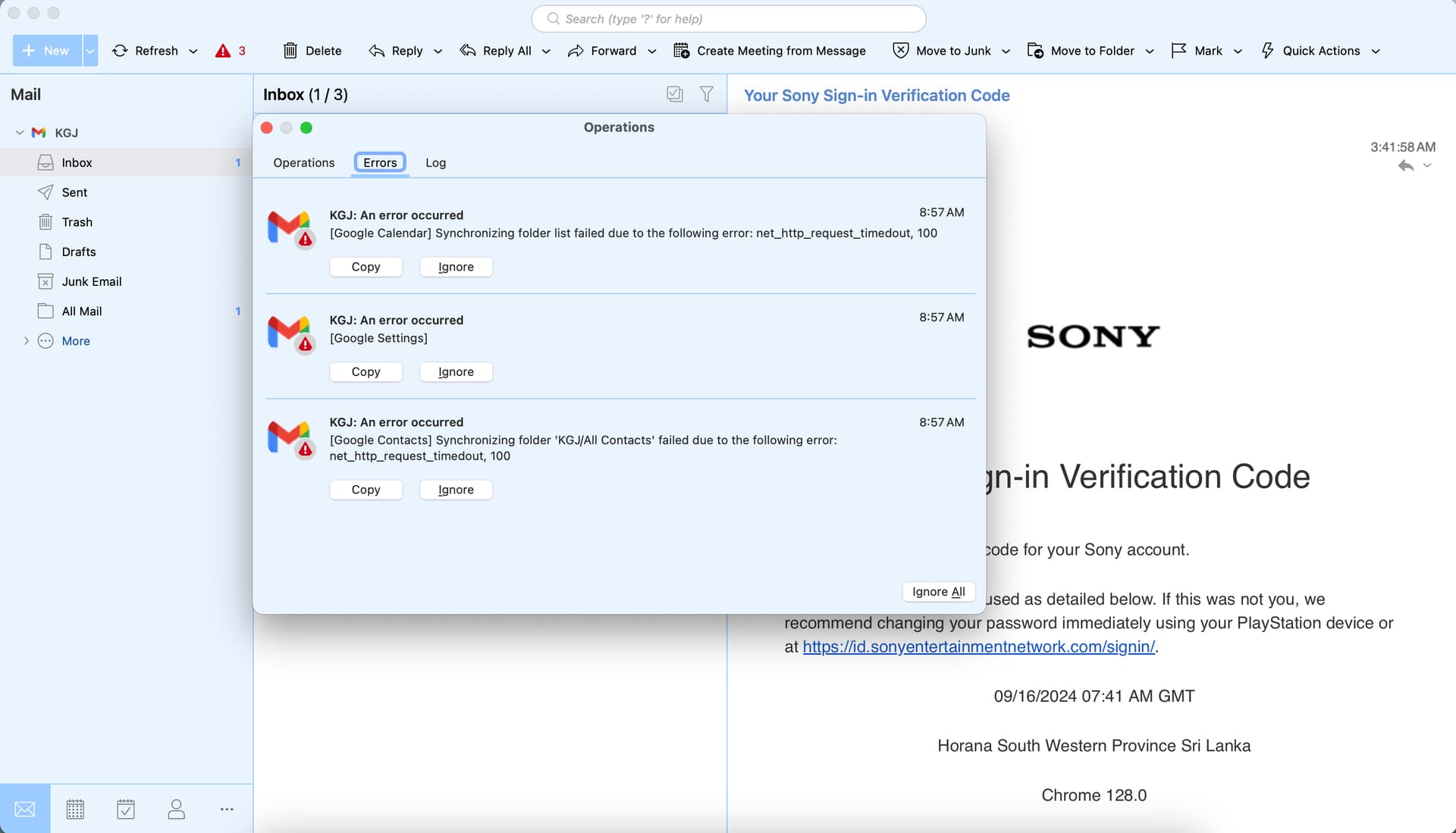
I see on your error messages, you are getting Timeout errors 100 when synching.
Timeout errors “provided your internet connection is stable and constant enough”, can sometimes be related to eg: delays by VPNs installed through alternative servers, or optional installed Antivirus programs or optionally installed Firewall / Security programs. So if you have anything like that installed “other than what comes default with your OS”, then try completely disabling those to test.
If that makes no difference or you don’t have any optional programs installed like that, then try completely powering off your Computer, ISP Modem / Router and / or any internal Lan switches etc if you have those too, for say 1 minute and then power them all back on incase you possibly have an eg: old stale Internet connection Wan IP address or some internal Lan problem.
Apart from that “check that you have the latest version of eM Client” for whatever you are currently running now. I don’t know what you currently have installed.
Recommend either the latest V9.2 or V10 if you don’t have either already. You can see and download all the latest versions via the release history page. If you do update close eM Client before updating. The latest V9.2 and 10 have updated support now for Google accounts.
Lastly “if you already have the latest eM Client version” then if you have a current active Paid Pro version or Personal version suggest to go to the following eM Client VIP support page and login and lodge a support ticket. Let them know what eM Client version you have an what OS & ver you have. An assigned engineer will then assist you.
Hey Cyberzork,
Thanks for the response and recommended corrective actions. I have done everything you have suggested as well as what was available on Google and ChatGPT and all without improvement. As seen in the latest screenshot, I continue to receive error messages in email, calendar, and contacts, ugh, so frustrating>
Any other suggestions?
Thanks again,
Greg
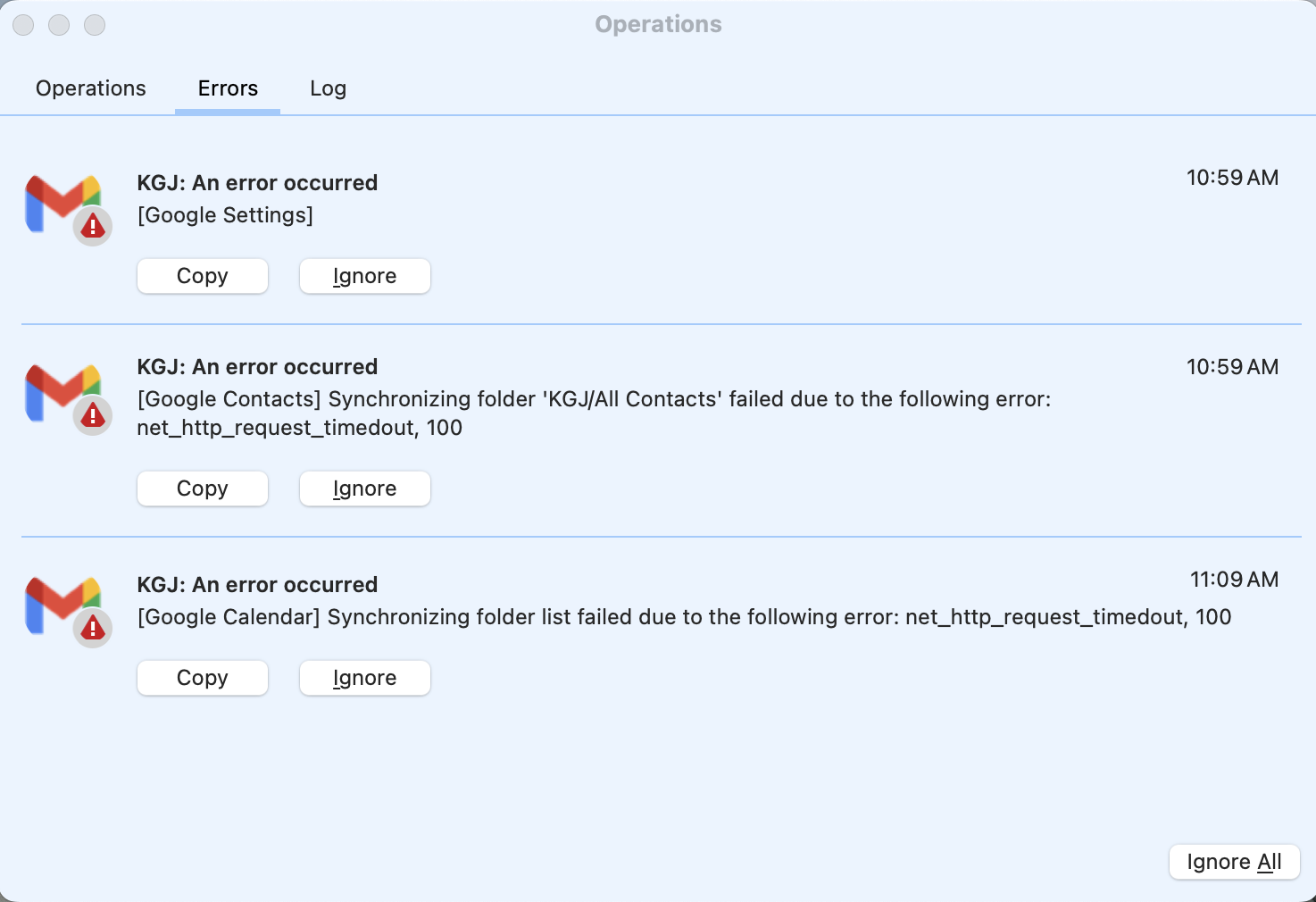
Unfortunately I’ve been seeing it as well across several devices. It seems like Google’s recent back end changes are causing issues. I’m curious, is this Google Workspace (corporate / institutional) or personal. I use Google Workspace for work and notice it a lot more there than on my personal calendar, but that may be related to the size of the calendar and number of events.
I am adding my voice here to emphasize that this is not a user-configuration issue. I have been dealing with this specific ‘Google.TimedOut (100)’ error for over a year on both of my PCs.
Like others in this thread, I have already exhausted the standard troubleshooting script multiple times:
- Repairing the folder/database.
- Removing and re-adding the account.
- Disabling Antivirus/Firewall completely.
- Reinstalling eM Client from scratch.
None of these provide a permanent solution. The persistence of this error suggests a hard-coded timeout limit within eM Client that is too aggressive for Google’s current API response times, especially for users with substantial history or data.
We need a developer-level response here, not more Level 1 troubleshooting.
Is there a config parameter or a patch coming that allows us to increase the timeout threshold manually?
The current architecture is clearly choking on latency that other clients handle fine.
I have been dealing with this specific ‘Google.TimedOut (100)’ error for over a year on both of my PCs
The current architecture is clearly choking on latency that other clients handle fine
Timeout issues are nothing to do with the mail client, and are something externally causing it.
So if you are still getting timeouts from Gmail and you are using the latest V9 or V10 from the release history page and “have nothing optionally installed as I mentioned previously” and “resetting your modem hasn’t helped”, then that can only mean two things.
-
Either your physical internet connection is not faster enough or stable enough.
-
Or you have some slow mail routing issue between your ISP and your nearest Gmail mirror server.
So next thing I would suggest you do is “a ping test to Gmail” and “a Traceroute test to Gmail” and see how much latency you are getting to and from the Gmail server. As sounds like to me a possible latency problem causing the mail timeouts.
This type of thing can happen with eg: Satellite where they are not constant enough and get lag.
With respect, the “unstable internet” theory does not fit the data.
A “timeout” error is an internal exception thrown by the client when it decides to stop waiting. If my connection were actually dropping packets or unstable, I would be seeing Socket Error, Connection Reset, or Host Unreachable errors. Instead, I get a clean TimedOut (100).
I have just performed a 20-packet ping test specifically to the Gmail IMAP server (imap.gmail.com) on my connection. The results are flawless:
Ping Statistics for imap.gmail.com:
- Packets: Sent = 20, Received = 20, Loss = 0%
- Latency: Minimum = 20ms, Maximum = 31ms, Average = 21ms
A consistent 21ms latency with zero packet loss is an excellent connection. Furthermore, other clients run on this same connection without a single timeout.
This confirms the issue is eM Client’s hard-coded timeout threshold being too aggressive for certain Google API handshakes. We need a way to increase the ReadTimeout value in the config, or the developers need to patch this to be resilient to standard syncing latency.
PS:
Pinging imap.gmail.com [64.233.165.108] with 32 bytes of data:
Reply from 64.233.165.108: bytes=32 time=21ms TTL=109
Reply from 64.233.165.108: bytes=32 time=21ms TTL=109
Reply from 64.233.165.108: bytes=32 time=21ms TTL=109
Reply from 64.233.165.108: bytes=32 time=21ms TTL=109
Reply from 64.233.165.108: bytes=32 time=21ms TTL=109
Reply from 64.233.165.108: bytes=32 time=24ms TTL=109
Reply from 64.233.165.108: bytes=32 time=21ms TTL=109
Reply from 64.233.165.108: bytes=32 time=21ms TTL=109
Reply from 64.233.165.108: bytes=32 time=20ms TTL=109
Reply from 64.233.165.108: bytes=32 time=21ms TTL=109
Reply from 64.233.165.108: bytes=32 time=21ms TTL=109
Reply from 64.233.165.108: bytes=32 time=21ms TTL=109
Reply from 64.233.165.108: bytes=32 time=21ms TTL=109
Reply from 64.233.165.108: bytes=32 time=21ms TTL=109
Reply from 64.233.165.108: bytes=32 time=21ms TTL=109
Reply from 64.233.165.108: bytes=32 time=21ms TTL=109
Reply from 64.233.165.108: bytes=32 time=21ms TTL=109
Reply from 64.233.165.108: bytes=32 time=31ms TTL=109
Reply from 64.233.165.108: bytes=32 time=23ms TTL=109
Reply from 64.233.165.108: bytes=32 time=21ms TTL=109
Ping statistics for 64.233.165.108:
Packets: Sent = 20, Received = 20, Lost = 0 (0% loss),
Approximate round trip times in milli-seconds:
Minimum = 20ms, Maximum = 31ms, Average = 21ms
I have just performed a 20-packet ping test specifically to the Gmail IMAP server (
imap.gmail.com) on my connection. The results are flawless
Do you get that low constant ping all the time or only sometimes ? As there has been some users where the ping times were not allways low and constant causing connection timeout.
Also did you do a trace test to test for latency along the way through the various servers to Gmail ? As sometimes high ms server hops can also causing connection timeouts.
If your ping times and trace ms times “are both low and constant all the time” to the Gmail server, then lodge a support ticket to have your IMAP logs investigated via the official VIP Support page link further up this thread.
I have followed your advice and ran the trace tests on two completely different physical networks (Home and Work) to eliminate local hardware or ISP specific issues.
The results are definitive: The network path is flawless.
Here is the trace from my Work connection directly to imap.gmail.com:
PlaintextTracing route to imap.gmail.com [209.85.233.108] ... 1 1 ms 1 ms 1 ms [Local Router] ... 9 5 ms 5 ms 4 ms 209.85.149.166 (Google) 10 5 ms 5 ms 4 ms 216.239.49.39 (Google) ... 24 16 ms 16 ms 16 ms lr-in-f108.1e100.net [209.85.233.108] Trace complete.
Analysis:
- Latency is near-zero: I am reaching Google’s network (hop 9) in 5ms.
- End-to-End is perfect: The final handshake with the Gmail server (hop 24) completes in 16ms.
- No Lag Spikes: Every hop is consistently under 20ms.
There is no ‘slow mail routing.’ There is no ‘unstable satellite connection.’
We have now ruled out:
- The ISP (tested on two different ISPs).
- The Modem/Router (tested on two different hardware setups).
- Packet Loss (0% loss on ping test).
- Latency (16ms round-trip).
The only variable left is eM Client. The application is timing out on a connection that is responding faster than human perception. This confirms the internal timeout threshold in the software is broken or mishandling the HTTP/2 handshake.
Please escalate this to the developers. We need a patch.
PS: I can file a support ticket, if you still recommend that I do so.
Yes as your Trace route test to Gmail Server also looks fine, yes i would lodge a support ticket to get your IMAP Logs investigated to see why you are getting the timeouts.
The only variable left is eM Client. The application is timing out on a connection that is responding faster than human perception. This confirms the internal timeout threshold in the software is broken or mishandling the HTTP/2 handshake.
I carn’t personally replicate that Gmail Timeout with Windows 10 /11 or Mac OS Sequoia / Tahoe using eM Client V9 or V10 on two different computers using different fixed line 50 & 100 mbps connections, so i can only presume there is some external factor outside of the mail client causing it.
Thanks.
Anyway, I’ve created a new ticket.
By the way, do you think this might help?
“C:\Program Files (x86)\eM Client\MailClient.exe” --gdata-disable-http2
Sorry don’t know. I’d ask official support.
Excuse me, do you have any idea how fast VIP support usually reacts to tickets?
I created one three days ago and added a couple of messages with useful logs.
No reaction whatsoever.
Thanks
do you have any idea how fast VIP support usually reacts to tickets?
I created one three days ago and added a couple of messages with useful logs
Sorry I don’t know the exact response time, but usually it’s not too long,
However this time of year might be longer than normal due to the Xmas / New Year period and availability support staff.
I have an update for everyone who might face this issue.
If you are seeing the Google.TimedOut (100) error, stop troubleshooting your router. Your internet is fine.
The Verdict: I just finished a month-long battle with “VIP” Support.
- The Issue: eM Client’s new library (
Microsoft.Kiota) has a defect. It fails to detect when an idle HTTP/2 connection drops. Instead of reconnecting, it hangs for exactly 100 seconds (hard-coded timeout) and then crashes. - Support’s Response: They admitted they see the error in my logs but officially refused to fix it, claiming “The server took too long.”
The Solution they offered (since they won’t patch it): You must force your computer to stop using HTTP/2 for .NET apps, or this will never stop (I am unwilling to even try this).
- Open Windows Environment Variables.
- Add a new System Variable:
- Name:
DOTNET_SYSTEM_NET_HTTP_DISABLEHTTP2 - Value:
1
- Restart your PC.
This is supposed to fix the issue instantly.
It is a shame we have to degrade our OS settings because eM Client won’t fix their broken code.
We understand this issue has been frustrating. Several experienced team members spent time reviewing your case, and the conclusion was consistent across the board.
As you know, our verdict is quite different: the logs did not show any evidence of a faulty Kiota implementation, a client-side HTTP/2 issue, or any other client-side failure. Because of that, we don’t have a reproducible bug to work with on our end.
Therefore, I cannot agree with the description that we “refused” to address the issue. At this point, there simply isn’t anything identifiable on the client side that we can fix.
We also reiterated that local or network-level traffic, including upsteam network devices and ISP-level filtering, is the most common cause of the error pattern seen in your logs.
1 Like
Hi Kim,
You stated: “the logs did not show any evidence of a faulty Kiota implementation… or any other client-side failure.”
With respect, this is like a doctor looking at an X-ray of a broken arm and saying “I see no evidence of a fracture.”
Here is the exact text from my log file:
15:26:56.142  Request: GET https://people.googleapis.com/v1/people/me/connections...
15:28:36.157  Exception: TaskCanceledException: The request was canceled due to the configured HttpClient.Timeout of 100 seconds elapsing.
              at Microsoft.Kiota.Http.HttpClientLibrary.HttpClientRequestAdapter.GetHttpResponseMessageAsync(...)
Fact check:
- “HttpClient.Timeout” is a client-side setting. This is the application’s own code cancelling the request after its internal 100-second timer expires. It is not a server error. It is not an ISP error. It is eM Client giving up.
- “Microsoft.Kiota” appears in the stack trace. This is the library I identified. It’s right there. In the text.
- The 100-second precision rules out network interference. ISP filtering and “upstream devices” do not wait exactly 100.000 seconds before blocking a packet. They act immediately. A perfect 100-second delay is the signature of a hard-coded software timeout — your software timeout.
- The idle-then-fail pattern (visible in the timestamps) is textbook TCP connection pool staleness — the client reuses a connection that NAT infrastructure has already closed. This is a known class of HTTP/2 bugs.
I have provided logs. I have provided timestamps. I have provided stack traces. The evidence is in your own diagnostic output. Repeating “we see no evidence” does not make the text disappear.
For other users experiencing this issue: the workaround posted above (DOTNET_SYSTEM_NET_HTTP_DISABLEHTTP2=1) forces .NET applications to use HTTP/1.1, which handles connection drops more gracefully. I refuse to apply it myself because degrading my entire operating system’s HTTP performance to compensate for one application’s bug is not an acceptable solution.
Regards,
Dmitry