Postbox has basically stopped working, so I finally tried to make the move to eM Client and so far I’m not impressed.
What Postbox did more than any other e-mail client was it boosted productivity. My workflow is usually:
CMD + 1 => I jump to my first inbox
I see an e-mail that I can file away
I hit the “v” key for move (German: “verschieben”) => I start typing the name of the folder and the e-mail will be moved there
This is what I’m doing most of the time. Yes, I also write e-mails, but for me it’s mostly filing e-mails away, trying to get a grasp of what I still need to do and what’s been taken care of / can be invoiced.
eM Client fails at these basic tasks.
I HATE the fact that I can’t assign a shortcut to jump to a particular inbox (I have 9 of them and 5 really matter, this is super important for me).
I can’t use a workaround like creating several tabs and then jumping between tabs (each tab representing a different inbox) like I did in other e-mail clients in the past.
There is literally NO workaround to quickly access different inboxes. How is this possible? This is the most important feature for a bunch of users as far as I’m concerned.
IF the “Quick Actions” would allow me to setup an action like “jump to folder” (with the option to actually define which folder I would then jump to), that would be a workaround, but alas, the Quick Actions only feature useless features that again have something to do with writing e-mails or marking them or whatever.
All I want to do is being able to navigate. Without my mouse.
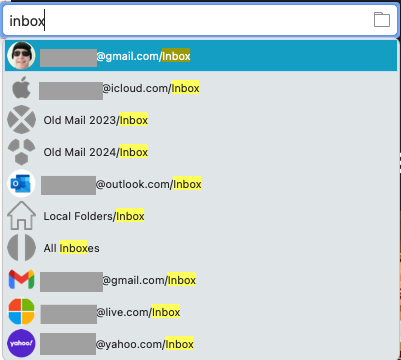
And no, the functionality from Postbox that was carried over, the quick “go to” doesn’t work, as ALL my inboxes are named “inbox” and I can’t type that and then click on the “down” button 10 times to find the correct inbox… and I don’t want to type the name of the e-mail inbox either as half of them are my name and my name is long and they all are similar (my name @ my company / @ private domain / @ me.com / etc…).
There is literally NO workaround to quickly access different inboxes. How is this possible? This is the most important feature for a bunch of users as far as I’m concerned.
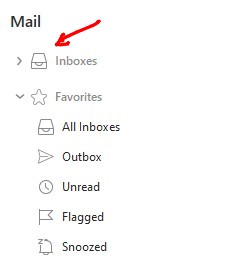
You can eg: hover your mouse at the very top left of eM Client “on the right of the heading Mail” and you will see a search appear which is a “Jump to folder” where you can type eg: Inbox and it will then show you all your various account Inboxes to then click on whatever one you want to go straight there that might help you with this issue.
The jump to folder will also be implemented on the mobile app later as per this post thread.
Or as @Michal_Burger advised in his post below press (G) Go to folder will also currently work on th desktop to jump quickly to any account Inbox and works fine for me personally for my own multiple accounts Inboxes.
Or lastly you can also enable in Settings to show all your various account Inboxes “at the very top of eM Client” to also jump quickly to your specific account Inboxes as in the example screenshot below. No shortcut then required. One mouse click.
“Hover your mouse” is not a shortcut. It takes LONGER than entering something on your keyboard.
The whole point of my thread was to identify ways how I can access various inboxes without having to switch from my keyboard (fast) to my mouse (slow).
Hitting “G” to use the “Go to folder” doesn’t work as all these inboxes are named the same. They are all called “Inbox”. They also use the same format. I am sometimes [email protected] and then [email protected]. I can’t always type out the entire e-mail address, even clicking is faster than trying that.
At the moment, I am more likely to use Shift + Tab to put the focus on the folder pane on the left, then use the arrow keys to navigate to the inbox I want to access and then hitting Tab again.
It’s an absolute chore and far from an enjoyable experience.
I really want to like this e-mail client, but so far it’s giving me an extremely hard time.
P.S.: I am certain that this is not the first time this was mentioned, I found several threads in this forum where people asked for the very same functionality.
Hitting “G” to use the “Go to folder” doesn’t work as all these inboxes are named the same. They are all called “Inbox”.
When i press G and type Inbox, all my various account Inboxes appear where i then “just click directly on the account Inbox i want” as per the below screenshot example. So works for me.
Yeah, but … if you want to go to your “live.com” inbox, you now have to press the down button 8 times.
How in the world could this be considered a “shortcut”? Again, compare it to holding down the CMD button and hitting the number 8 on the keyboard. That takes less than a second?
Apple Mail, the default e-mail client on a Mac can do that. If it had quick move for storing away read mails (hitting a shortcut key, entering the name of a folder and then hitting enter to file the mail away), I’d have switched back to it by now.
No after I type Inbox, I then “click my mouse” on the Live Inbox. No need to press 8 times.
How in the world could this be considered a “shortcut”? Again, compare it to holding down the CMD button and hitting the number 8 on the keyboard. That takes less than a second?
Yes an actual Macro is quicker if you only want to use Keyboard shortcuts and no mouse.
Suggest then to add your suggestion to the Sleekplan page for others to also vote on it.
 appear which is a “Jump to folder” where you can type eg: Inbox and it will then show you all your various account Inboxes to then click on whatever one you want to go straight there that might help you with this issue.