I am new to eM Client and have set up the desktop version. Now I want to set up the mobile version (IOS) and doing so via a QR code generated on the desktop. The password I input does not work. I reset my gmail password and still does not work. Any tips?
Thats very strange.
As you have already tried resetting your Google password and the app still asked for a password when importing via QR code, i would next suggest to “close the Desktop and iOS app” and then go to your Google account connections and “revoke / remove the eM Client OAuth token” via this link https://myaccount.google.com/connections
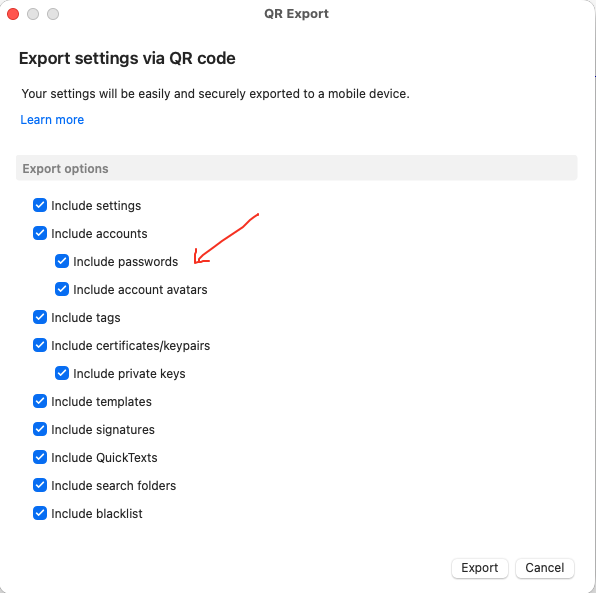
Then reopen eM Client for desktop and you will get a prompt to re-allow eM Client access to your Google account. Then once thats done, go on the Desktop to “Menu / Tools / QR Export” and make sure you select “include passwords” on the export window as in the example screenshot below. Then click next and when you get to the QR Code, open the iOS app and press “Menu / Settings / Import-Export” and press “Import via QR Code”.
If that still doesn’t work, “try uninstall the iOS app and reinstall” if you haven’t already incase there was an app installation problem. Then try scan the QR Code again. Make sure you are using the latest iOS app version 10.4.5267 which scans the code ok for me using Desktop V10.4.5326
Apart from that, might be something to do with your eg: Google Security setup online. eg: I have 2 step and passkeys setup in my own Google account https://myaccount.google.com/security.