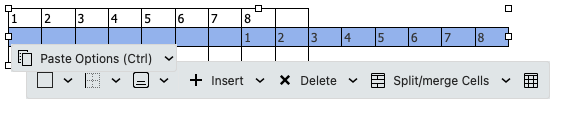
If you create a Table using the latest V10.4.4756 for PC or Mac, and “copy part of a row to then paste on the next row exactly the same” as in the first 4 cells, when you paste after selecting the first 4 cells in the 2nd row, “it pastes everything in the 1st cell” and not in the 4 cells like the first row.
Selected the first 4 cells in the 1st row of the table and pressed copy.

Then selected the first 4 cells in the 2nd row of the table and selected paste.
The 4 cells in the 1st row then all pasted into the 1st cell instead of the 4 cells.

This compose copy and paste table cell issue still happens in the latest eM Client V10.4.4867
The fix of this issue should be included in the next update.
1 Like
Using the latest V10.4.4924 on Mac and Windows the pasting of table issue is still not fixed and also has another issue with the undo of the pasting cells.
When you now copy and paste the cell contents from the first row to the second row below it, the cell contents in the second row “all moves to the right in the row after pasting” instead of being directly underneath the first row as in the two examples below.
Also if you go to undo the paste in the second row, “it starts undoing the first row” from the last cell backwards and doesn’t undo the second row contents at all.
“Copying the first four cells to the next row”

“Copying the first eight cells to the next row”