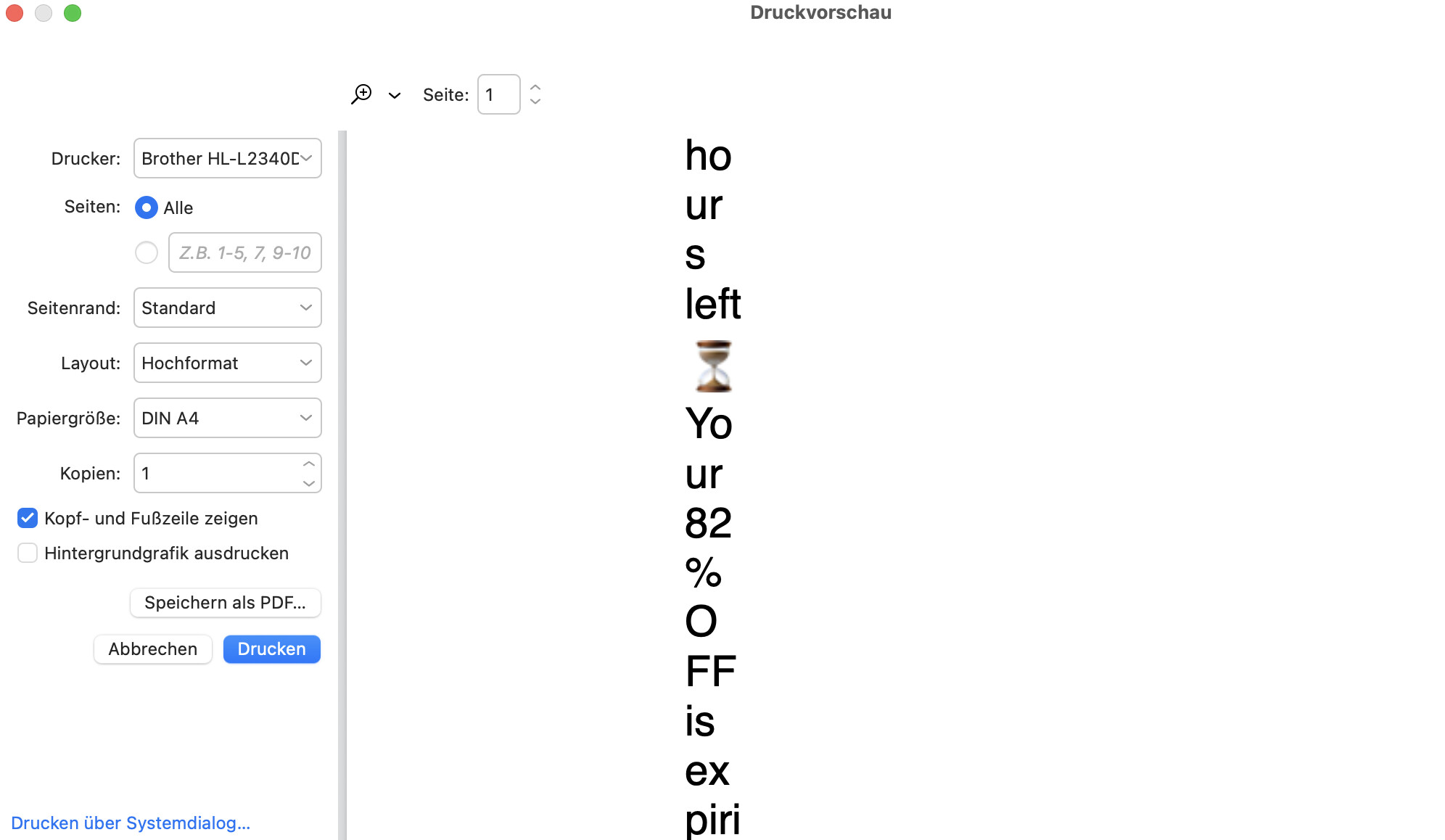
On MacBook Air with 26.2 Beta (25C5048a) and eM Client version 10.3.2622 (9cd48bf) with standard printer Brother HL-L2340D, the printout is greatly enlarged and spread over several pages. See image.
Was this problem doing this on the previous OS26.0 non Beta release ?
Also have you tried uninstalling and reinstalling your printer driver ?
Also does it preview the same if you select “Print using system dialogue” at the bottom left ?
Also does it happen with every email or only specific emails?
Was this problem doing this on the previous OS26.0 non Beta release ?
Yes, same isse with previous beta release.
Also have you tried uninstalling and reinstalling your printer driver ?
Yes, printer software was completely removed and re-installed.
Also does it preview the same if you select “Print using system dialogue” at the bottom left ?
Yes, in all cases / circumstances, the failure occours
Also does it happen with every email or only specific emails?
Yes, no matter what email I choose, the same error occurs.
iOS 26.1 (23B85) as well as iPadOS 26.2 (23C5044b) are working seemlesly perfect..
What reading font and size are you using via “Menu / Settings (Preferences) / Mail / Read” ?
It’s unchanged ever since: Helvetica; 12pt
It’s unchanged ever since: Helvetica; 12pt
Try different reading fonts and see if it makes any difference such as eg: Tahoma 12
Failing that, if your happy to test the upcoming Mac version 10.3.4341, see the following link below where there is also a feedback email address at the bottom of that page if still an issue with that.
If you do try the upcoming version make a backup first via Menu / Backup incase you need to restore for any reason. Also close eM Client before updating.
Thank you for your kind assistance. Font change (good idea) didn’t help. Going to test beta.
OK… preview loaded and still facing the same error. Furthermore, when you are in the print preview window, the bottom down link “Print via system dialog” crashes the entire app immediately. Error reports been sent..
Hi, we have reproduced the issue using our Tahoe 26.2 Beta, and our developers are working on a resolution.
1 Like
Hi Kim.. I knew you folks will solve it! Super. Thank You 
1 Like
With 10.4.4293 (5858dfd) Problem solved. Thanks You!
A Merry Christmas 2 all of U!
Andreas
2 Likes