i understand that Microsoft quietly removed EWS/OAuthcapability for personal accounts, which leaves me with IMAP+AirSync on windows 11 that syncs calendar, contacts and tasks with many errors (or do not sync them at all).
For now this means that i need to use alternative apps (e.g. using outlook in my browser, the new Outlook) IN ADDITION to eM Client, which is very dissappoitnting.
is there somethind i can do to enable my personal outlook account once again in eM Client?
1 Like
i understand that Microsoft quietly removed EWS/OAuthcapability for personal accounts
Yes Exchange for Microsoft Personal accounts was removed along time ago by Microsoft so its only IMAP with an Outlook.com, Live.com & Hotmail.com acct. The only thing you loose is Notes, but you can still access those via the either One Note on the web or using the One Note app.
IMAP+AirSync on windows 11 that syncs calendar, contacts and tasks with many errors (or do not sync them at all).
What AirSync errors are you getting in eM Client using an IMAP setup ?
It seems that emails are syncing properly, but Calendar events and tasks are not syncing. At all:
- events i added on Outlook web do not appear in eM apps.
- events i added in eM app do not appear in my Outlook web, as well as on other apps on my mobile.
Here is my log, maybe it can help:
07:43:19 Live [AirSync] MailClient.Accounts.ConnectionException: Found invalid data while decoding.
—> System.IO.InvalidDataException: Found invalid data while decoding.
at MailClient.Protocols.AirSync.AirSyncItemSynchronizer2.Upload(IItemUploadContext1 uploadContext, Folder folder, IEnumerable1 items, Int32 maxObjectsInSync, CancellationToken cancellationToken) at MailClient.Protocols.AirSync.AirSyncItemSynchronizer2.Upload(IItemUploadContext1 uploadContext, Folder folder, IEnumerable1 items, CancellationToken cancellationToken)
at MailClient.Protocols.Common.ItemSynchronizer`2.<>c__DisplayClass32_0.b__0(WorkerStatus status, CancellationToken cancellationToken)
at MailClient.Protocols.AirSync.AirSyncGenericCommand.Execute(WorkerStatus status)
— End of inner exception stack trace —
at MailClient.Protocols.AirSync.AirSyncGenericCommand.Execute(WorkerStatus status)
at MailClient.Commands.Command.Process(WorkerStatus status)
Microsoft didn’t fully remove EWS/OAuth for personal accounts, but they’ve been limiting support, which breaks apps like eM Client when using Microsoft Outlook accounts your best workaround is to re-add the account using the dedicated Outlook.com option in eM Client, or update to the latest version where they patched compatibility. If that still fails, you’re basically stuck using IMAP (mail only) plus web or the New Outlook for Windows for full calendar/contacts sync, since Microsoft now prioritizes its own clients. Long term, switching to a provider with full open protocol support or waiting for eM Client to implement Microsoft’s newer APIs is the only clean fix.
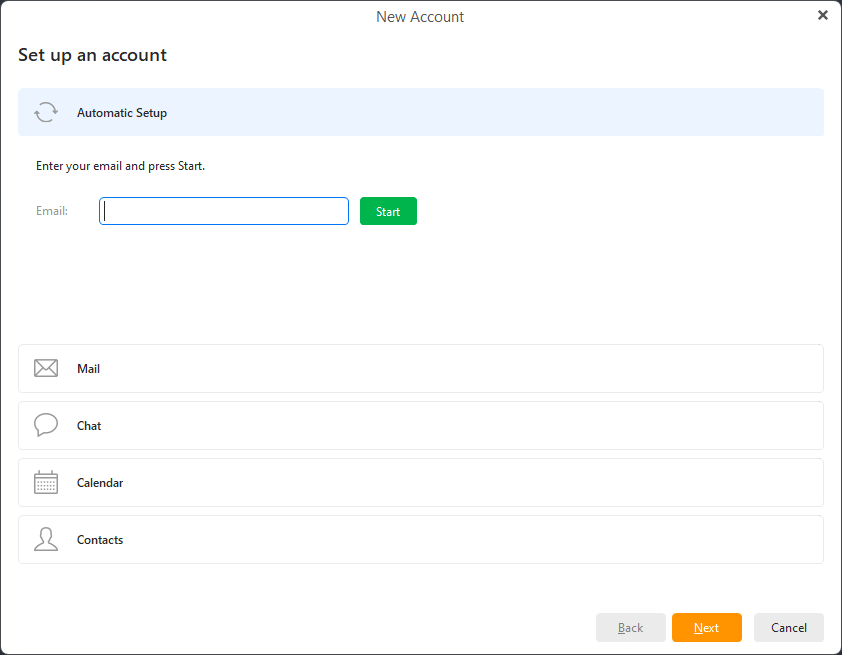
Suggest for that error to go to “Menu / Accounts” and “remove and re-add your MS personal account account again” via the add account “automatic account wizard at the top”, and make sure “you select the calendar and contacts & tasks at the end of the wizard setup” when you allow eM Client access to your Microsoft account.
As could be the account didn’t all add 100% authenticate properly initially when first setup.
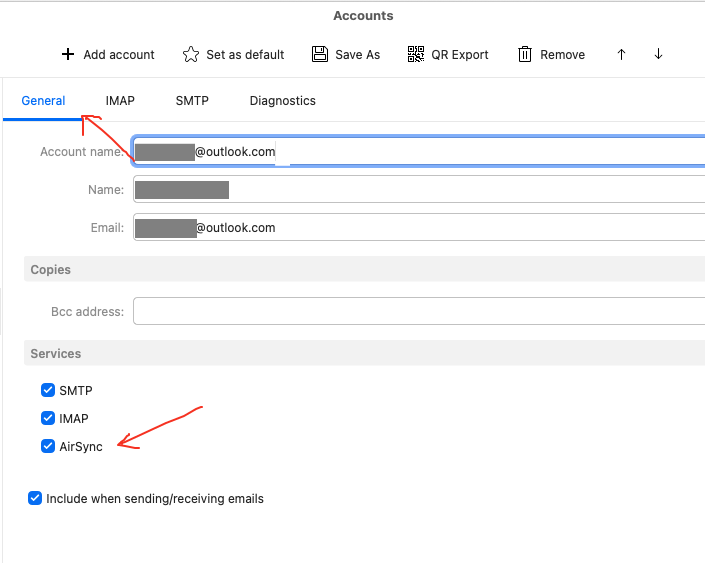
Also after the account is created, make sure under the “General” account tab that you have selected “AirSync” or the Calendars and Contacts won’t sync as in the below screenshot.
Lastly if still have the same issue, then could be something possibly interferring with eM Client.
So if you have any eg: optionally installed firewall / security programs or optionally installed antivirus programs or vpns “other than what comes default with your os”, try completely disabling those to test incase of any interference.
Updating to the latest eM Client won’t make any difference for Microsoft Personal accounts.
Unless you have a Business / Commercial or Corporate type account, you will be only setup as an IMAP setup “as per Microsoft changes along-time ago” whether you setup via the automatic account wizard or via the manual exchange setup.
I know that for a fact as my own and all my friends who used personal Hotmail, Live and Outlook accounts “used to setup in Exchange via the manual wizard” in eM Client and stopped working.
So if you are able to connect in eM Client to a Microsoft Exchange account via either the automatic account wizard or manual setup, then Microsoft must determine that you are a Business / Commercial or Corporate type customer.
1 Like
following your suggestion:
- i removed the account, then edded it again (after closing the app)
- chacked that contacts and calendar are selected
- I manually enabled eM client in my firewall
the account was added, but now the account does not show at all on the calendars account list (mail works fine!)
Could be then a database problem. So try “closing eM Client” and then go to the following Windows hidden database folder below and “rename it” to eg: eM Client-Old
(Hidden database folder Windows)
C:\Users%username%\AppData\Roaming\eM Client
Then reopen eM Client and setup as new again via the wizard and see if your account then shows in the Calendar and Contacts section.
If it still doesn’t show, then could possibly be eM Client didn’t initially install correctly.
So next “close eM Client again” and uninstall eM Client and “delete the database” when asked on the uninstall wizard which will still leave your original database intact in the eM Client-Old hidden folder. Also if the following folder “C:\Program Files (x86)\eM Client still exists “delete it”.
Then redownload and reinstall the “the same or later version of eM Client” either via the release history page or Windows store depending on where you originally installed it from and see if your account then shows in the Calendar and Contacts section.
First of all, thank you your reply.
However, I tried everything you offered, including re-installing eM client, but nothing works.
It seems that have to move to Outlook app until this issue resolves (thank you microsoft  )
)