Since 9 November emclient can’t access my Outlook account. Is it a new security change by Microsoft?
What happens when you try to access your Outlook account ? Are you getting and error message appear. Can you elaborate.
Is it a new security change by Microsoft?
Nothing has changed at Microsoft end as far as accounts go that I’m aware of.
I’m sorry but something changed because emclient no longer has access to the email account since 9 November. Only Outlook app and web access it and curiously Blue mail client also can access it. Do emclient have any log that can be send?

I’'ve just bought and installed emclient and have set up my outlook account without any problems
First off go to “Menu / Accounts” and click on your @netcabo,pt account and then update what you “Incoming” Server Address, Server Port & Security Policy is and also what mail server you are with so we can see then if there is any obvious settings wrong.
Also click the dropdown arrow on the right of Refresh and click “Show Operations” and click the “Log” tab and look for any obvious error messages and paste them in this thread and we might then be able to see whats wrong. Blank out anything personal in the log errors.
Here is a text with the log.
eM Client 10.3.1524+2e684e959e (Windows)
10:58:32 Internet Calendars Web Calendar A sincronizar pasta ‘/Christian Holidays’
10:58:32 [email protected] IMAP A carregar iten(s) para a pasta ‘/Caixa de Entrada’
10:58:32 [email protected] AirSync A sincronizar lista de pastas
10:58:32 [email protected] Google Contacts A sincronizar pasta ‘/Todos os contactos’
10:58:32 [email protected] Google Settings A sincronizar etiquetas
10:58:32 [email protected] IMAP A sincronizar pasta ‘/Todo o correio’
10:58:32 [email protected] Google Contacts A sincronizar pasta ‘/Outros Contactos’
10:58:32 [email protected] Google Contacts A sincronizar lista de pastas
10:58:32 [email protected] IMAP A sincronizar lista de pastas
10:58:33 [email protected] IMAP A sincronizar pasta ‘/Todo o correio’
10:58:33 Internet Calendars Web Calendar A sincronizar pasta ‘/Portugal Holidays’
10:58:33 [email protected] AirSync A sincronizar pasta ‘/Calendário’
10:58:33 Internet Calendars Web Calendar A sincronizar pasta ‘/Liga Portugal 2019-2020: Liga NOS’
10:58:33 [email protected] AirSync A sincronizar pasta ‘/Contactos’
10:58:33 [email protected] [IMAP] MailClient.Accounts.AuthenticationAbortedException: Autenticação cancelada
at MailClient.Protocols.Imap.ConnectionPoolEntry.g__ThrowNotOKServerResponseReacquireCredentialsFailed|57_6()
at MailClient.Protocols.Imap.ConnectionPoolEntry.ConnectInternalAsync(CancellationToken cancellationToken)
at MailClient.Protocols.Imap.ConnectionPoolEntry.ConnectInternalAsync(CancellationToken cancellationToken)
at MailClient.Protocols.Imap.ConnectionPool.AcquireConnectionAsync(Folder mailFolder, Boolean noSelect)
at MailClient.Protocols.Imap.ConnectionContext.CreateContextAsync(ImapAccount account, Folder folder, Boolean noSelect)
at MailClient.Protocols.Imap.ImapMailSynchronizer.StoreAsync(IItemUploadContext1 uploadContext, FolderInfo info, List1 uploadItems, CancellationToken cancellationToken)
at MailClient.Protocols.Imap.ImapMailSynchronizer.UploadAsync(IItemUploadContext1 uploadContext, Folder folder, IEnumerable1 items, CancellationToken cancellationToken)
at MailClient.Protocols.Imap.ImapMailSynchronizer.Upload(IItemUploadContext1 uploadContext, Folder folder, IEnumerable1 items, CancellationToken cancellationToken)
at MailClient.Protocols.Common.ItemSynchronizer2.<>c__DisplayClass32_0.<EnqueueUpload>b__0(WorkerStatus status, CancellationToken cancellationToken) at MailClient.Protocols.Imap.ImapActionCommand.<>c__DisplayClass11_0.<.ctor>b__0(WorkerStatus ws, CancellationToken ct) at MailClient.Protocols.Imap.ImapActionCommand.ExecuteInternalSync(WorkerStatus status) at MailClient.Protocols.Imap.ImapActionCommand.Execute(WorkerStatus status) at MailClient.Commands.Command.Process(WorkerStatus status) RunInPlace = False EnqueuedStackTrace = at MailClient.Protocols.Common.ItemSynchronizer2.EnqueueUpload(Folder folder, IEnumerable1 items, Action1 completed, CancellationToken cancellationToken)
at MailClient.Protocols.Common.ItemSynchronizer2.GoOnline() at MailClient.Protocols.Imap.ImapMailSynchronizer.GoOnline() at MailClient.Protocols.Imap.ImapAccount.GoOnlineInt() at MailClient.Protocols.Common.AccountBase.ChangeOnlineState(Boolean online, OfflineReason offlineReason) at MailClient.Protocols.Common.AccountBase.GoOnline() at MailClient.Protocols.Common.AccountBase.RunIfOnline[T](Func1 actionIfOnline, Func`1 actionIfOffline)
at MailClient.Protocols.Common.SynchronizableMailAccount.Synchronize(SynchronizationPriority priority)
at MailClient.Accounts.BindingAccountBase.Receive()
at MailClient.Accounts.AccountManager.ReceiveAllInternal(Boolean checkIncludeInGlobalOperations, Boolean fromBackgroundSync)
at MailClient.Accounts.AccountManager.SendAndReceiveAll(Boolean checkIncludeInGlobalOperations)
at MailClient.UI.Forms.formMain.sendReceiveAll()
at MailClient.UI.Forms.formMain.stripButton_Refresh_Click(Object sender, EventArgs e)
at System.Windows.Forms.Control.OnClick(EventArgs e)
at MailClient.Common.UI.Controls.ControlToolStrip.ControlToolStripButton.PerformClick()
at MailClient.Common.UI.Controls.ControlToolStrip.ControlToolStripButton.OnMouseUp(MouseEventArgs e)
at System.Windows.Forms.Control.WmMouseUp(Message& m, MouseButtons button, Int32 clicks)
at System.Windows.Forms.Control.WndProc(Message& m)
at MailClient.Common.UI.Controls.AutomationViewUserControl.WndProc(Message& m)
at System.Windows.Forms.NativeWindow.Callback(HWND hWnd, MessageId msg, WPARAM wparam, LPARAM lparam)
at Windows.Win32.PInvoke.DispatchMessage(MSG* lpMsg)
at System.Windows.Forms.Application.ComponentManager.Microsoft.Office.IMsoComponentManager.FPushMessageLoop(UIntPtr dwComponentID, msoloop uReason, Void* pvLoopData)
at System.Windows.Forms.Application.ThreadContext.RunMessageLoopInner(msoloop reason, ApplicationContext context)
at System.Windows.Forms.Application.ThreadContext.RunMessageLoop(msoloop reason, ApplicationContext context)
at System.Windows.Forms.Application.Run(ApplicationContext context)
at MailClient.Program.<>c.b__209_4()
at System.Windows.Forms.Control.InvokeMarshaledCallbackDo(ThreadMethodEntry tme)
at System.Windows.Forms.Control.InvokeMarshaledCallbackHelper(Object obj)
at System.Threading.ExecutionContext.RunInternal(ExecutionContext executionContext, ContextCallback callback, Object state)
at System.Threading.ExecutionContext.Run(ExecutionContext executionContext, ContextCallback callback, Object state)
at System.Windows.Forms.Control.InvokeMarshaledCallback(ThreadMethodEntry tme)
at System.Windows.Forms.Control.InvokeMarshaledCallbacks()
at System.Windows.Forms.Control.WndProc(Message& m)
at System.Windows.Forms.ScrollableControl.WndProc(Message& m)
at System.Windows.Forms.ContainerControl.WndProc(Message& m)
at System.Windows.Forms.Form.WndProc(Message& m)
at MailClient.Common.UI.Forms.BaseForm.WndProc(Message& m)
at System.Windows.Forms.Control.ControlNativeWindow.OnMessage(Message& m)
at System.Windows.Forms.Control.ControlNativeWindow.WndProc(Message& m)
at System.Windows.Forms.NativeWindow.Callback(HWND hWnd, MessageId msg, WPARAM wparam, LPARAM lparam)
at Xilium.CefGlue.Interop.libcef.run_message_loop()
at MailClient.Program.Main(String args)
GUIStatus_Exception_Reported = True
10:58:33 [email protected] IMAP A sincronizar pasta ‘/Correio Não Solicitado’
10:58:33 [email protected] AirSync A sincronizar pasta ‘/Tarefas’
10:58:34 [email protected] IMAP A sincronizar pasta ‘/Pasta de Lixo’
10:58:34 Internet Calendars Web Calendar A sincronizar pasta ‘/Liga Portugal 2020-2021: Liga NOS’
10:58:33 [email protected] [IMAP] MailClient.Accounts.AuthenticationAbortedException: Autenticação cancelada
at MailClient.Protocols.Imap.ConnectionPoolEntry.g__ThrowNotOKServerResponseReacquireCredentialsFailed|57_6()
You appear to be “authentication cancelled / reaquire credentials failed” which could mean either your server mailbox is not working currently “depending on if you can still login to Webmail online”, Or you might now require a different authentication method than what you had previously and might need to reauthenticate, Or you might have the wrong IMAP server settings.
So go to “Menu / Accounts” and click on your on [email protected] account. Then click the “IMAP Tab” and update what your “Server address, Server Port and Security Policy” is so we can check those.
Also update in this thread “if your mail server uses an OAuth (passwordless) token login” or "if you use a legacy username and password.
Also update if you can login to your same mail account online in webmail ok via a browser.
According to the settings in Outlook web, the configuration in Emclient is correct.
As for the Oauth token, I don’t know if it’s necessary.
As for other email clients, I can say that Outlook works on both the Android and web versions. I can also access it using the Blue mail client. I also tried Mailbird without success, but here the settings have the option to choose Oauth from various providers such as Microsoft, Google, and Yahoo.
OAuth is required for an eg: MS Outlook.com account or MS Outlook Office 365 type accounts. Some Microsoft Exchange accounts “may have to be manually setup” depending on your server.
So if you do have a Outlook.com account or Outlook Office 365 type account, “you need to use the automatic account wizard” which uses an OAuth2 token at the end where you press allow to give eM Client access to your Outlook Mail, Calendar, Contacts, Tasks etc.
Have you tried removing and re-adding your Outlook account using the automatic account wizard ? and is it an IMAP, Exchange or Office 365 account ? & who is your mail hosted with ?
According to the settings in Outlook web, the configuration in eM Client is correct.
What Incoming Mail Server settings do you have in your eM Client Outlook account ? and what version of eM Client are you running ? & Win OS ver ?
The emclient version is 10.3.1524
It was an Exchange account but I think it is an IMAP now.
the incoming mail server is outlook.office365.com
Ok thats an old eM Client version. So if you originally downloaded eM Client from the eM Client website, then “close eM Client” and go to the release history page and download and install the latest version 10.3.2619 on Windows or 10.3.2622 on Mac and see if that fixes it.
If updating to the latest version still doesn’t fix it, then go back to “Menu / Accounts” and remove and re-add your account via the automatic account wizard at the top & see if that fixes it.
Hi
Installed last version of emclient reinstalled the mail account but the incoming server that is detected by emclient is imap-mail.outlook.com different from what it was because I have a office365 account.
When the account is defined a browser page appears with this window
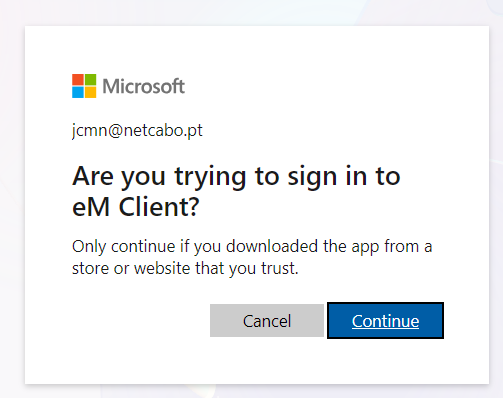
but clicking the CONTINUE button doesn’t make nothing, the page still persists.
clicking the CONTINUE button doesn’t make nothing, the page still persists.
If you click the continue button and nothing happens, then try “closing eM Client and your current default browser” and “clear the cache in your browser”. Then try again via the wizard.
If clearing the cache in you browser makes no difference, then “try setting another browser as default” and then reopen eM Client and try running the automatic account wizard again.
Failing that go into your Outlook account online and “remove / revoke any previous eM Client OAuth tokens” in third party apps section incase it’s a OAuth token problem & needs a new token.
It was an Exchange account but I think it is an IMAP now.
Installed last version of emclient reinstalled the mail account but the incoming server that is detected by emclient is imap-mail.outlook.com different from what it was because I have a office365 account.
If it’s an MS Exchange type account “which includes Notes”, then you can try manually adding it in accounts via “Add account / Mail / Exchange” as per the below example screenshot.

Lastly if none of the above works and you have a current active paid Pro, Personal or Business version, go to the VIP support page and login and lodge a support ticket for further assistance.
A client recently set me up with an Outlook account. It’s webmail only. I tried to access it using eM Client but the client’s IT support said it was web browser access only and I could not use my own email client. Could that be the reason for you too?