For the last few weeks, emails are not properly syncing. Some messages won’t download, and in some cases, the message will only partially download.
The only way I am able to know that emails are not downloading is that I can see the emails on Gmail.com. I also downloaded and installed Thunderbird and confirmed that I am able to download/sync all emails fine using another client, so the issue seems to be EM clients. I’ve repaired the inbox, which didn’t resolve the issue. I’ve uninstalled, deleted all files and reinstalled EM client and it’s still having an issue. This is not just on one computer, but on both my work and home computer, accessing the same accounts.
I am on the latest version 10.4.5663 (fd3063d)
Windows 11, most recenter updates.
As repairing your Gmail account hasn’t helped and uninstalling and reinstalling eM Client hasn’t helped, then could be your OAuth tokens need to removed and re-adding in your Gmail account as might be party corrupted causing the synching issues.
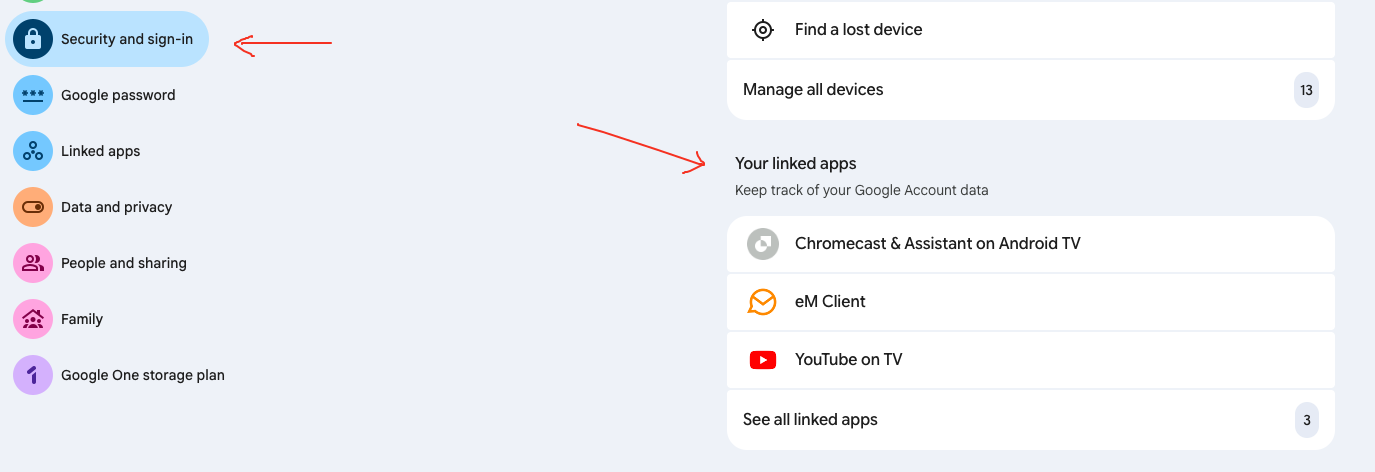
So to remove / revoke the Gmail OAuth token, go online to your Google My Account / Security” section “Your Linked apps” per the example below, and remove the eM Client token.
Then once removed “close and reopen eM Client” & you will get prompted to re-allow eM Client and see if that fixes the problem.
Thanks for the tip. Unfortunately, I tried and no difference. Several emails are still not being fully downloaded. I tried running the repair on the folder again, but nothing. I looked into the messages that were partially loaded in more detail and noticed that there are attachments in “.asm” format. If I open the attachment using Wordpad, it shows the missing email text. I resent the email to myself to see what happes and the resent version appears in full. So the issue seems to be, at least for the emails that download partially, that part of the email is being removed from the body and inserted as an attachment in the original email transmission.
I looked into the messages that were partially loaded in more detail and noticed that there are attachments in “.asm” format. If I open the attachment using Wordpad, it shows the missing email text. I resent the email to myself to see what happes and the resent version appears in full.
So the issue seems to be, at least for the emails that download partially, that part of the email is being removed from the body and inserted as an attachment in the original email transmission.
That type of email with .asm attachments is usually sent from an eg: Apple mail app / Apple mail client which have multiple HTML sections that eM Client doesn’t support in a standard html mail client.
So as you are using the latest V10.4.5663 and they are only partially displaying, then if you want those emails investigated as to why they won’t display fully, then if you have a current active paid Pro, Personal or Business license then go to the VIP support page and login and lodge a support ticket and attach the emails as .eml messages. You can export those messages to .eml files to attach via going to “Menu / File / Export”.
If you have run out of your 12months support time then you can get another year support extension via the following page VIP Support Extension | eM Client