in vesion 9 is it possible to see Office 365 groups?
Maybe there is some option to enable?
Is that Distribution Groups ?
Can you update this thread with more info as to what you want with example Office 365 distribution screenshot etc to help with your query in V9.
in outlook I have this
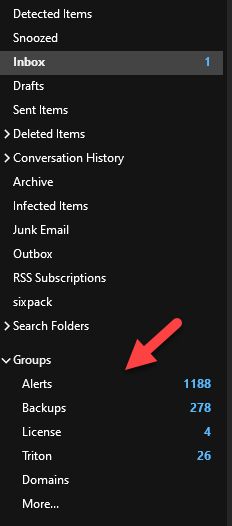
Messages come to groups.
Office 365 groups is not same as distribution groups.
Compare groups
Learn about Microsoft 365 Groups
Messages come to groups.
Office 365 groups is not same as distribution groups
Ah ok I see. Im unsure of how to access that in V9 or if you can do that already, but I’m sure someone on this forum will know if can be done.
I’ve had eM Client feedback on this, and Office 365 Groups are “not currently” supported.
thank you for response.
Do you maybe have info are there plans to enable O365 groups in v9?
O365 groups are something standard in O365 environment.
Do you maybe have info are there plans to enable O365 groups in v9?
No info on if this will be implemented, only that the program doesn’t currently support it. Who knows hopefully down the track.
To implement new features takes time, and also usually depends on “how many other peeps would also want this feature”. Have to wait and see.
Ps Usually eM Client will also update the blog page for any new stuff so maybe keep & eye on that
We currently use the EWS API (Exchange Web Services) to connect to the O365 server. That API does not support Groups.
In order to offer that, we would need to make a massive change over to the Graph API, which is not planned at this time.
1 Like
I understand.
Maybe idea to add Graph API to current code to show/manage O365 groups.
This way you don’t need to rewrite everything but add as module.
This is just idea because I don’t know how hard and if possible to do that.
Thank you for answers.
The 11 beta supports the Graph API now and I migrated my account to Graph. Can’t see my O365 groups unfortunately. 
The 11 beta supports the Graph API now and I migrated my account to Graph. Can’t see my O365 groups unfortunately.
Are Groups like Shared Mailbox folders ?
If Groups are like Shared Mailbox folders, you can eg: “right click on your Graph Account” and you might see the option you want to add your Groups.
No, I mean Microsoft 365 Groups, not Shared Mailboxes. The “folder” is a Microsoft 365 Group / Unified Group, not a shared mailbox.
I’m attaching an image showing how it looks like in Outlook (for Mac)
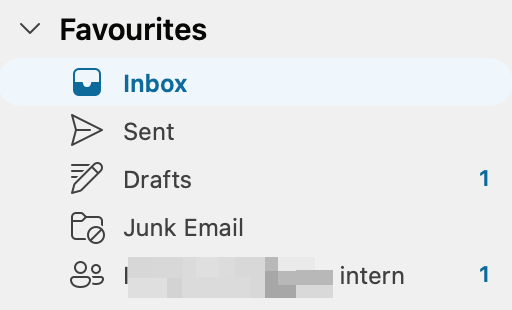
Ok i would then suggest you email the Beta team at [email protected] for assitance.
eM Client support advised Office 365 Account Groups with a Graph account setup are not yet supported in eM Client 11 Beta, However support advised they will be looking into that shortly.
1 Like
Workarounds as an alternative to Office 365 Account Groups with a Graph account setup as per alot of websites reccomend.
Workaround 1: Route Group Emails to Your Inbox
Since you cannot browse the Group folder directly in eM Client, you can configure Microsoft 365 to push all group conversations directly to your personal mailbox.
-
Log into the Microsoft 365 Admin Center (or ask your IT administrator).
-
Navigate to Teams & Groups > Active groups.
-
Select your collaboration group to open the settings panel.
-
Click the Settings tab.
-
Check the box for “Send copies of group conversations and events to group members’ inboxes”.
Note: Group members must also make sure they haven’t manually un-followed the group in their personal Outlook Web app settings.
Workaround 2: Convert to a Standard “Shared Mailbox”
If your team primarily uses the group to manage a collaborative email queue (e.g., info@ or sales@), ask your IT administrator to convert the M365 Group into a traditional Shared Mailbox.
-
Why this works: Unlike M365 Groups, traditional Shared Mailboxes use standard Exchange protocol folders.
-
The Result: eM Client 11 can natively discover, map, sync, and display Shared Mailboxes right alongside your primary email account.