I have a couple of email aliases which relay to my personal hosted email address. They’re not hosted themselves; they just relay directly (as configured) to my main address.
One is for is for a club role, and may well change (and thus may forward/relay to someone else in future), and the other I use as a not quite but at least presorted junk or quarantine mechanism.
This mailbox also infrequently receives relayed mails to: [email protected] AND to [email protected] both which I would like otherwise automatically categorise or move to a specified folder.
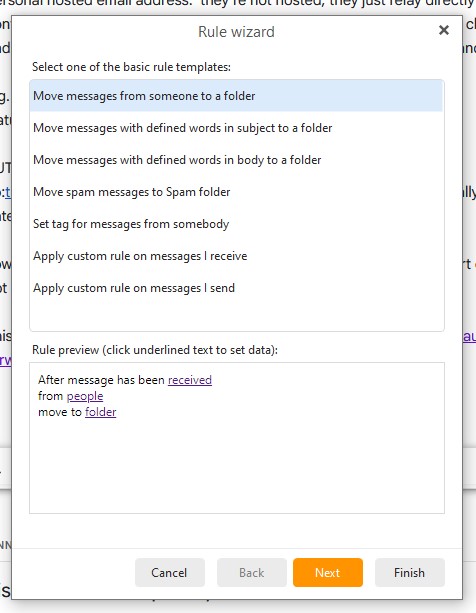
This forum post seems to illustrate a rule wizard option I want; ‘Sent to People’ but I can’t see it in my version; 10.4.5326
This is what you need to do:
1./ In Rule wizard select - Apply custom rule on messages I send
2./ Click Next
3./ Select - sent to people
4./ Continue selecting elements you want and DO MOT FORGET to save at end
Sorry no image as instructions are partly in Spanish
That’s it.
skybat
¡Buena suerte!
¡Saludos desde Sevilla la soleada en España!
¡Mis mejores deseos y mantente a salvo!
Reading my post again; I think I’ve described my issue poorly and likely confused you.
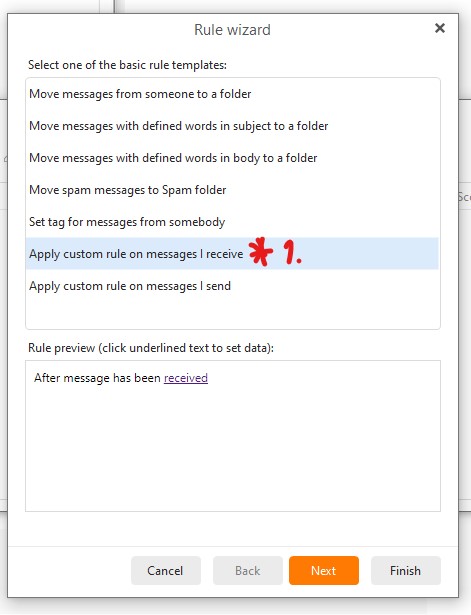
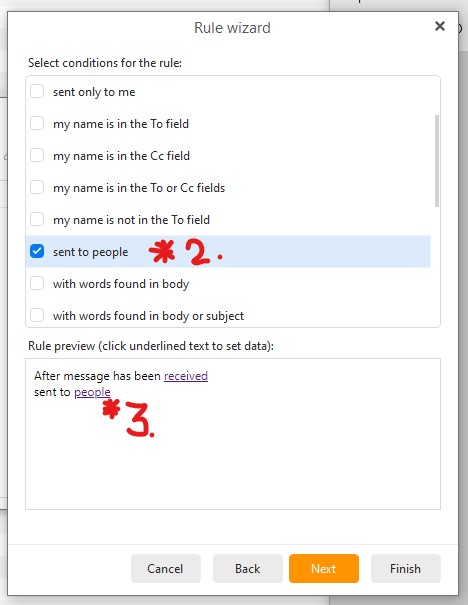
I can receive emails not explicitly addressed to me in the To field. This is as intended; I would just like to move them to a specified folder or tag them, with a rule. But yesterday I did not see any option in the Rule Wizard logic which seemed to match my requirements.
However, now looking at the issue with a fresh set of eyes; I see the option I want is found via another selection first. Here’s the two dialogs in sequence with the options highlighted for anyone else’s reference;