I am a new user, switched/migrated from Thunderbird, Windows 11, Internet connection is Starlink. Despite being a computer tech, I have several questions for things I can’t figure out and can’t find in the documentation.
-
Red triangle with exclamation mark in it on e-mail account. I understand that this means that eM is having trouble communicating with that server. I click on the red triangle and after a bit it goes away, but later I see that it is back. This happens randomly with all four of my e-mail addresses with three providers. Is this normal? It is concerning. Thunderbird never seemed to have this problem, but I’m seeing it all the time with eM Client.
-
Tasks:
A. There are two options/locations for me to assign a task: my Gmail account or Local Folders. Not my own e-mail with my own domain. Why is that? Tasks in Thunderbird were associated with a Calendar, but I guess that is not the case with eM.
B. Why does Local Folders have two task categories, “Tasks” and “Home”?
C. When I create a new task, it is automatically assigned to my Gmail account, which I don’t want. How can I get it to automatically assign it to Local Folders, or any other account?
D. Reaccuring Tasks Reminder: It appears that the Reminder is set for a single date and time, not relative to the occurance of the task. Does that mean I will get reminded then and never again even though the task is reaccuring?
E. Private task checkbox. Documentation just says “If you check the checkbox, the task will get the private status.” OK, but what does “private status” mean? If I don’t assign it to a contact, is the task not private? If it is assigned to a contact an invitation is sent to them, but if you also mark it also private, what is the point of assigning it to a contact?
F. I want to set up a task to remind me on the 1st and 15th of the month. How can I do that with one task?
G. I create a new Task, but it doesn’t prompt me for any settings for it. That doesn’t make sense. I have to double-click the task to bring up the settings. Is there a setting to have it automatically bring up the settings when I create it?
-
Notifications for new e-mails are delayed. I’ve witnessed it a few times. I’ll see an e-mail appear in an Inbox and the notification will happen a few seconds, more than a few seconds, or sometimes minutes later. Is something going wrong or is there somewhere to change this behavior? I can’t find it.
-
I’ve gotten used to, and like, seeing the number of e-mails in a folder in Thunderbird in the folder list. Is there a way to do this in eM?
-
Appearance: Folder. How can I make a folder icon in the folder list solid instead of an outline? I looked at different themes and none of them have solid folder icons. Looking at the theme editor, I can’t see any way to do it there.
-
Is it possible to add a custom keyboard shortcut? I often look at the “Mail Source” of an e-mail, but there is no keyboard shortcut for that and I see no way to create one.
I thank you for your time!
I am a new user, switched/migrated from Thunderbird, Windows 11, Internet connection is Starlink.
- Red triangle with exclamation mark in it on e-mail account. I understand that this means that eM is having trouble communicating with that server. I click on the red triangle and after a bit it goes away, but later I see that it is back. This happens randomly with all four of my e-mail addresses with three providers. Is this normal? It is concerning. Thunderbird never seemed to have this problem, but I’m seeing it all the time with eM Client.
Assuming you have the correct Incoming mail server settings sometimes that can happen if you eg: have a resident background program possibly interfering with the mail client. Programs that can sometimes interfere are eg: optionally installed firewall security programs or optionally installed antivirus programs or vpns.
So if you have anything like that installed other than what comes default with your OS, try completely disabling those to test incase of interference.
If you have nothing like that optionally installed or you do but disabling made no difference, then update “each account” incoming server address, server port & security policy is so we can then check if there is any obvious errors.
- Notifications for new e-mails are delayed. I’ve witnessed it a few times. I’ll see an e-mail appear in an Inbox and the notification will happen a few seconds, more than a few seconds, or sometimes minutes later.
That doesn’t normally happen with eM Client. Sounds like some sort of either eg: external internet delay / lag getting the email notifications or possibly something installed locally on the computer delaying the email notifications.
- Appearance: Folder. How can I make a folder icon in the folder list solid instead of an outline? I looked at different themes and none of them have solid folder icons. Looking at the theme editor, I can’t see any way to do it there.
You carn’t, as currently eM Client has only Outline folder colours. You can though change the folder name text colour that might help u see it better as @Frantisek_Svarc advised in this link.
There is a current Sleekplan suggestion to have optional Solid folder colours which you can vote for via the following link.
- Is it possible to add a custom keyboard shortcut? I often look at the “Mail Source” of an e-mail, but there is no keyboard shortcut for that and I see no way to create one.
You can modify the keyboard shortcuts in via going to “Menu / Settings (Preferences) / General / Shortcuts” as per the online documentation. There is also a known list of keyboard shortcuts that might be useful for you via this link.
- Rules:
A Is it possible to create a Rule that applies to both Received and Sent e-mails?
I don’t know that personally but suggest to look in the Rules documentation online that may assist you. There is also going to be in the upcoming eM Client V11 a complete rework of all the rules.
Lastly as a new user inside 30days, you can also email eM Client directly for anything specific questions not answered to [email protected]
1 Like
Thank you for your reply, I appreciate it. 
-
Red triangle with exclamation mark in it on e-mail account.
As suggested, I disabled Bitdefender scanning e-mails. I also disabled Windows firewall “Mail and accounts” and eM Client when I added it. Then I completely disabled Microsoft Defender Firewall. The issue still remains, mostly with Gmail. I left these disabled as I tested further.
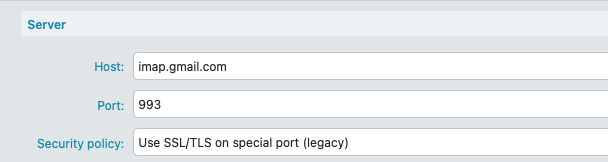
All accounts use port 993 & Security policy “Use SSL/TLS on special port (legacy)”, which was what eM Client set automatically, and which was also used by Thunderbird with no problems. BTW, I’ve stopped using Thunderbird entirely, so it is not interfering.
Gmail seems the most affected, almost always showing the red triangle unless I click on it, then it will be OK for awhile before the red triangle returning. Gmail is authenticated properly with OAuth. Testing shows that it will only work with port 993 & Security policy “Use SSL/TLS on special port (legacy)”.
The other three e-mails with two providers seem to be more flexible, also working with port 143 and “Force usage of SSL/TLS”, or “Use SSL/TLS if available”. They will not work with port 993 if Security is anything other than “Use SSL/TLS on special port (legacy)”. I will leave these other three with port 143 and “Force usage of SSL/TLS” for awhile to see if it makes a difference for them. The issue doesn’t happen with them as much as it does Gmail. Plus I will re-enable all security for e-mail, since disabling them made no difference.
-
Tasks, 7 questions.
With no response, I guess I will post separately about this.
-
Notifications for new e-mails are delayed.
You recommended disabling security programs for this also. Whether they are disabled or not, testing between my different e-mail accounts today shows a 5 second delay between appearance and notification. That is curious, but acceptable. Only with constant watching will I notice longer delays, and I haven’t done that today.
-
Showing the number of e-mails in a folder in the folder list.
With no response, I guess I will post separately about this.
-
Solid folder icon.
I have added my vote and comment.
-
Custom keyboard shortcut
I asked if I could create a custom keyboard shortcut because there doesn’t exist one for “View Mail Source”.
-
Rules: Creating a Rule that applies to both Received & Sent e-mails.
Just like all my questions, I asked because I already had looked at the documentation and found nothing relevant.
The builtin Windows security / defender firewall “doesn’t block eM Client” so must be something else causing it. Re-enable that. Its only sometimes other third party firewalls can interfere.
You mentioned Bitdefender. If that also includes a firewall built-in “completely disable that” to test incase thats causing any interference.
Gmail seems the most affected, almost always showing the red triangle unless I click on it, then it will be OK for awhile before the red triangle returning. Gmail is authenticated properly with OAuth. Testing shows that it will only work with port 993 & Security policy “Use SSL/TLS on special port (legacy)”.
Yes Port 993 & Use SSL/TLS on special port (legacy) is correct for Gmail and works fine for me personally with Windows 11 using a eg: 50mbps FTTC connection.
No, the version of Bitdefender I have does not include a firewall, and I am not using any other firewalls or security programs.
Right now I have the red triangle on both Gmail and one of my own domain e-mail accounts. I’m going back to Port 993 & Use SSL/TLS on special port (legacy) for my own domain, since that is what my webhost says it should be . I might as well do the same for the other provider too, since it also keeps having the red triangle with the alternate port.
So I have done everything possible to address eM Client showing the red triangle because it cannot communicate with the server. This is a significant problem.
No, the version of Bitdefender I have does not include a firewall, and I am not using any other firewalls or security programs.
Ok you will probably then need your eM Client IMAP logs checked.
So suggest to email [email protected] within your 30day trial period, and let them know you just joined a couple of days ago and having these issues with the red triangles etc.
OK. I’ve turned on logging for Global: Authentication, Global: Security, plus IMAP & SMTP for all four e-mail accounts. Then pinpoint when the issue ocurrs before e-mailing them.
Thank you for your help.
One other thing that can sometimes cause red triangle errors or delays in mail arriving & mail notifications etc is eg: If the Internet connection “is not constant enough” you could get errors.
So on your Starlink connection is it allways constant or do you get lag / delays ?
As I had a friend on a eg: Sat (non Starlink) internet connection years ago in a regional location who used to get red triangle connection errors due to they had “alot of lag” and wasn’t constant / stable enough to work. They eventually moved to a fixed line underground connection & are now ok.
1 Like
That is something I have kept an eye on since I got Starlink. The Starlink app on my phone has a statistics area that reports “Events & outages”. In the last 24 hours it has recorded three events.
- 4:42 am, 0.9 seconds, Network interruption
- 1:36 pm, 1 second, Unable to reach satellite
- 1:36 pm, 0.8 seconds, Unable to reach satellite
Those events don’t account for the almost constant inability of eM Client connecting to Gmail, even right now at this moment. And, there goes my main e-mail account again.
Time to gather the relevant log entries and e-mail them.
I agree with @cyberzork above post, if the Internet connection is not consistent enough, the IMAP IDLE connection breaks which gives the red triangle error. If you click the red triangle it will refresh the connection. If your connection is known not to be solid, then I would suggest under then “General” settings section, to set “Synchronize items every minutes” setting which will auto-refresh the connection and remove the red triangle.
Otherwise if you feel there are zero issues with your network connection, then I agree with sending the log entries to eM Client to examine if it is a client or server based issues. I know for myself I have a very solid Internet connection and the only time I get red triangles is when one of the big email providers has server side issues. The one server I do connect to which I know has a very solid IMAP connection and is very reliable, I never have issues.
1 Like
It has 9 days since I e-mailed [email protected] with my support request, and there has been no response. I e-mailed again early yesterday to prompt them to reply, and nothing.
My e-mail server is not in any RBLs and my e-mails pass SPF & DKIM, so there is no reason why my e-mails would be automatically labeled as spam.
It is difficult to justify buying a program that has a significant problem for me (red triangle/server connection issues), and there is no support.
BTW: My Starlink Internet connection continues to be reliable/consistent.
Surprise, surprise. I have responses to my support request today.
From eM Client:
To give you an update, ůooking at the error messages in the logs, they are consistent across all three affected accounts and indicate that “an existing connection was forcibly closed by the remote host.” In other words, eM Client successfully establishes the connection to the mail servers, but something on the system or network side is later terminating it unexpectedly.
When the connection is re-established after clicking the red triangle, everything works again until it’s once more interrupted externally. This points to something outside of eM Client’s direct control.
More testing with exclusions in Bitdefender Antivirus Plus (no firewall), then disabling everything in Bitdefender, the red triangle still shows up.
Windows Defender Firewall still has exclusions for both “Email and accounts” and “eM Client”.
I have no other security software on my computer, so the problem is not something on my computer.
Therefore the reason why “an existing connection was forcibly closed by the remote host”, must be that they don’t like how eM Client communicates with them. I did not have this issue with Thunderbird or the other e-mail programs I have tested.